Best SEO Chrome Extensions: 32+ Free & Powerful Tools
Published: 21 Jul 2026
Finding the best SEO Chrome extensions can make a huge difference in how you manage and improve your website’s performance. With the right chrome extension SEO tools, you can analyze keywords, check backlinks, audit pages, and track competitors without switching tabs.
These chrome SEO addons are designed to simplify complex SEO tasks and save your time. Whether you are a beginner or a professional, using a reliable SEO Chrome extension helps you get accurate insights instantly. The good thing is that many of these tools are available as a free SEO Chrome extension, so you don’t need a big budget to get started.
In this guide, you will discover the most useful extensions that can boost your SEO workflow. Let’s explore how these tools can help you work smarter and rank better.
Best SEO Chrome Extensions
Here, I have listed the names of all the SEO Chrome extensions that are free and best to use for improving your SEO performance:
- Ahrefs SEO Toolbar
- SEOquake (by Semrush)
- MozBar
- Keyword Surfer
- Keywords Everywhere
- Ubersuggest
- Glimpse
- Detailed SEO Extension
- SEO Meta in 1 Click
- Redirect Path
- Robots Exclusion Checker
- Google Lighthouse
- Hunter (Email Finder)
- Check My Links
- Majestic Backlink Analyzer
- NoFollow
- Glippy
- AIPRM for ChatGPT
- MarketMuse
- Clearscope
- SimilarWeb
- SEOTesting
- Sprout SEO
- Grammarly
- Racoon SEO Link Checker
- Similar Sites
- Schema Builder
- View Rendered Source
- Link Redirect Trace
- SEO Search Simulator by NightWatch
- SEO Minion
- Link Grabber
- Siteimprove Accessibility Checker
- META SEO
Now, let me guide you through all of these tools by grouping them into specific categories so you can easily choose the right extensions based on your SEO needs.
All-in-Ones Free SEO Extension
These are powerful chrome extension SEO tools that give you a complete snapshot of any website’s authority, traffic, and overall SEO health.
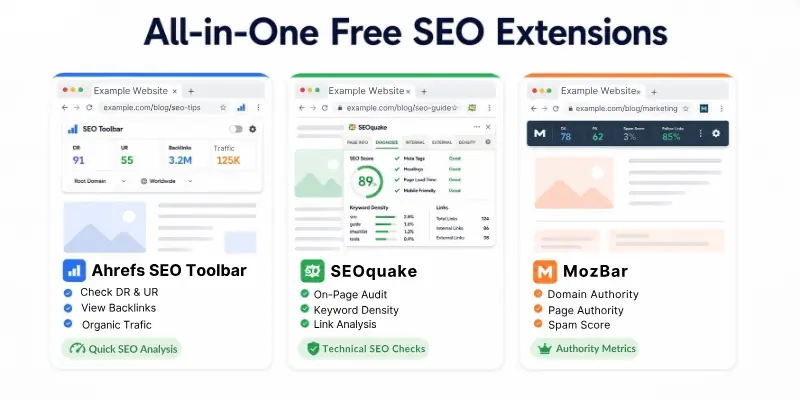
- Ahrefs SEO Toolbar
- SEOquake (by Semrush)
- MozBar
Let me guide you through its features now.
1. Ahrefs SEO Toolbar
Ahrefs SEO Toolbar is one of the most powerful chrome extension SEO tools used by SEO experts. It helps you see important data about any website directly in your browser. You can quickly check backlinks, traffic, and authority without opening another tool.
This SEO Chrome extension also works inside Google search results, which makes keyword research faster. It is very useful when you are doing competitor analysis. Even beginners can use it easily because the interface is simple.
Key Features:
- Shows Domain Rating (DR) and URL Rating (UR) instantly
- Displays total backlinks and referring domains
- Shows organic traffic and top keywords
- Works directly in Google search results (SERP overlay)
- Highlights broken links on a page
Why You Should Use It: Ahrefs SEO Toolbar is best when you want quick and reliable SEO data without logging into a dashboard. It helps you analyze competitors in seconds.
2. SEOquake (by Semrush)
SEOquake is a very popular SEO Chrome extension that gives you a complete SEO overview of any webpage. It is widely used by beginners and professionals for quick audits.
This chrome extension SEO tool helps you understand how a page is performing in terms of SEO. You can check links, keyword density, and other important metrics easily. It also shows useful data directly in search results. The tool is simple to use and works fast.
Key Features:
- Gives full on-page SEO audit report
- Shows keyword density analysis
- Displays internal and external links
- Allows real-time domain comparison
- Provides SEO metrics directly in search results
Why You Should Use It: This tool is great if you want detailed page analysis along with comparisons. It is very helpful for technical and on-page SEO checks.
3. MozBar
MozBar is one of the most trusted chrome SEO addons for checking website authority and link metrics. It is very helpful for understanding the strength of any website. This SEO Chrome extension shows important scores like Domain Authority and Page Authority instantly.
You can also see which links are follow or no-follow on a page. It works well on search engine result pages to compare multiple websites. The tool is beginner-friendly and easy to understand.
Key Features:
- Shows Domain Authority (DA) and Page Authority (PA)
- Highlights follow and no-follow links
- Displays spam score of websites
- Provides keyword difficulty insights
- Works on SERP to compare multiple sites
Why You Should Use It: MozBar is perfect for beginners who want simple and easy-to-understand SEO metrics. It helps you quickly judge the quality of any website.
Keyword Research & SERP Insights
These chrome SEO addons help you find keywords, search volume, and competitor data directly in Google search results.
- Keyword Surfer
- Keywords Everywhere
- Ubersuggest
- Glimpse
Let me guide you in detail.
1. Keyword Surfer
Keyword Surfer is a simple and free SEO Chrome extension that shows keyword data directly in Google search results. It is very useful for beginners who want quick insights without using paid tools.
You can see search volume, CPC, and keyword suggestions instantly. This chrome extension SEO tool also shows data for related keywords on the side. It helps you understand what people are searching for. The tool is lightweight and easy to use.
Key Features:
- Shows monthly search volume in Google search
- Displays CPC data for keywords
- Provides related keyword suggestions
- Shows estimated traffic for pages
- 100% free to use
Why You Should Use It: It is perfect if you want a free SEO Chrome extension for quick keyword research while browsing Google.
2. Keywords Everywhere
Keywords Everywhere is a powerful SEO Chrome extension for deep keyword research and analysis. It helps you get more detailed data compared to basic tools. You can see keyword trends, search volume, and competition easily.
This chrome SEO addon also shows “People Also Ask” data and long-tail keywords. It works across multiple platforms like Google, YouTube, and more. It is very helpful for content planning.
Key Features:
- Shows search volume, CPC, and competition
- Provides long-tail keyword suggestions
- Displays historical keyword trends
- Shows “People Also Ask” data
- Works on multiple platforms
Why You Should Use It: Use this tool when you want more advanced keyword data and better content ideas.
3. Ubersuggest
Ubersuggest is a popular chrome extension SEO tool created by Neil Patel. It helps you find keyword opportunities and analyze competitors easily. You can see keyword difficulty, search volume, and traffic data.
This SEO Chrome extension also shows domain-level insights. It works directly in search results which saves time. It is beginner-friendly and useful for content creators.
Key Features:
- Shows keyword difficulty and search volume
- Displays domain traffic and backlinks
- Provides keyword suggestions
- Shows top-ranking pages
- Easy to use interface
Why You Should Use It: It is a great option if you want both keyword research and competitor analysis in one tool.
4. Glimpse
Glimpse is a unique chrome SEO addon that enhances Google Trends with extra data. It helps you understand trending topics more clearly. You can see actual search volume along with trend graphs.
This SEO Chrome extension is useful for finding viral and seasonal topics. It helps content creators plan better strategies. The tool is simple and works well with Google Trends.
Key Features:
- Adds search volume to Google Trends
- Helps identify trending topics
- Shows keyword growth over time
- Useful for content planning
- Easy integration with Trends
Why You Should Use It: Use Glimpse when you want to discover trending topics and create content at the right time.
On-Page & Technical Audits
Use these SEO Chrome extensions to analyze website structure, meta tags, redirects, and technical SEO issues.
- Detailed SEO Extension
- SEO Meta in 1 Click
- Redirect Path
- Robots Exclusion Checker
- Google Lighthouse
- View Rendered Source
- Schema Builder
- META SEO
Let me guide you about all in detail.
1. Detailed SEO Extension
Detailed SEO Extension is one of the most useful chrome SEO addons for on-page analysis. It gives you a complete overview of a webpage in just one click. You can check titles, meta descriptions, and heading structure easily.
This SEO Chrome extension is very helpful for bloggers and SEO experts. It saves time by showing all important data in one place. The interface is clean and simple to use.
Key Features:
- Shows meta title and description
- Displays heading tags (H1 to H6)
- Shows canonical and robots tags
- Highlights internal and external links
- Quick one-click SEO overview
Why You Should Use It: It is perfect for quick on-page SEO checks without opening multiple tools.
2. SEO Meta in 1 Click
SEO Meta in 1 Click is a simple chrome extension SEO tool for checking meta data of any webpage. It helps you analyze important SEO elements quickly. You can see meta tags, headings, and image alt attributes.
This SEO Chrome extension is useful for basic audits. It is lightweight and works fast. Beginners can easily understand the data.
Key Features:
- Displays meta tags instantly
- Shows heading structure
- Highlights image alt text
- Checks Open Graph data
- Easy to use interface
Why You Should Use It: Use this tool when you want a quick and simple meta tag analysis.
3. Redirect Path
Redirect Path is an important SEO Chrome extension for technical SEO checks. It helps you identify redirect issues on a webpage.
You can see 301, 302, and 404 errors instantly. This chrome SEO addon also shows redirect chains. It is very useful for fixing broken links. The tool works in real-time and is easy to use.
Key Features:
- Detects 301, 302, and 404 redirects
- Shows redirect chains
- Highlights HTTP header issues
- Works instantly on any page
- Helps fix broken links
Why You Should Use It: It is essential for technical SEO and fixing redirect problems.
4. Robots Exclusion Checker
Robots Exclusion Checker is a helpful chrome extension SEO tool for checking indexing issues. It tells you if a page is blocked from search engines. The tool uses simple color indicators to show status.
This SEO Chrome extension is useful for technical audits. It helps avoid indexing mistakes. It is very easy to use.
Key Features:
- Shows if a page is blocked by robots.txt
- Indicates noindex tags
- Uses simple color signals
- Works instantly on pages
- Helps prevent indexing errors
Why You Should Use It: Use this tool to make sure your pages are properly indexed by search engines.
5. Google Lighthouse
Google Lighthouse is a powerful tool created by Google for website audits. It checks performance, SEO, and user experience. This SEO Chrome extension gives detailed reports. You can analyze speed and Core Web Vitals easily. It is useful for developers and SEO experts. The tool provides actionable suggestions.
Key Features:
- Audits website performance
- Checks Core Web Vitals
- Provides SEO recommendations
- Analyzes accessibility
- Generates detailed reports
Why You Should Use It: It is best for improving site speed and overall performance.
6. View Rendered Source
View Rendered Source is a technical chrome SEO addon that shows how a webpage is rendered in the browser. It helps you compare raw HTML with rendered HTML. This is useful for JavaScript-heavy websites.
The SEO Chrome extension helps identify hidden content issues. It is mostly used by developers and technical SEOs. The tool is simple but powerful.
Key Features:
- Shows rendered HTML of a page
- Compares raw vs rendered code
- Helps detect JavaScript issues
- Useful for technical SEO
- Easy to access in browser
Why You Should Use It: Use this tool to understand how search engines see your website content.
7. Schema Builder
Schema Builder is a helpful SEO Chrome extension for adding structured data. It allows you to create schema markup easily. This chrome extension SEO tool helps improve rich results in search engines.
You can generate JSON-LD code quickly. It is useful for beginners and professionals. The tool simplifies schema creation.
Key Features:
- Generates schema markup
- Supports multiple schema types
- Easy JSON-LD creation
- Improves rich snippets
- Beginner-friendly tool
Why You Should Use It: Use it to enhance your search appearance with structured data.
8. META SEO
META SEO is a simple chrome SEO addon for checking meta tags and SEO basics. It helps you review important on-page elements quickly.
You can see titles, descriptions, and keywords easily. This SEO Chrome extension is useful for quick audits. It is lightweight and fast. Beginners can use it without confusion.
Key Features:
- Displays meta tags clearly
- Shows page title and description
- Checks basic SEO elements
- Fast and lightweight
- Easy to use
Why You Should Use It: It is a good option for quick and basic SEO checks.
Link Building & Outreach
These free SEO Chrome extensions help you analyze backlinks, find broken links, and collect outreach contacts.
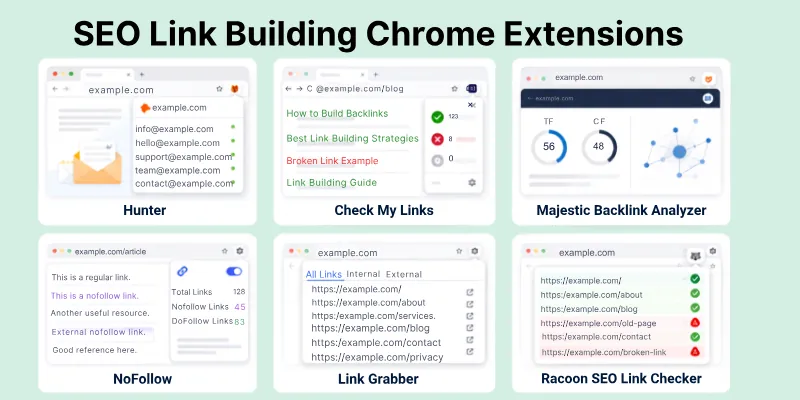
- Hunter (Email Finder)
- Check My Links
- Majestic Backlink Analyzer
- NoFollow
- Link Grabber
- Racoon SEO Link Checker
Let us cover them in detail.
1. Hunter (Email Finder)
Hunter is a very popular SEO Chrome extension used for finding email addresses of website owners. It is helpful when you want to do outreach for backlinks or collaborations. You can visit any website and quickly see available contact emails.
This chrome SEO addon also shows the source of the email. It is very useful for link building campaigns. The tool is simple and beginner-friendly.
Key Features:
- Finds email addresses from websites
- Shows email sources and confidence score
- Works instantly on any page
- Helps in outreach campaigns
- Easy to use interface
Why You Should Use It: Use Hunter when you want to quickly collect contact emails for link building and outreach.
2. Check My Links
Check My Links is a useful chrome extension SEO tool for finding broken links on a webpage. It scans all links and highlights the broken ones in red. This helps you identify opportunities for broken link building. It is very fast and works with one click. This SEO Chrome extension is helpful for bloggers and SEO experts. It saves a lot of manual effort.
Key Features:
- Detects broken links on a page
- Highlights valid and invalid links
- Works quickly with one click
- Useful for link audits
- Helps in broken link building
Why You Should Use It: It is perfect for finding broken links and using them for SEO opportunities.
3. Majestic Backlink Analyzer
Majestic Backlink Analyzer is a powerful SEO Chrome extension for checking backlink quality. It provides important metrics like Trust Flow and Citation Flow. These metrics help you understand if a website is high-quality or spammy.
This chrome SEO addon is very useful for backlink analysis. It works directly in your browser. The tool is simple but very effective.
Key Features:
- Shows Trust Flow (TF) and Citation Flow (CF)
- Provides backlink data instantly
- Helps evaluate link quality
- Works on any webpage
- Easy to use
Why You Should Use It: Use this tool to check if a website is worth getting a backlink from.
4. NoFollow
NoFollow is a simple SEO Chrome extension that highlights no-follow links on a webpage. It helps you understand which links pass SEO value and which do not. This chrome extension SEO tool marks no-follow links clearly. It is useful for link analysis and audits. The tool is lightweight and easy to use. It works instantly on any page.
Key Features:
- Highlights no-follow links
- Helps identify follow vs no-follow
- Works in real-time
- Simple and lightweight
- Useful for link audits
Why You Should Use It: Use it to quickly check the type of links on any webpage.
5. Link Grabber
Link Grabber is a helpful chrome SEO addon that extracts all links from a webpage. It collects internal and external links in one place. This makes link analysis much easier. You can quickly review all links without checking them one by one. This SEO Chrome extension is useful for audits and research. It is fast and simple.
Key Features:
- Extracts all links from a page
- Shows internal and external links
- Helps in link analysis
- Fast and easy to use
- Saves time
Why You Should Use It: It is great for quickly gathering and analyzing all links on a webpage.
6. Racoon SEO Link Checker
Racoon SEO Link Checker is a useful chrome extension SEO tool for checking link health. It helps you identify broken and valid links on a website.
This SEO Chrome extension is helpful for maintaining link quality. It works quickly and shows results clearly. It is suitable for both beginners and professionals. The tool improves your link-building strategy.
Key Features:
- Checks broken and working links
- Highlights link status clearly
- Helps maintain link quality
- Easy to use
- Works fast
Why You Should Use It: Use this tool to ensure your links are working properly and improve your SEO performance.
AI & Content Optimization
These tools focus on content quality, AI SEO, and improving your chances of ranking in modern search engines.
- Glippy
- AIPRM for ChatGPT
- MarketMuse
- Clearscope
- Grammarly
Let us learn them.
1. Glippy
Glippy is a modern SEO Chrome extension designed for AI-based content optimization. It helps you understand how likely your content is to appear in AI search results. This chrome extension SEO tool focuses on generative engine optimization (GEO).
It gives insights on how to improve your content for tools like AI search assistants. It is useful for staying ahead in SEO trends. The tool is simple and easy to use.
Key Features:
- Provides AI content scoring
- Helps optimize for AI search engines
- Gives content improvement suggestions
- Focuses on GEO (Generative Engine Optimization)
- Easy to use interface
Why You Should Use It: Use Glippy if you want to optimize your content for AI-driven search results.
2. AIPRM for ChatGPT
AIPRM for ChatGPT is a powerful chrome SEO addon that adds ready-made SEO prompts to your ChatGPT interface. It helps you create optimized content quickly. This SEO Chrome extension is very useful for keyword research, blog writing, and content ideas.
You can access thousands of SEO prompts. It saves time and improves productivity. The tool is beginner-friendly.
Key Features:
- Provides pre-built SEO prompts
- Helps generate optimized content
- Supports keyword research
- Improves content creation speed
- Easy integration with ChatGPT
Why You Should Use It: It is perfect for creating SEO-friendly content faster using AI.
3. MarketMuse
MarketMuse is an advanced SEO Chrome extension for content planning and optimization. It helps you analyze your content against competitors. This chrome extension SEO tool shows content gaps and improvement areas. It is useful for creating in-depth and high-quality articles. The tool is mostly used by professionals. It helps improve content strategy.
Key Features:
- Analyzes content depth
- Shows keyword gaps
- Compares with competitors
- Helps improve topic coverage
- Provides optimization suggestions
Why You Should Use It: Use MarketMuse when you want to create detailed and competitive content.
4. Clearscope
Clearscope is another powerful SEO Chrome extension for content optimization. It helps you improve your content using keyword suggestions.
This chrome SEO addon analyzes top-ranking pages and gives recommendations. It helps you write content that ranks better. The tool is easy to understand. It is widely used by content marketers.
Key Features:
- Provides keyword recommendations
- Analyzes top-ranking content
- Helps improve content quality
- Gives readability insights
- Easy to use
Why You Should Use It: It is great for optimizing your content based on real search data.
5. Grammarly
Grammarly is a popular SEO Chrome extension that improves your writing quality. It checks grammar, spelling, and clarity in real-time. This chrome extension SEO tool helps you write error-free content.
It also gives suggestions to improve readability and tone. It works on almost all websites. It is very useful for content creators.
Key Features:
- Checks grammar and spelling
- Improves sentence clarity
- Suggests tone improvements
- Works across websites
- Easy to use
Why You Should Use It: Use Grammarly to make your content clear, professional, and easy to read.
Competitor Research & Analytics
These extensions help you analyze competitor traffic, behavior, and market trends.
- SimilarWeb
- Similar Sites
- SEOTesting
- Sprout SEO
Let’s examine them.
1. SimilarWeb
SimilarWeb is a powerful SEO Chrome extension that shows detailed traffic insights of any website. It helps you understand where a website’s visitors are coming from. This chrome extension SEO tool also shows traffic sources like search, social, and direct visits.
You can compare multiple websites easily. It is widely used for competitor analysis. The tool gives a clear overview of online performance.
Key Features:
- Shows total website traffic estimates
- Displays traffic sources breakdown
- Provides audience geography insights
- Helps compare competitor websites
- Works directly in browser
Why You Should Use It: Use SimilarWeb to quickly understand how your competitors are getting traffic and where they are strong.
2. Similar Sites
Similar Sites is a simple SEO Chrome extension that helps you find websites similar to any domain. It is useful when you want to discover competitors in your niche. This chrome SEO addon gives you related website suggestions instantly.
It helps in competitor research and market exploration. The tool is very easy to use. It works fast and requires no setup.
Key Features:
- Finds similar websites instantly
- Helps discover competitors
- Useful for niche research
- Simple and lightweight tool
- Works with one click
Why You Should Use It: Use it when you want to quickly find competitors or explore new websites in your industry.
3. SEOTesting
SEOTesting is a helpful SEO Chrome extension for tracking SEO experiments and performance changes. It allows you to test different SEO strategies and measure results. This chrome extension SEO tool is useful for understanding what works and what doesn’t.
It helps improve decision-making in SEO campaigns. The tool is more focused on testing and analysis. It is useful for advanced SEO users.
Key Features:
- Tracks SEO performance changes
- Helps run SEO experiments
- Measures impact of updates
- Useful for A/B testing SEO strategies
- Provides data-driven insights
Why You Should Use It: Use SEOTesting when you want to measure the real impact of your SEO changes.
4. Sprout SEO
Sprout SEO is a simple chrome SEO addon for analyzing website performance and trends. It helps you understand competitor SEO basics easily.
This SEO Chrome extension provides quick insights into SEO health. It is useful for beginners who want basic analytics. The tool is lightweight and fast. It gives a simple overview without complexity.
Key Features:
- Shows basic SEO metrics
- Helps analyze competitors
- Provides quick website insights
- Easy to use interface
- Lightweight extension
Why You Should Use It: Use Sprout SEO if you want simple and quick competitor analysis without advanced setup.
Miscellaneous & Utility Tools
These are additional helpful SEO Chrome extensions for testing, simulations, and accessibility improvements.
- SEO Search Simulator by NightWatch
- SEO Minion
- Siteimprove Accessibility Checker
- Link Redirect Trace
Let’s discover them.
1. SEO Search Simulator by NightWatch
SEO Search Simulator by NightWatch is a useful SEO Chrome extension that helps you simulate Google search results from different locations. It allows you to see how your website ranks in other countries or cities.
This chrome extension SEO tool is very helpful for international SEO. You don’t need a VPN or separate tools for testing rankings. It gives quick and accurate search result previews. The tool is simple and beginner-friendly.
Key Features:
- Simulates Google search results by location
- Helps track international rankings
- No need for VPN
- Shows accurate SERP previews
- Useful for SEO testing
Why You Should Use It: Use this tool when you want to check how your website appears in different regions.
2. SEO Minion
SEO Minion is a popular all-in-one chrome SEO addon for daily SEO tasks. It helps you analyze on-page SEO, check links, and preview search results. This SEO Chrome extension is very useful for quick audits. It also helps highlight broken links and missing tags. The tool is widely used by SEO professionals. It is simple and saves a lot of time.
Key Features:
- On-page SEO analysis
- Highlights broken links
- SERP preview tool
- Checks hreflang tags
- Easy one-click analysis
Why You Should Use It: Use SEO Minion for quick SEO checks and daily optimization tasks.
3. Siteimprove Accessibility Checker
Siteimprove Accessibility Checker is a helpful SEO Chrome extension for improving website accessibility. It checks how user-friendly your website is for all visitors.
This chrome extension SEO tool highlights accessibility issues like missing alt text or poor contrast. It helps make your site more inclusive. The tool is very useful for modern SEO practices. It is simple to understand.
Key Features:
- Checks website accessibility issues
- Highlights missing alt text
- Detects contrast problems
- Improves user experience
- Easy reporting system
Why You Should Use It: Use it to make your website more accessible and user-friendly for everyone.
4. Link Redirect Trace
Link Redirect Trace is a powerful SEO Chrome extension for analyzing redirects. It shows how a URL is redirected step by step. This chrome extension SEO tool helps you detect redirect chains and errors.
It is very useful for technical SEO audits. You can quickly find 301, 302, and other redirect types. The tool is fast and accurate.
Key Features:
- Shows full redirect path
- Detects redirect chains
- Identifies 301 and 302 redirects
- Helps fix SEO issues
- Works instantly in browser
Why You Should Use It: Use this tool to ensure your redirects are clean and SEO-friendly.
Pro Tip for Better Performance
Using SEO Chrome extensions is very helpful, but keeping too many of them active at the same time can slow down your browser.
Each extension uses memory and background processes, which can affect your Chrome speed and overall performance. That’s why it’s important to use them smartly instead of keeping everything switched on all the time.
If you manage them properly, you can enjoy smooth browsing and better SEO workflow without any lag.
- Don’t keep all SEO Chrome extensions active together, as it can slow down your browser
- Enable only the tools you need for daily work to keep Chrome fast and smooth
- For daily SEO tasks, keep lightweight tools like Detailed SEO Extension and Keyword Surfer active
- Use heavy tools like Ahrefs SEO Toolbar only when doing detailed competitor or backlink analysis
- Turn on technical tools like Redirect Path only during SEO audits or troubleshooting
- Disable unused extensions after work to save memory and improve speed
- Organize your extensions and remove ones you don’t use regularly
Final Advice: Be selective with your SEO Chrome extensions. Using fewer but powerful tools at the right time will not only improve your browser speed but also make your SEO workflow more efficient and focused.
Conclusion
In this guide, we have covered the 34 best SEO Chrome extensions that are free, reliable, and widely used for different SEO tasks.
I have also explained each tool in detail with its features and grouped them into clear categories so you can easily understand which SEO Chrome extension is useful for your specific work. This way, you don’t just know the tools, you also know when and how to use them properly.
Personal Recommendation
If you are just starting, don’t try to use everything at once. My personal suggestion is to keep it simple. Start with Keyword Surfer, SEOquake, and Detailed SEO Extension because these cover most basic SEO needs. Once you get comfortable, you can add advanced tools like Ahrefs SEO Toolbar and Redirect Path for deeper analysis. The key is to use only what you need, not everything at once.
FAQs
Here are some of the most frequently asked questions related to the free best SEO chrome extension:
A SEO Chrome extension is a small browser tool that helps you improve your website’s SEO. It gives quick data like keywords, backlinks, and page analysis directly in Chrome. These tools save time and make SEO work easier. Many free SEO Chrome extensions are available for beginners.
Yes, many chrome extension SEO tools are completely free. They offer basic features like keyword checking, backlink analysis, and on-page SEO audits. Some tools also have paid versions for advanced features. But free SEO Chrome extension options are enough for beginners.
Chrome SEO addons are used to analyze websites and improve search rankings. They help you check SEO errors, keyword performance, and competitor data. These tools make SEO tasks faster and more accurate. They are useful for bloggers, marketers, and website owners.
For beginners, tools like Keyword Surfer, SEOquake, and MozBar are very useful. They are simple and easy to understand. These free SEO Chrome extensions give basic SEO data without confusion. They are perfect for learning SEO step by step.
A SEO Chrome extension shows keyword data directly in search results. You can see search volume, CPC, and related keywords easily. This helps you find good content ideas quickly. It saves time compared to manual keyword research.
Yes, they can indirectly help improve rankings. These tools help you find SEO issues and fix them quickly. They also guide you in choosing better keywords and content ideas. Using a SEO Chrome extension regularly improves your SEO strategy.
Free SEO Chrome extensions offer basic features like keyword data and page analysis. Paid versions provide advanced features like deep competitor research and detailed reports. Beginners usually don’t need paid tools. Free tools are enough to start learning SEO.
Most chrome SEO addons are safe if downloaded from the official Chrome Web Store. Trusted tools like Ahrefs, MozBar, and SEOquake are widely used. Always avoid unknown or suspicious extensions. This keeps your data and browser secure.
It is better to use only a few SEO Chrome extensions at one time. Using too many can slow down your browser. You should keep only the tools you need for daily work. This improves speed and performance.
A free SEO Chrome extension helps you learn SEO without spending money. It gives quick insights into keywords, backlinks, and website health. These tools are perfect for beginners and small website owners. They make SEO simple and easy to manage.




- Be Respectful
- Stay Relevant
- Stay Positive
- True Feedback
- Encourage Discussion
- Avoid Spamming
- No Fake News
- Don't Copy-Paste
- No Personal Attacks
- Be Respectful
- Stay Relevant
- Stay Positive
- True Feedback
- Encourage Discussion
- Avoid Spamming
- No Fake News
- Don't Copy-Paste
- No Personal Attacks
