What Are Google Products? Full Guide to Google Services
Published: 22 Aug 2026
You use Google almost every day. You search for information, check email, watch videos, find a place on Maps, or save files online. But Google offers many more products than most people know.
Today, Google has tools for search, communication, office work, education, marketing, SEO, business, software development, maps, entertainment, mobile devices, and many other tasks. Google also keeps adding new products and changing older ones.
Its current official product list includes products such as Search, Gemini, Gmail, Drive, Maps, YouTube, Google Workspace, Business Profile, Analytics, Search Console, Merchant Center, Firebase, Android, and many more.
In this guide, I will explain the main Google products in very simple English. We will understand what each product does, who can use it, and why it matters.
So, let us start step by step.
What Are Google Products?
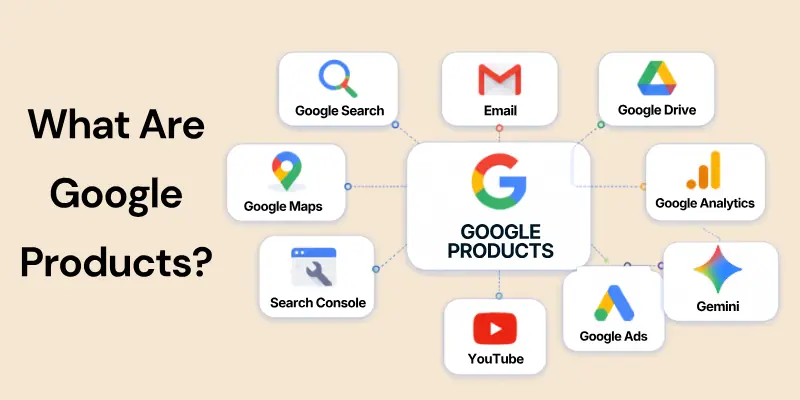
Google products are apps, websites, tools, platforms, and services created or managed by Google to help people complete different tasks.
Some products help normal users. Some help students. Some help businesses. Others help marketers, website owners, advertisers, and developers.
For example:
- Google Search helps you find information online.
- Gmail helps you send and receive emails.
- Google Drive helps you store files online.
- Google Maps helps you find places and directions.
- Google Analytics helps you understand website and app users.
- Google Search Console helps you check your website’s performance in Google Search.
- Google Ads helps businesses advertise online.
- Gemini helps users ask questions, work with information, create content, and complete different tasks.
- YouTube helps people watch and publish videos.
Google’s official product directory divides its products for general users, businesses, and developers. Google also says that some products are not available in every country.
In simple words, Google products are tools that help you search, work, learn, communicate, market, create, travel, and manage your online work.
Why Are Google Products Important?
Google products are important because one company provides many tools for different types of work. You do not need to use every Google product. You can choose the tools that solve your own problem.
Here are some main benefits:
- Easy to Start: Many Google products offer free basic versions. You can start using tools such as Gmail, Docs, Sheets, Drive, Search Console, and Analytics without buying expensive software. Google Analytics, for example, provides free tools for understanding customer journeys.
- Work Together: Many Google tools connect with each other. You can save a Google Doc in Drive, schedule a Meet call through Calendar, or work on a Sheet with other people.
- Useful for Different Users: Students, teachers, businesses, developers, marketers, creators, and normal users can all find useful Google tools.
- Access from Different Devices: Many Google services work through browsers and mobile apps, so users can continue their work from different devices.
- Regular Updates: Google continues to improve its major products and add new features. In 2026, for example, Google announced major changes to Search, Gemini, Gmail, Workspace, and other products.
From my experience, the best approach is simple. Do not try to learn every Google product at the same time. Start with the tools related to your work and learn them properly.
Categories of Google Products
Google has a very large number of products, so it becomes easier to learn them when we divide them into groups.
In this guide, we will cover these main categories:
- Search and Web-Based Products: Help users search, browse, and discover information.
- Productivity Tools: Help users create documents, manage files, and organize work.
- Communication Tools: Help users communicate through email, chat, calls, and meetings.
- Marketing and SEO Tools: Help website owners, marketers, advertisers, and online businesses.
- Developer and Business Tools: Help businesses and developers build and manage digital products.
- Maps and Location-Based Services: Help users find places, routes, businesses, and travel information.
- Media and Entertainment Products: Help people watch videos, listen to music, manage photos, and enjoy digital content.
- Gemini and Smart Tools: Help users work with Gemini, research information, search visually, and create different types of content.
- Education and Learning Tools: Help teachers, students, and researchers.
- Android and Device Products: Include Android, Pixel, Wear OS, Chromebooks, and other device-related products.
Google’s current official product list includes products across all of these areas.
Let us now understand them in detail.
Google Search & Web-Based Products
In this section, we will cover Google products that help people search, browse, and discover information online.
1. Google Search
Google Search helps users find information on the internet.
You type a word, question, product, business name, location, or topic into Google. Google then shows results that may include web pages, images, videos, products, maps, news, and other information.
For example, you can search:
- What is SEO?
- Best restaurants near me
- Weather in Lahore
- How to repair an AC
- Buy running shoes
- Digital marketing course
Google Search has changed a lot in recent years. In 2026, Google continued expanding newer Search experiences such as AI Mode, which lets users ask detailed questions and continue with follow-up questions and web links. Google also upgraded AI Mode with newer Gemini models during Google I/O 2026.
Remember one thing: Google Search is the product. AI Mode is a feature inside Search.
2. Google Chrome
Google Chrome is Google’s web browser. You use a browser to open and use websites. Chrome works on computers, phones, and other supported devices.
Chrome allows users to:
- Open websites.
- Use multiple tabs.
- Save bookmarks.
- Save passwords.
- Use browser extensions.
- Sync information across supported devices.
- Use Google services directly from the browser.
Google still lists Chrome as one of its active products in 2026. For beginners, you can understand Chrome simply as the software you use to browse websites, while Google Search is the search service you can use inside the browser.
3. Google Discover
Google Discover helps users find content without typing a normal search query every time. It may show articles and other content based on topics that may interest the user.
For example, someone interested in:
- SEO,
- football,
- technology,
- cooking,
- business,
- or travel
may see related content in Discover. For publishers and SEO professionals, Discover can become another source of visitors in addition to normal Google Search.
4. Google News
Google News helps users find and follow news from different publishers.
It organizes stories around topics and current events. Users can also follow subjects that interest them. It is useful when you want to:
- Follow current news.
- Read different reports about a topic.
- Track industries.
- Find stories from different publishers.
Google still lists Google News as an active product.
5. Google Lens
Google Lens allows you to search using an image or camera instead of typing everything. For example, you can point your camera at an object and use Lens to learn more about it.
You can use Lens to:
- Identify objects.
- Search products.
- Copy text from an image.
- Translate visible text.
- Find visually similar items.
- Search something you see around you.
Google describes Lens as a way to search with your camera, an image, or something on your screen.
6. Google Trends
Google Trends shows how search interest changes over time. It is especially useful for marketers, SEO professionals, researchers, and content creators.
You can use it to:
- Compare keywords.
- Check seasonal interest.
- Find rising topics.
- Compare search interest between locations.
- Study how interest changes over time.
Google continues to list Google Trends as an active Google product in 2026.
Google Productivity Tools
In this section, we will explore Google products that help people create, organize, save, and manage their work.
1. Google Docs
Google Docs is an online document writing tool. You can use it to write:
- Articles.
- Reports.
- Assignments.
- Business documents.
- Notes.
- Proposals.
- Guides.
One of its biggest benefits is collaboration. More than one person can work on the same document. Google Docs also saves work online and connects with Google Drive. Google continues to add Gemini features inside Docs, including tools that help users work with documents.
For a student, you can think of Google Docs as an online alternative to normal word-processing software.
2. Google Sheets
Google Sheets is Google’s online spreadsheet tool. It helps you organize numbers and information in rows and columns. You can use Sheets for:
- Budgets.
- Sales records.
- Keyword research.
- SEO reports.
- Attendance.
- Customer lists.
- Inventory.
- Calculations.
- Charts.
- Business reports.
Google describes Sheets as an online spreadsheet product for managing, viewing, and analysing information. It is especially useful when several team members need to work on the same data.
3. Google Slides
Google Slides helps users create presentations. You can use it for:
- School presentations.
- Business meetings.
- Training.
- Project reports.
- Sales presentations.
- Class lectures.
Users can add:
- Text.
- Images.
- Videos.
- Charts.
- Shapes.
- Animations.
- Transitions.
Like Docs and Sheets, Google Slides supports online collaboration and is part of Google’s Workspace tools.
4. Google Drive
Google Drive is Google’s online file storage service. You can save files in Drive and open them from supported devices. You can store:
- Documents.
- Images.
- Videos.
- PDFs.
- Spreadsheets.
- Presentations.
- Folders.
- Other files.
Google describes Drive as cloud storage where people and teams can upload, open, share, and edit files from different devices. Drive also connects closely with Docs, Sheets, Slides, Forms, and other Google products.
5. Google Calendar
Google Calendar helps users organize time. You can use it to:
- Schedule meetings.
- Add events.
- Set important dates.
- Plan work.
- Send meeting invitations.
- Manage shared calendars.
- Create recurring events.
Calendar also connects with Google Meet and Gmail. Google Workspace continues to list Calendar as one of its main work products.
6. Google Forms
Google Forms helps users create online forms and surveys. You can use Forms for:
- Student quizzes.
- Customer surveys.
- Feedback forms.
- Registrations.
- Job applications.
- Event forms.
- Research questionnaires.
Responses can also be organized in Google Sheets. Google still lists Forms as an active product.
7. Google Keep
Google Keep is a simple note-taking tool. You can use it when you do not need a full document. It is useful for:
- Quick notes.
- Ideas.
- Shopping lists.
- Checklists.
- Reminders.
- Small pieces of information.
Google continues to list Keep among its main products.
8. Google Tasks
Google Tasks helps you create and manage tasks. You can write what you need to do and mark a task complete when you finish it. It is useful for:
- Daily work.
- Study tasks.
- Personal reminders.
- Small project tasks.
- Meeting follow-ups.
Google continues to offer Tasks as a separate product.
9. Google Sites
Google Sites allows users to create simple websites without writing much code. You can use it for:
- Team websites.
- School projects.
- Internal company pages.
- Project information.
- Event pages.
- Simple information websites.
Google describes Sites as a tool for creating websites for teams, projects, or events that work across devices.
10. Google Vids
Google Vids is an important product that was missing from your old guide. It helps users create, edit, and share videos online. You can use it for:
- Training videos.
- Business videos.
- Explainer videos.
- Presentations.
- Internal company updates.
- Marketing content.
Google continues to add new creation and editing features to Vids. In 2026, Google added more video creation, voice, avatar, and editing tools.
So, in a 2026 guide, Google Vids should now be included with Docs, Sheets, Slides, and other work tools.
Google Communication Tools
In this section, we will look at Google products that help people communicate.
1. Gmail
Gmail is Google’s email service. People use Gmail for personal and professional email. You can use Gmail to:
- Send emails.
- Receive emails.
- Send attachments.
- Organize messages.
- Search old emails.
- Filter spam.
- Manage business communication.
Google Workspace users can also use Gmail with a business domain, depending on their plan. Google describes Gmail as an email product for personal and business use.
In 2026, Google also continued adding Gemini features inside Gmail to help eligible users work with messages and inbox tasks.
2. Google Meet
Google Meet is Google’s video meeting service. You can use Meet for:
- Business meetings.
- Online classes.
- Interviews.
- Team calls.
- Client meetings.
- Remote work.
Meet can work with Google Calendar, which makes scheduling meetings easier. The available meeting features depend on the user’s account and Workspace plan.
3. Google Chat
Google Chat helps teams communicate through messages. You can use it to:
- Send messages.
- Create team conversations.
- Discuss projects.
- Share files.
- Work with colleagues.
It is mainly useful for workplace and team communication and remains part of Google Workspace.
4. Google Messages
Google Messages is another active Google communication product. It is mainly used for messaging on supported Android devices. It allows users to send messages and use supported modern messaging features. Google currently includes Messages in its official product list.
5. Google Voice
Google Voice provides calling and phone number services for supported users and businesses. It can help organizations manage business calls through Google’s services. Availability and features depend on location and plan. Google currently lists Google Voice as an active product.
Google Marketing & SEO Tools
In this section, we will cover Google products that are very useful for SEO, digital marketing, advertising, local businesses, and e-commerce.
1. Google Analytics
Google Analytics helps you understand how people use your website or app. It can show useful information about:
- Visitors.
- Traffic sources.
- Pages.
- Events.
- Customer journeys.
- Marketing campaigns.
- Conversions.
- Different devices and platforms.
Google says Analytics helps businesses understand customers across devices and platforms and improve marketing results. For marketers, the main question Analytics helps answer is:
What happens after a user reaches my website or app?
2. Google Search Console
Google Search Console helps website owners understand their website’s performance in Google Search. You can use Search Console to check:
- Search queries.
- Clicks.
- Impressions.
- Search positions.
- Indexing.
- URL information.
- Sitemap information.
- Website problems.
Google says Search Console helps users measure Search traffic and performance and identify problems. For an SEO student, Google Search Console is one of the most important Google tools to learn.
3. Google Ads
Google Ads is Google’s paid advertising platform. Businesses can use it to advertise products and services across different Google surfaces. Depending on the campaign, advertisers may use:
- Search ads.
- Shopping ads.
- Video ads.
- App campaigns.
- Display advertising.
- Demand Gen.
- Performance Max.
- Local Services Ads.
Google’s current business product directory lists Google Ads along with Search Ads, Shopping Ads, Demand Gen, Performance Max, and Local Services Ads.
Remember: SEO brings unpaid Search traffic. Google Ads is used for paid advertising.
They are different areas.
4. Google Business Profile
Google Business Profile helps eligible businesses manage how they appear on Google Search and Google Maps.
A business can manage information such as:
- Business name.
- Address.
- Service area.
- Contact information.
- Opening hours.
- Photos.
- Services.
- Reviews.
- Posts.
Google says businesses that have a location customers can visit, or businesses that travel to customers, may be eligible for a Business Profile.
Google also allows verified businesses to update their information so customers can find correct details. For local SEO, this is one of the most important Google products.
5. Google Merchant Center
Google Merchant Center helps online sellers provide product information to Google. It can help products appear across supported Google shopping experiences. Businesses can add information such as:
- Product title.
- Price.
- Availability.
- Image.
- Brand.
- Product description.
- Shipping information.
- Other product details.
Google describes Merchant Center as a free tool that helps shoppers discover, explore, and buy products.
Important 2026 Update
Earlier, Google used the name Merchant Center Next for the newer version of Merchant Center.
In July 2026, Google removed the word Next. The current name is simply:
Google Merchant Center
Google says this was only a name change and did not remove existing account data or features. So, when updating old guides, use Google Merchant Center, not Merchant Center Next.
6. Google Tag Manager
Google Tag Manager helps users manage website and app tracking tags. For example, marketers may use tags for:
- Analytics.
- Advertising.
- Conversion tracking.
- Other measurement tools.
Instead of changing website code manually every time, Tag Manager can make tag management easier. Google continues to list Tag Manager as a current business product.
7. Google AdSense
Google AdSense helps eligible website publishers earn money from ads shown on their websites.
In simple words: A website owner provides space for ads, and AdSense can help place ads in that space. Google continues to list AdSense as a business product.
8. Google AdMob
Google AdMob focuses mainly on mobile apps. App developers can use AdMob to earn money by displaying supported ads inside apps. Google currently lists AdMob for both businesses and developers.
9. Google Marketing Platform
Google Marketing Platform brings together marketing measurement and advertising tools for businesses.
Google describes it as a platform that combines advertising and analytics tools to help marketers measure and improve results. It is more useful for marketers and organizations that need stronger advertising and measurement tools.
Google Developer & Business Tools
In this section, we will explore products mainly used by developers, technical teams, and businesses.
1. Google Cloud
Google Cloud provides online computing services for businesses and developers. It can help organizations with areas such as:
- Website and app hosting.
- Data storage.
- Databases.
- Computing.
- Data analysis.
- Security.
- Software development.
- Machine learning.
Google currently lists Google Cloud as one of its main business and developer products. You should understand Google Cloud as a large group of technical services, not one small application.
2. Firebase
Firebase helps developers build and manage mobile and web applications. Developers can use Firebase for different parts of app development, such as:
- Authentication.
- Databases.
- Hosting.
- App services.
- Notifications.
- Analytics.
- Testing.
Google continues to list Firebase as an active developer product. For a beginner, you can simply understand Firebase as a group of tools that makes app development easier.
3. Google Workspace
Google Workspace is a collection of work and business products. It includes tools such as:
- Gmail.
- Google Drive.
- Docs.
- Sheets.
- Slides.
- Calendar.
- Meet.
- Chat.
- Forms.
- Sites.
- Vids.
- Keep.
- Tasks.
Workspace plans provide different levels of storage, meeting features, security, business email, and other services. Businesses use Google Workspace when teams need to communicate and work together using Google tools.
4. Google Maps Platform
Google Maps Platform is mainly for developers and businesses. Do not confuse it with the normal Google Maps app.
The normal Maps app helps a person find a route or place. Google Maps Platform allows developers to add map and location functions to their own websites and applications. Google lists it as a business and developer product.
For example, a delivery app may use a map to show the driver’s location.
5. Flutter
Flutter is another Google developer product. Developers use Flutter to build applications for different types of devices and platforms. Google continues to list Flutter in its current developer product directory.
Google Maps & Location-Based Services
In this section, we will cover Google products related to places, directions, travel, and navigation.
1. Google Maps
Google Maps helps users find places and directions. You can use Maps to:
- Search for businesses.
- Find roads.
- Get driving directions.
- Check routes.
- Find nearby places.
- Explore an area.
- View business information.
Google Maps is also closely connected with Google Business Profile for local businesses. Google continues to list Maps as one of its main products.
2. Google Earth
Google Earth lets you explore the world through satellite images and 3D views. It is useful for:
- Geography.
- Education.
- Travel research.
- Exploring cities.
- Studying landscapes.
- Viewing different places around the world.
Google still lists Google Earth as an active product.
3. Street View
Street View lets users see street-level images of supported places. This is useful when you want to understand what a location looks like before visiting it. Google currently lists Street View as a separate product in its product directory.
4. Waze
Waze is a navigation service owned by Google. It focuses strongly on driving and road information. Drivers use it to find routes and understand road conditions. Google continues to list Waze as an active product.
5. Google Flights
Google Flights helps users search and compare flights. You can use it to compare:
- Airlines.
- Travel dates.
- Routes.
- Flight options.
Google still lists Flights among its active products.
6. Google Travel
Google Travel helps users research and organize travel information. It can help when planning:
- Trips.
- Destinations.
- Flights.
- Hotels.
- Other travel activities.
Google currently lists Travel as an active product.
Google Media & Entertainment Products
In this section, we will explore Google products used for videos, music, photos, apps, games, and entertainment.
1. YouTube
YouTube allows people to watch, upload, and share videos. Users can use YouTube for:
- Education.
- Entertainment.
- Tutorials.
- News.
- Marketing.
- Business videos.
- Live streams.
- Content creation.
Creators can also build channels and, when eligible, earn money through YouTube’s monetization systems. YouTube remains one of Google’s main consumer products.
2. YouTube Music
YouTube Music focuses on music streaming. Users can listen to:
- Songs.
- Albums.
- Artists.
- Playlists.
- Music recommendations.
Google continues to list YouTube Music as an active product.
3. YouTube Kids
YouTube Kids provides a YouTube experience made for children and families. It remains a separate active Google product.
4. Google Photos
Google Photos helps users store, organize, search, edit, and share photos and videos. Users can:
- Back up supported photos.
- Search their photo library.
- Edit photos.
- Create collections.
- Share images.
Google continues to add new editing tools to Google Photos.
5. Google Play
Google Play is Google’s digital store and content platform for Android. Users can find:
- Apps.
- Games.
- Books.
- Digital services.
- Subscriptions.
Google also has related products such as:
- Google Play Books.
- Google Play Games.
- Google Play Pass.
- Google Play Protect.
All of these remain on Google’s current product list.
Google Gemini & Smart Tools
Your old guide called this section Google AI & Smart Tools. We can keep the same idea, but it needs a major 2026 update.
1. Google Gemini
Gemini has become one of Google’s main products. Users can use Gemini for many types of tasks, such as:
- Asking questions.
- Understanding difficult topics.
- Working with files.
- Researching information.
- Creating images.
- Helping with writing.
- Understanding images.
- Having voice conversations.
- Working with Google services.
Google’s main product page now describes Gemini as its personal assistant and highlights Gemini Live, image creation, video creation, and other features. Gemini also appears inside several Google products, including Workspace tools.
2. Google Assistant
Google Assistant is still listed as a Google product, but its position has changed. Google is moving many users from Google Assistant to Gemini.
Google’s official Android Auto help says Gemini is replacing Google Assistant on most mobile devices, and Google is continuing this transition during 2026.
So your updated guide should not present Google Assistant as Google’s main future assistant.
The simple explanation is:
- Old main assistant: Google Assistant.
- Current direction: Gemini.
- 2026: The change from Assistant to Gemini is still continuing on supported devices.
3. Google Lens
Google Lens also belongs in this smart-tools section because it helps users understand what they see through a camera or image. You can use it for:
- Visual search.
- Text scanning.
- Translation.
- Product search.
- Object recognition.
Google still promotes Lens as a major way to search beyond typed words.
4. Gemini Notebook
This is a very important 2026 update. You may know this product by its old name: NotebookLM
In July 2026, Google officially renamed NotebookLM to Gemini Notebook. Gemini Notebook helps users work with information and sources they provide.
It is useful for:
- Research.
- Studying.
- Understanding documents.
- Organizing project information.
- Working with sources.
- Learning difficult topics.
Google describes Gemini Notebook as a research and thinking partner based on information the user trusts.
So in a fully updated 2026 guide:
Old Name: NotebookLM
Current Name: Gemini Notebook
5. Google Pics — New in 2026
Google announced Google Pics in May 2026. Pics is a new image creation and editing tool. Google announced that it would allow users to create and edit images for tasks such as:
- Flyers.
- Graphics.
- Visual designs.
- Image editing.
- Business creative work.
Google said the product would begin with testers and then roll out to eligible Google AI and Workspace users during summer 2026.
Because it is a new 2026 product, it is worth adding to your updated guide.
Google Education & Learning Tools
This category was missing from your old guide, but it deserves its own section.
1. Google Classroom
Google Classroom helps teachers and students manage online learning. Teachers can:
- Create classes.
- Share lessons.
- Give assignments.
- Manage student work.
- Communicate with students.
Students can receive and submit work through Classroom. Google continues to list Classroom as one of its main education products.
2. Google Scholar
Google Scholar helps students and researchers find academic information. You can use it to search for:
- Research papers.
- Academic articles.
- Books.
- Theses.
- Citations.
Google still lists Scholar as an active product.
3. Google Translate
Google Translate helps users translate information between supported languages. You can use it for:
- Text.
- Words.
- Sentences.
- Documents.
- Images.
- Conversations.
Google continues to list Translate as one of its main products.
4. Google Arts & Culture
Google Arts & Culture helps users explore art, culture, history, museums, and collections. It can be useful for:
- Students.
- Teachers.
- History lovers.
- Art students.
- Researchers.
Google continues to list Arts & Culture as an active product.
Google Android & Device Products
Google also provides operating systems and physical devices.
1. Android
Android is Google’s mobile operating system platform. Many smartphones and other devices use Android. Google continues to list Android as one of its major products.
2. Android Auto
Android Auto connects supported Android phone features with compatible vehicles. Drivers can use supported features for:
- Navigation.
- Calling.
- Messaging.
- Music.
- Assistant or Gemini functions.
Google is also moving supported Android Auto assistant experiences toward Gemini during 2026.
3. Chromebook and ChromeOS
ChromeOS is Google’s operating system for Chromebooks and related devices. A Chromebook is a computer built around ChromeOS and Google’s web-based services. Google currently lists both Chromebook and ChromeOS among its products.
4. Google Pixel
Pixel is Google’s device brand. Google’s current Pixel family includes products such as:
- Pixel phones.
- Pixel Buds.
- Pixel Tablet.
- Pixel Watch.
Google lists all of these products in its current directory.
5. Wear OS
Wear OS is Google’s operating system for supported smartwatches. It allows smartwatch makers to use Google’s wearable platform. Google continues to list Wear OS as an active product.
Other Useful Google Products
Google has many products, so it is impossible to explain every product deeply in one beginner article.
However, you should know about some other useful tools.
1. Google Wallet
Google Wallet helps supported users store digital items such as payment cards, tickets, and passes. Features depend on the user’s device and country. Google continues to list Wallet as an active product.
2. Google Authenticator
Google Authenticator helps users generate verification codes for accounts using two-step verification. It provides an extra security step beyond a password. Google currently lists Authenticator among its products.
3. Google Family Link
Google Family Link helps families manage supported children’s accounts and devices. It gives parents tools for supervision and account management. Google currently lists Family Link as an active product.
4. Google One
Google One provides storage and subscription plans connected with Google’s services. In 2026, Google also offers different paid Google AI subscription plans with access levels that vary by plan and country.
Free vs Paid Google Products
Not every Google product follows the same payment model. Some products are free for normal use. Some offer both free and paid versions. Others mainly work through paid plans, advertising budgets, cloud usage, or business subscriptions.
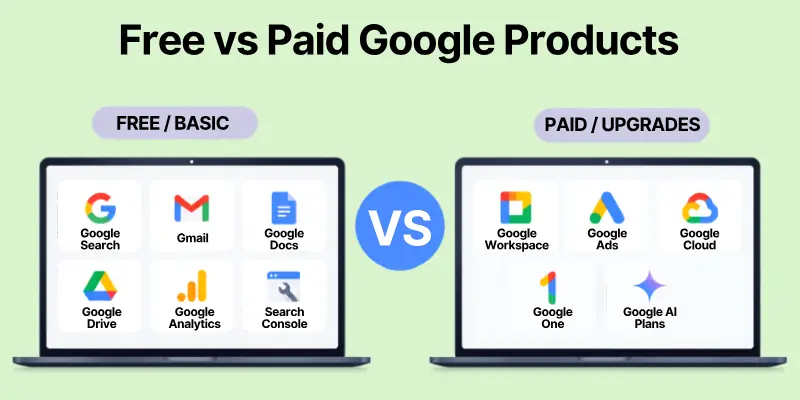
Free or Free Basic Access
Examples can include:
- Google Search.
- Gmail.
- Google Docs.
- Google Sheets.
- Google Slides.
- Google Drive with included storage.
- Google Search Console.
- Google Analytics.
- Google Trends.
- Google Business Profile for eligible businesses.
- Google Merchant Center.
- Google Forms.
- Google Keep.
- Google Tasks.
For example, Google describes Merchant Center as a free tool, while Google Analytics also provides free tools for understanding users.
Paid Products or Paid Upgrades
Some Google services require payment or provide paid upgrades.
Examples include:
- Google Workspace plans.
- Google Ads campaigns.
- Google Cloud usage.
- Google One storage plans.
- Google AI subscription plans.
- Some YouTube subscription services.
For example, Google Workspace offers different business plans with different levels of storage, meetings, security, and other features. Do not assume that every Google product is completely free. Always check the current plan and availability for your country.
How to Choose the Right Google Products
You do not need every tool Google offers. Choose tools according to your work.
1. If You Are a Student
You may start with:
- Google Search.
- Google Scholar.
- Docs.
- Drive.
- Slides.
- Classroom.
- Gemini Notebook.
- Google Translate.
2. If You Are an SEO Professional
You may need:
- Google Search.
- Search Console.
- Analytics.
- Trends.
- Business Profile.
- Tag Manager.
- Merchant Center for e-commerce SEO.
- Google Ads for keyword and paid-search work.
3. If You Run a Local Business
You may need:
- Google Business Profile.
- Google Maps.
- Gmail.
- Google Workspace.
- Google Ads.
- Analytics.
- Search Console.
4. If You Run an Online Store
You may need:
- Google Merchant Center.
- Google Ads.
- Shopping Ads.
- Analytics.
- Search Console.
- Tag Manager.
5. If You Are a Developer
You may use:
- Google Cloud.
- Firebase.
- Flutter.
- Android.
- Maps Platform.
- Google developer tools.
Google’s official product directory separates many products into general-use, business, and developer groups, which can also help you understand which tools fit your needs.
My suggestion is simple: learn the tools related to your work first. Do not open ten products when three products can solve your problem.
Limitations of Google Products
Google products provide many benefits, but you should also understand their limits.
1. Availability
Some Google products and features are not available in every country. Google clearly states that products shown in its product directory may not be available in all countries.
This means a feature your friend uses in the United States may not yet be available in your country.
2. Free Versions Have Limits
A free account may not provide every feature. For example:
- Storage can have limits.
- Business plans can offer stronger security.
- Paid Workspace plans can offer larger meeting limits.
- Paid subscriptions can provide higher Gemini usage limits.
So always check the current plan before choosing a tool.
3. Products Change Over Time
Google may:
- Add new products.
- Rename products.
- Remove old products.
- Change features.
- Move features from one service to another.
A good example is NotebookLM.
In July 2026, Google renamed it Gemini Notebook.
Another example is Google Assistant. Google is continuing to move supported users from Assistant to Gemini during 2026.
That is why old Google product guides need regular updates.
Future of Google Products
We do not need to guess too much about the future because Google has already shown its current direction in 2026.
Google is putting Gemini into more of its products. We can already see this in:
- Google Search.
- Gmail.
- Docs.
- Sheets.
- Chrome.
- Google Photos.
- Google Maps.
- Vids.
- Gemini Notebook.
Google’s current main product page highlights Gemini inside Search, Workspace, Chrome, Photos, Maps, and other services.
Google also announced new products and features at I/O 2026, including Google Pics and further changes to Gmail and Workspace.
For users, the main lesson is simple: Do not only memorize product names. Learn what problem each Google product solves.
Product names and features may change, but the basic needs remain the same.
People still need to:
- Search.
- Communicate.
- Store files.
- Work together.
- Advertise.
- Analyse websites.
- Build software.
- Find places.
- Watch videos.
- Study.
- Manage businesses.
Google keeps changing the tools it uses to solve these problems.
Conclusion
In this guide, we have covered what Google products are and studied the main Google tools available in 2026.
We learned about:
- Google Search and Chrome.
- Docs, Sheets, Slides, and Drive.
- Gmail, Meet, and Chat.
- Google Analytics and Search Console.
- Google Ads and Business Profile.
- Google Merchant Center.
- Google Cloud and Firebase.
- Google Maps and Earth.
- YouTube and Google Photos.
- Gemini and Gemini Notebook.
- Google Classroom and Scholar.
- Android, Pixel, and other Google products.
One important thing to remember is that you do not need to learn all Google products at once. If you are learning SEO, start with Search Console, Analytics, Trends, Business Profile, and Google Search.
If you are a student, start with Search, Docs, Drive, Scholar, Classroom, and Gemini Notebook. If you run a business, start with the products that help you communicate with customers, measure performance, and manage your work.
Learn one product properly, use it in real work, and then move to the next one.
That is much better than knowing the names of fifty Google products but not knowing how to use any of them. Goodbye and keep learning.
FAQs
Here are some commonly asked questions related to what are Google products:
Google products are apps, services, platforms, and tools created or managed by Google. They help users search, communicate, work, learn, advertise, store information, build applications, and complete many other tasks. Google’s current official directory contains products for general users, businesses, and developers.
No. Many Google products offer free access, but some services have paid plans or paid features. Google Workspace, Google Cloud, Google Ads, Google One, and some other services can involve payment depending on how you use them.
Some of the most useful Google products for SEO include Google Search, Search Console, Google Analytics, Google Trends, Google Business Profile, and Merchant Center for e-commerce websites. Search Console specifically helps website owners measure Search traffic and performance.
Google Search Console is a free Google tool for website owners. It helps you monitor your site’s performance in Google Search, including queries, clicks, impressions, indexing information, and website problems.
Google Analytics helps you understand how users interact with your website or app. It helps you study customer journeys, traffic, events, and marketing performance.
Google Workspace is a collection of work and communication products. It includes products such as Gmail, Drive, Calendar, Meet, Docs, Sheets, Slides, and other tools. Paid plans offer different business features and limits.
Google Assistant is still listed among Google’s products, but Google is moving many supported users toward Gemini. Google says the transition from Assistant to Gemini on mobile devices continues during 2026.
Google renamed NotebookLM to Gemini Notebook on July 16, 2026. Google says it remains a separate product but now connects more closely with other Google services.
Google removed the Next name in July 2026. The current name is simply Google Merchant Center. Google says the change did not affect existing accounts, product data, or campaigns.
One important new product announced in 2026 is Google Pics, an image creation and editing tool. Google announced it at I/O 2026 and planned its rollout to eligible users through summer 2026.
Yes. Google Vids is an active Google Workspace video creation and editing product. Google continued adding new video, editing, voice, and avatar features during 2026.
Yes. An eligible business can use Google Business Profile to manage information shown on Google Search and Maps, such as address, opening hours, contact information, photos, and other business details.
Google describes Merchant Center as a free tool that helps merchants provide product information so shoppers can discover and explore their products on Google. Advertising through Google Ads is separate and may cost money.
Yes. Many Google products work together. For example, you can store Docs in Drive, schedule Meet calls through Calendar, use Gmail with Workspace, and connect marketing products such as Analytics with other Google services.
Google does not present one simple permanent number because its product list changes over time. Its current official directory contains many products for general users, businesses, and developers, and Google continues to add, rename, and update services.