What is SEO? Simple & Complete Guide for Beginners
Published: 1 Aug 2026
You may hear people talk about SEO everywhere. Some people say SEO brings free traffic. Others say SEO feels too technical. Many beginners simply do not know where to start. You may also wonder whether SEO only involves keywords or covers something much bigger.
Do not worry. I will explain SEO in very simple English. I will show you how search engines work, what you need to optimize, and how you can start improving your website step by step.
I have worked with different websites and SEO projects, and I always give beginners one clear suggestion: learn the basics first and avoid shortcuts.
Let us start.
What is SEO?
Let us first understand the basic meaning of SEO.
SEO stands for Search Engine Optimization. It means improving your website so search engines can understand it and show it to the right people.
For example, imagine that you run a digital marketing website. A person searches for “best SEO course for beginners.” SEO helps your relevant course page appear in the search results.
SEO mainly focuses on organic search results. You do not pay a search engine for each organic click. However, you still invest time, knowledge, tools, content, and technical work in your SEO strategy.
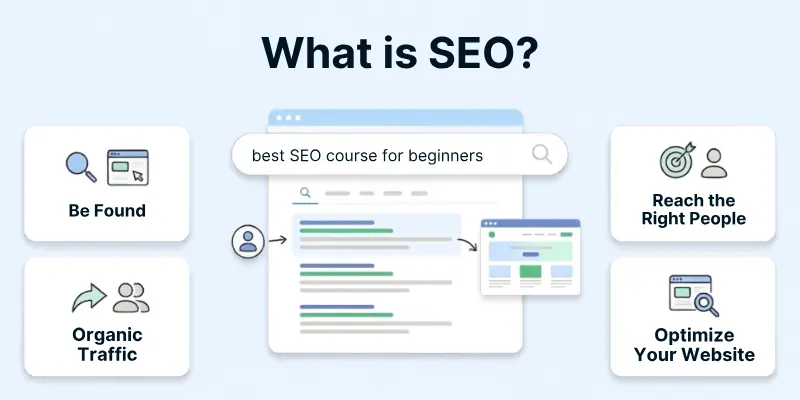
SEO does not only focus on Google. You can also optimize your website for Bing and other search platforms. However, most website owners focus heavily on Google because it drives a large part of global search activity.
Google describes SEO as the process of improving a website for search engines and helping relevant people find its pages. nition of SEO
I use this simple definition when I teach beginners.
SEO means helping people find the right page on your website when they search for an answer, product, service, or solution.
How Search Engines Work
In this section, we will cover how search engines operate so you can understand the base of SEO.
Crawling:
Search engines first need to discover your pages.
- Crawlers or spiders: Search engines use bots called crawlers or spiders to scan websites and discover new pages.
- Discovering content: These bots follow links from one page to another to find and update content across the internet.
Indexing:
Search engines then decide whether they want to store your page in their index.
- What is indexing: Indexing is the process where search engines store your page in their database after analyzing it.
- Storing content: Search engines organize this data so they can quickly show relevant pages when someone searches.
Ranking
Search engines finally select and order results for each search.
- How ranking works: Search engines rank pages based on relevance, quality, and usefulness to the user.
- Ranking factors: Factors like content quality, backlinks, and user experience decide which page appears on top.
How SEO Works
In this section, we will connect SEO with search engine processes.
- Connection with search engines: SEO helps search engines understand your content better and show it to the right audience.
- Matching user intent: SEO focuses on creating content that answers what users are searching for.
- Role of algorithms: Search engines use algorithms to decide rankings, and SEO helps you align your content with those rules.
So, this is how SEO works: When someone searches for a keyword like “advantages and disadvantages of SEO”, search engines scan and rank pages that best match that query. If your content is well-optimized, clear, and helpful, it has a higher chance of appearing on top results, bringing organic traffic to your website without paid ads.
Why SEO is Important
In this section, we will explore why SEO matters for websites and businesses.
- Brings free website traffic: SEO helps people visit your website from Google without paying for every click.
- Finds the right people: SEO brings people who already need your information, product, or service.
- Builds trust: When people see your website on Google, they feel more confident about your business.
- Saves money: SEO helps you get customers without spending money on ads every day.
- Gives long-term results: A well-written and properly optimized page can bring visitors for a long time.
- Helps small businesses grow: A small business can also compete with big companies by targeting the right keywords.
- Brings local customers: Local SEO helps people near your area find your shop, office, or service.
- Improves your website: SEO encourages you to make your website faster, easier to use, and mobile-friendly.
- Brings more calls and sales: The right visitors may contact you, book your service, or buy your product.
- Makes your brand popular: When people see your website many times in search results, they start remembering your business name.
- Keeps your business active online: Regular SEO work helps your website stay updated and useful for visitors.
My recommendation: Do not do SEO only to get more visitors. Focus on bringing people who really need your product or service.
Parts of SEO
In this section, I will explain the three main parts of SEO. You need to work on all three parts to grow your website properly.
1. On-Page SEO
On-page SEO covers everything you improve inside your website pages. It helps visitors and search engines understand your content easily.
- Content optimization: You write clear, useful, and complete content that answers the user’s question.
- Keyword usage: You add your main keyword naturally without repeating it too many times.
- Page titles: You write a clear title that tells people what the page covers.
- Meta descriptions: You write a short description that explains why people should visit your page.
- Headings: You use proper headings to divide your content into simple sections.
- URLs: You create short and easy URLs that clearly describe the page topic.
- Internal links: You link related pages so visitors can find more useful information on your website.
- Images: You add useful images, simple file names, and clear alt text.
- Content updates: You update old information so your page stays useful and correct.
My recommendation: First make your content helpful for people. After that, add keywords and other on-page SEO settings.
2. Off-Page SEO
Off-page SEO covers the work you do outside your website. It helps more people discover your website and trust your business.
- Backlinks: You get links from useful and related websites.
- Brand mentions: Other websites, blogs, and people mention your business name online.
- Guest posting: You write useful content for relevant websites and introduce your knowledge to a new audience.
- Business listings: You add your business details to trusted and related online directories.
- Customer reviews: You ask happy customers to share honest reviews about your business.
- Social sharing: You share your content on social media so more people can find and read it.
- Online relationships: You build good connections with bloggers, business owners, and people from your field.
- Local mentions: Local websites and news pages mention your business and help nearby customers find you.
My recommendation: Do not buy hundreds of cheap backlinks. One good and related link can help more than many poor links.
3. Technical SEO
Technical SEO improves the working side of your website. It helps search engines visit, read, and save your pages without problems.
- Website speed: You make your pages load quickly on mobile phones and computers.
- Mobile-friendly design: You make sure your website works properly on every screen size.
- Crawling: You allow search engines to visit your important pages.
- Indexing: You help search engines save the correct pages in their records.
- XML sitemap: You create and submit a sitemap that lists your important website pages.
- Website security: You use HTTPS to keep your website and visitors safe.
- Broken links: You find and fix links that lead to missing or error pages.
- Page redirects: You send visitors and search engines to the correct page when you change an old URL.
- Website structure: You arrange pages in a simple order so users can easily move around your website.
- Duplicate pages: You guide search engines toward the main page when similar pages appear on your website.
My recommendation: Check your technical SEO regularly because one small mistake can stop an important page from appearing in Google.
Key Components of SEO
In this section, we will cover the main elements that make SEO successful.
- Keywords: Keywords help match your content with user searches.
- Content quality: High quality content keeps users engaged and improves rankings.
- Backlinks: Strong backlinks increase your website authority.
- User experience: Easy navigation and design improve engagement.
- Page speed: Faster pages keep users on your site longer.
- Mobile optimization: Mobile friendly sites perform better in search results.
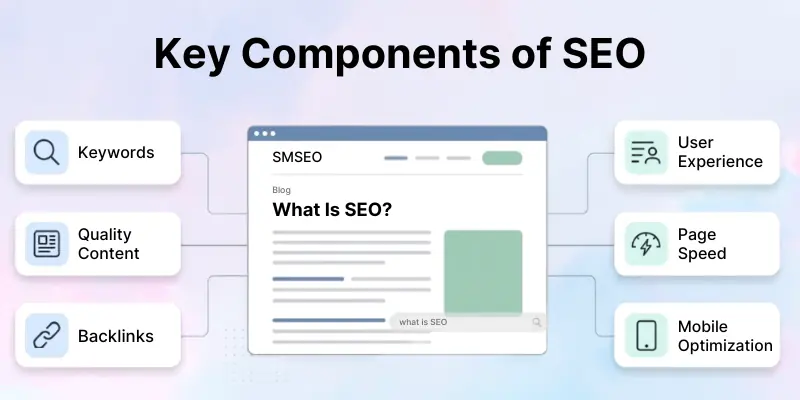
Let’s understand this with a simple blog example: Suppose you have a blog called “SMSEO” where you are covering everything about SEO. Now, if you write an article targeting the keyword “what is SEO”, here’s how these components work together:
- You use the keyword naturally in your headings and content
- You create helpful and easy-to-understand content
- Other websites link back to your article (backlinks)
- Your blog is easy to navigate and looks clean
- Your page loads fast
- Your blog works perfectly on mobile
Result: When someone searches for “what is SEO,” your SMSEO blog has a higher chance of ranking on top, because all key SEO components are properly optimized.
SEO Best Practices
In this section, we will share proven tips for better results:
- Understand what people need: First understand why people search for the topic, and then give them the exact answer they need.
- Write helpful content: Create content that solves the reader’s problem and explains the topic in simple words.
- Add your own experience: Share your own tips, examples, results, or lessons instead of copying the same information from other websites.
- Use keywords naturally: Add keywords where they fit properly, but do not repeat them again and again.
- Write clear titles: Create a simple page title that clearly tells people what they will find on the page.
- Use proper headings: Divide your content into clear headings so people can read and understand it easily.
- Answer the main question early: Do not make readers wait too long. Give the main answer near the start of the page.
- Use internal links: Connect your related pages so readers can easily find more helpful information on your website.
- Use clear link words: Tell readers what they will find after opening a link instead of only writing “click here.”
- Improve your mobile website: Make sure people can easily read your content and use your website on a mobile phone.
- Make your pages load fast: Reduce large images, heavy files, and unnecessary plugins that slow down your website.
- Optimize your images: Compress images, use simple file names, and add clear alt text that explains each image.
- Keep important content open: Make sure Google and visitors can easily see your main text, images, and links.
- Update old content: Check your old pages and correct any outdated facts, broken links, or missing information.
- Fix broken links: Remove or repair links that take visitors to missing pages.
- Use Google Search Console: Check which pages Google finds, which keywords bring visitors, and which website problems need your attention.
- Avoid poor backlinks: Do not buy cheap backlink packages. Build links from useful and related websites.
- Do not create useless pages: Every page should answer a real question or help the visitor in some way.
- Keep your website safe: Use HTTPS and protect your website from spam, hacking, and harmful pages.
My recommendation: Do not try every new SEO trick you see online. First help the reader, keep your website simple, and improve your important pages one by one.
Common SEO Mistakes to Avoid
In this section, we will highlight SEO mistakes you should avoid:
- Ignoring what people want: Do not write only around a keyword. First understand what people want to know and give them a clear answer.
- Writing only for Google: Write for real people first. Keep your content simple, helpful, and easy to understand.
- Copying content: Do not copy content from other websites or repeat the same content on many pages. Add your own knowledge, examples, and advice.
- Repeating keywords too much: Do not force the same keyword into every line. Use it naturally where it makes sense.
- Using the wrong keywords: Choose words that your real customers search for. Wrong keywords may bring people who do not need your product or service.
- Publishing too many weak pages: Do not create hundreds of short pages only to target more keywords. Every page should give proper help to the reader.
- Ignoring mobile users: Make sure your full content, images, links, and buttons work properly on mobile phones. Google uses the mobile version of your website to understand and save your pages.
- Keeping a slow website: Large images, heavy plugins, and unnecessary files can make your pages slow. A slow website makes people leave before reading your content.
- Chasing a perfect speed score: Improve your website for real visitors, but do not waste all your time trying to get a perfect score. Helpful content still matters more than a testing number.
- Buying cheap backlinks: Do not buy hundreds of links from poor or unrelated websites. Build links through useful content and real business relationships.
- Using poor internal links: Link your related pages properly. Without internal links, people and Google may not find your important pages.
- Blocking important pages: Check that your important pages do not contain the wrong noindex setting or other blocks that stop Google from saving them.
- Using unclear page titles: Write a different and clear title for each important page. Do not fill your title with repeated keywords.
- Not fixing broken links: Check and repair links that send people to missing pages or error pages.
- Showing too many pop-ups: Do not cover the main content with large pop-ups, ads, or signup boxes. Let people read the page easily.
- Not updating old content: Check old pages and correct outdated facts, broken links, old screenshots, and missing information.
- Changing only the date: Do not add a new date to old content without improving it. Make real changes before you call a page updated.
- Ignoring Google Search Console: Check which pages Google finds, which pages have problems, and which search words bring people to your website.
My recommendation: Do not try to fool Google with shortcuts. Write for people, keep your website clean, and fix one important problem at a time.
SEO Tools for Beginners
In this section, I will recommend tools you can start using:
- Google Search Console: This free tool shows which keywords bring people to your website. It also shows clicks, pages, indexing problems, and other website issues.
- Google Analytics 4: This tool shows where your visitors come from and what they do after opening your website. You can check popular pages, visits, forms, sales, and other important actions.
- Google Keyword Planner: This tool helps you find new keyword ideas. It also gives an estimate of how often people search for those keywords.
- Google Trends: This free tool shows which topics people search for more or less over time. You can also compare two or more topics before choosing one.
- PageSpeed Insights: This tool checks how fast your page opens on mobile phones and computers. It also shows the problems that may slow down your page.
- Rich Results Test: This tool checks whether Google can properly read the extra information that you add through schema.
- Ahrefs: This paid tool helps you find keywords, check backlinks, study other websites, and find new content ideas.
- Ubersuggest: This tool gives keyword ideas and basic information about websites. Beginners can use it to start simple keyword research.
- Free tools: Start with free Google tools because they give you enough information for basic SEO work.
- Paid tools: Use a paid tool when you need more keyword ideas, backlink details, or information about other websites.
- Do not trust every number: SEO tools often show estimated numbers. Always check Google Search Console and study the actual Google results before making a final decision.
My recommendation: Start with Google Search Console and Google Analytics 4. After that, learn Keyword Planner, Google Trends, and PageSpeed Insights. Do not buy an expensive tool until you clearly understand why you need it.
How Long Does SEO Take?
In this section, I will explain how much time SEO may take in 2026. SEO does not give quick or equal results to every website, so you need patience and regular work.
- Realistic timeline: Some small changes may show results within a few days or weeks, but strong SEO results can take several months. Google also explains that different website changes take different amounts of time.
- SEO needs continuous work: SEO is not a one-time job. You need to publish helpful content, update old pages, fix website problems, and check your results regularly.
- Every website takes different time: A new website may take more time because Google still needs to find, understand, and check its pages. An older and trusted website may see some changes sooner.
- Competition affects the time: A low-competition keyword may give results earlier, while a difficult keyword may need more content, better pages, useful links, and more time.
- Small changes and big changes: A title change or fixed link may show an effect quickly. A full website improvement may take several months.
- Short-term and long-term results: SEO may feel slow at the start, but a good page can keep bringing visitors for a long time. Paid ads usually stop bringing traffic when you stop spending money.
- Regular checking is important: Check Google Search Console every month to see which pages get clicks, which keywords improve, and which pages still need work.
- Do not expect guaranteed rankings: No SEO expert can promise an exact position or date because Google results keep changing.
- Expert insight: From my experience, people who work on SEO regularly get better results than people who publish a few pages and then stop.
My recommendation: Give SEO proper time and keep improving your website. Do not look for quick tricks. Work continuously, check your progress, and improve one important page at a time.
Future of SEO
In this section, we will look at upcoming trends that will shape SEO in the years to come:
- SEO will not end: People will continue searching for products, services, and answers. The way Google shows the results may change, but businesses will still need SEO.
- Useful content will win: Google will give more importance to pages that answer the question properly. Long and difficult content will not help when it does not solve the reader’s problem.
- Real experience will matter more: Anyone can rewrite common information. You should add your own examples, results, mistakes, screenshots, and working methods to make your content different.
- Search results will keep changing: Google now gives answers in different ways and may also suggest useful website links with them. Your content should give a clear answer and also explain the topic properly.
- Basic SEO will remain important: You will still need good content, proper headings, internal links, fast pages, and correct indexing. New changes will not remove these basic SEO rules.
- Mobile websites will remain important: Your mobile website should show the full content and work properly. Do not keep important information only on the computer version.
- Simple websites will perform better: People do not like slow pages, confusing menus, or too many pop-ups. Keep your website fast, clean, and easy to use.
- Images and videos will help more: Some people like reading, while others prefer watching or seeing an example. Add useful images and videos when they make the topic easier to understand.
- Your name and experience will matter: Tell readers who wrote the content and why they should trust that person. Add a proper author introduction, real experience, and correct contact details.
- Small and focused websites can still grow: You do not need to write about every topic. Choose your main field and cover it properly.
- Old content will need regular work: Do not publish a page and forget it. Check old information, repair broken links, improve weak parts, and add new details when needed.
- Shortcuts will become more risky: Copied pages, forced keywords, cheap backlinks, and hundreds of weak articles will not build a strong website.
- SEO experts will need to keep learning: Google will continue making changes. A good SEO expert will check the results, learn what changed, and improve the website instead of following every online rumour.
My recommendation: Do not become worried about every new SEO update. Keep your content helpful, share your real experience, maintain your website, and work regularly. These simple steps will also support your SEO in the coming years.
Conclusion
In this guide, we have covered what SEO is in great detail. You now understand how it works, why it matters, and how you can start using it.
From my experience as a guide, I always suggest starting simple. Focus on creating helpful content first, then gradually improve the technical aspects of your website. SEO is not hard if you stay consistent and patient.
If you want to learn more about SEO in a practical way, you can visit our YouTube channel “Learn with GA” for step-by-step tutorials. You can also explore our detailed SEO course and resources on our page.
Good luck with your SEO journey, and keep learning and experimenting; you’ll see results over time!
FAQs
Here are the most commonly asked questions related to what is SEO:
SEO means improving your website so people can find it on Google and other search engines. It helps Google understand your pages and show them to the right people. Good SEO can bring visitors without paying for every click. In simple words, SEO connects your website with people who need your information, product, or service.
SEO works by helping search engines find, understand, and save your website pages.
- Google visits your pages.
- Google checks your content.
- Google shows useful pages in search results.
You improve your chances when you write helpful content and keep your website working properly.
SEO helps your website reach people who already search for your topic or service. It can bring visitors, calls, customers, and sales without daily ad spending. It also helps small businesses compete with bigger companies. From my experience, SEO works best when you focus on the right people instead of only chasing traffic.
You do not pay Google for normal SEO rankings. However, SEO needs your time, effort, and regular work. You may also spend money on content, tools, website fixes, or an SEO expert. Beginners can start with free tools and learn step by step.
SEO does not give the same timeline for every website.
- Small changes may show results in a few weeks.
- Strong results may take several months.
- Difficult keywords may take more time.
SEO needs continuous work, so keep improving your pages instead of waiting after one update.
The three main parts of SEO are on-page SEO, off-page SEO, and technical SEO. On-page SEO improves your content and page details. Off-page SEO includes backlinks and mentions from other websites. Technical SEO helps Google visit, understand, and save your pages correctly.
A keyword is a word or phrase that people type into Google. For example, “what is SEO” is a keyword because people search for it to learn about SEO. You should use keywords naturally in your title, headings, and content. Do not repeat the same keyword in every sentence.
Yes, beginners can learn SEO with regular practice.
- Start with helpful content.
- Learn basic keyword research.
- Use Google Search Console.
- Improve one page at a time.
I always suggest learning the basics properly before using difficult tools or methods. You can follow “Learn with GA” YouTube channel.
SEO supports long-term growth, while paid ads can bring visitors quickly. Paid traffic usually stops when you stop paying. A useful SEO page may continue bringing people for a long time. Both methods can work well, but SEO gives your website a stronger long-term base.
Yes, a new website can rank on Google. You need to publish useful content, use proper keywords, add internal links, and fix website problems. A new website may take more time because Google still needs to understand and trust its pages. My recommendation is simple: stay regular, avoid shortcuts, and improve your important pages one by one.



- Be Respectful
- Stay Relevant
- Stay Positive
- True Feedback
- Encourage Discussion
- Avoid Spamming
- No Fake News
- Don't Copy-Paste
- No Personal Attacks
- Be Respectful
- Stay Relevant
- Stay Positive
- True Feedback
- Encourage Discussion
- Avoid Spamming
- No Fake News
- Don't Copy-Paste
- No Personal Attacks
