Google Search Operators: 150+ Complete List with Examples
Published: 15 Jul 2026
Guys, first let me briefly tell you what are search operators; basically, Google search operators are special commands and symbols that you add to your search queries to get more accurate, filtered, and targeted results from Google. Instead of typing simple keywords, these operators help you control what Google shows you, making your searches faster and smarter.
And yes, I know many of you know this, and you know that you need to know the Google search operators list, like their names, functions, and examples. So i have made this guide for you from basic till advanced ones, 150+ search operators, so you can fully understand how to use them in real situations.
So, without wasting time, let us cover the entire list of Google search operators.
Google Search Operators: The Complete List
Readers, I have divided the list of all the search operators in three parts:
- Basic Google Search Operators
- Advanced Google Search Operators
- Special / Less-Known / Mixed Operators
Now, let us cover the names, functions, and examples in great detail.
1. Basic Google Search Operators
These are the most essential Google search operators that every beginner should learn. They help you refine searches, filter results, and find accurate information faster. These operators are widely used in SEO, research, and daily Google searches.
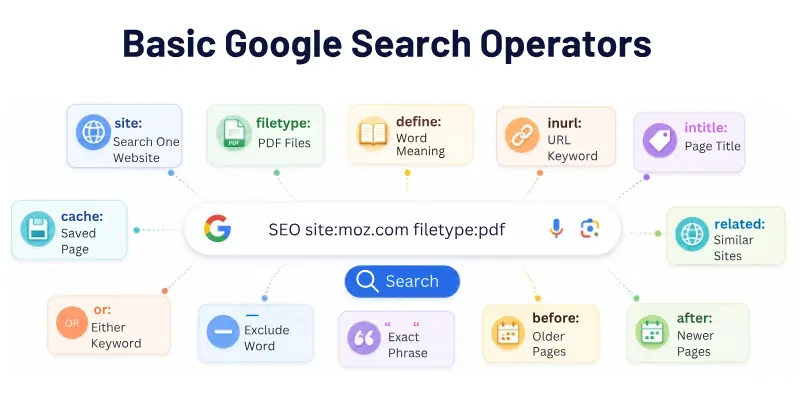
- “exact phrase” – Finds results that contain the exact phrase in the same order without any changes. Example: “digital marketing strategy”
- OR – Shows results that include either one keyword or another. Example: SEO OR PPC
- AND – Ensures both keywords appear in the results (Google already uses this by default, but still useful in complex searches). Example: SEO AND content marketing
- – (minus sign) – Excludes a specific word or phrase from search results. Example: apple -fruit
- * (wildcard) – Replaces unknown words in a phrase. Example: “best * tools for SEO”
- ( ) (grouping) – Groups multiple terms to control search logic. Example: (SEO OR PPC) AND marketing
- define: – Shows the meaning or definition of a word instantly. Example: define:algorithm
- cache: – Displays the cached (saved) version of a webpage stored by Google. Example: cache:example.com
- related: – Finds websites that are similar to a given website. Example: related:amazon.com
- info: – Shows basic information about a website (cache, similar pages, backlinks). Example: info:example.com
- site: – Limits search results to a specific website or domain. Example: SEO site:moz.com
- filetype: – Finds specific file formats like PDF, DOC, PPT, XLS. Example: SEO checklist filetype:pdf
- ext: – Another version of filetype used to find file extensions. Example: resume ext:doc
- inurl: – Finds pages that contain a specific keyword in the URL. Example: SEO inurl:blog
- allinurl: – Finds pages where all keywords appear in the URL. Example: allinurl:SEO tools guide
- intitle: – Finds pages with a keyword in the title tag. Example: intitle:SEO tips
- allintitle: – Finds pages where all keywords appear in the title. Example: allintitle:SEO tools free guide
- intext: – Finds pages where a keyword appears inside the content. Example: intext:”content marketing strategy”
- allintext: – Finds pages where multiple keywords appear in the content. Example: allintext:SEO ranking factors guide
- before: – Shows results published before a specific date. Example: SEO trends before:2022
- after: – Shows results published after a specific date. Example: SEO trends after:2023
- .. (number range) – Searches within a numeric range (price, years, stats, etc.). Example: laptop $500..$1000
- weather: – Shows weather information for a location. Example: weather:London
- stocks: – Shows stock market data for a company. Example: stocks:Tesla
- map: – Displays map results for a location. Example: map:New York
- movie: – Shows movie details, ratings, and showtimes. Example: movie:Inception
- source: – Filters news results from a specific source. Example: SEO updates source:BBC
- location: – Filters news or results by geographic location. Example: tech news location:USA
- book: – Searches for book-related results. Example: book:SEO guide
- author: – Finds content written by a specific author (mainly Google Books). Example: author:Neil Patel
- translate: – Translates words or phrases into another language. Example: translate:hello to Urdu
- time: – Shows current time in a specific location. Example: time:London
- calculator (direct math input) – Performs quick calculations inside Google. Example: 125*8
- unit conversion – Converts units like weight, distance, currency, temperature. Example: 10 kg to pounds
2. Advanced Google Search Operators
These operators are used for deep SEO research, competitor analysis, backlink hunting, content gap analysis, and technical search filtering. They are more precise and less commonly known than basic operators.
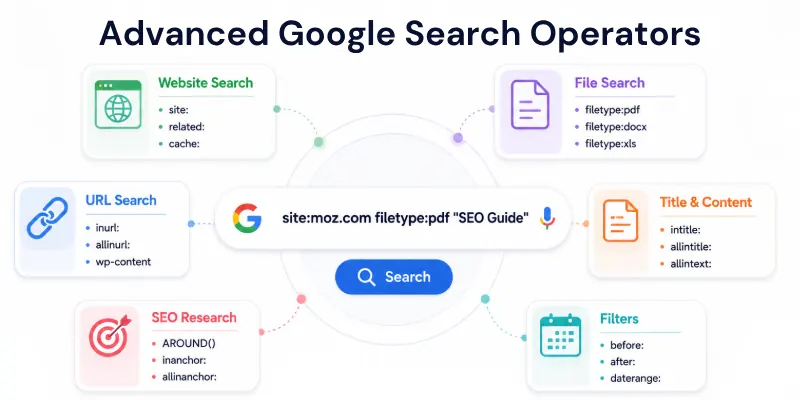
- allinurl: – Finds pages where all specified keywords appear in the URL structure. Example: allinurl:seo tools guide
- allintitle: – Finds pages where all keywords appear in the title tag. Example: allintitle:best seo tools 2026
- allintext: – Finds pages where all keywords appear inside page content. Example: allintext:seo ranking factors checklist
- inanchor: – Finds pages where keywords appear in anchor text of backlinks. Example: inanchor:”best seo tools”
- allinanchor: – Finds pages where all keywords appear in anchor text. Example: allinanchor:seo tools free download
- AROUND(X) – Finds two keywords within X words of each other (context-based SEO research). Example: seo AROUND(5) ranking
- site:*.domain.com – Searches across all subdomains of a website. Example: site:*.edu research papers
- site:domain.com -www – Excludes main domain and focuses on subdomains. Example: site:example.com -www
- site:domain.com filetype:pdf – Finds downloadable files inside a specific website. Example: site:moz.com filetype:pdf seo
- site:domain.com intitle:index.of – Finds open directory listings on a website. Example: site:example.com intitle:index.of
- filetype:pdf site:edu – Finds academic PDF resources. Example: “machine learning” filetype:pdf site:edu
- filetype:ppt site:org – Finds presentations from organizations. Example: “digital marketing” filetype:ppt site:org
- filetype:xls – Finds spreadsheets (useful for data extraction). Example: “seo keywords” filetype:xls
- filetype:docx – Finds Word documents. Example: “content strategy” filetype:docx
- inurl:wp-content – Finds WordPress site structures (useful for SEO audits). Example: inurl:wp-content seo
- inurl:wp-admin – Finds WordPress admin login pages. Example: inurl:wp-admin login
- inurl:login OR inurl:signin – Finds login pages across websites. Example: inurl:login seo tools
- inurl:signup OR inurl:register – Finds registration pages. Example: inurl:signup marketing tools
- inurl:blog + keyword – Finds blog sections on websites. Example: inurl:blog seo tips
- intitle:”write for us” – Finds guest posting opportunities (link building SEO). Example: intitle:”write for us” seo
- intitle:”guest post” – Finds websites accepting guest posts. Example: intitle:”guest post” marketing
- intitle:”contribute” – Finds contributor pages. Example: intitle:”contribute seo”
- intitle:”resources” OR “useful links” – Finds SEO resource pages. Example: intitle:”seo resources”
- “keyword” -site:domain.com – Excludes a specific website (competitor filtering). Example: “seo tools” -site:ahrefs.com
- (keyword1 OR keyword2) site:domain.com – Multi-query search inside a website. Example: (seo OR ppc) site:moz.com
- “keyword” AROUND(3) “keyword” – Finds keywords appearing close together for context analysis. Example: “seo” AROUND(3) “ranking”
- daterange: – Searches within a specific date range (advanced historical SEO research). Example: seo updates daterange:20230101-20231231
- before:YYYY-MM-DD – Filters results before a date. Example: seo trends before:2020-01-01
- after:YYYY-MM-DD – Filters results after a date. Example: seo trends after:2023-01-01
- cache:domain.com – Shows Google’s stored version of a page (useful for SEO auditing). Example: cache:moz.com
- related:domain.com – Finds competitor or similar websites. Example: related:ahrefs.com
- info:domain.com – Shows domain details (cache, related links, etc.). Example: info:semrush.com
- link:domain.com (deprecated but still used in SEO discussions) – Attempts to find backlinks to a domain. Example: link:example.com
3. Special / Less-Known / Mixed Google Search Operators
These are advanced Google search operators that are not widely used but are very powerful for SEO research, content discovery, competitor analysis, and data finding. They help you dig deeper into search results and find hidden opportunities.
- site:linkedin.com “keyword” – Finds keyword mentions on LinkedIn profiles, posts, and pages. Example: site:linkedin.com “SEO specialist”
- site:facebook.com “keyword” – Finds keyword mentions on Facebook pages and posts. Example: site:facebook.com “digital marketing course”
- site:twitter.com “keyword” – Finds tweets and profiles related to a keyword. Example: site:twitter.com “SEO tools”
- site:instagram.com “keyword” – Finds Instagram posts, captions, and bios with the keyword. Example: site:instagram.com “marketing tips”
- site:pinterest.com “keyword” – Finds visual ideas and pins. Example: site:pinterest.com “web design ideas”
- site:youtube.com “keyword” – Finds videos related to a topic. Example: site:youtube.com “SEO tutorial”
- site:reddit.com “keyword” – Finds discussions and real user opinions. Example: site:reddit.com “best SEO tools”
- site:quora.com “keyword” – Finds questions and answers related to a topic. Example: site:quora.com “what is SEO ranking”
- site:medium.com “keyword” – Finds blog articles published on Medium. Example: site:medium.com “content marketing strategy”
- site:github.com “keyword” – Finds code, tools, and repositories. Example: site:github.com “SEO scraper”
- site:stackexchange.com “keyword” – Finds technical Q&A discussions. Example: site:stackexchange.com “SEO indexing issue”
- site:.edu “keyword” – Finds academic content from universities. Example: site:.edu “machine learning research”
- site:.gov “keyword” – Finds official government resources. Example: site:.gov “climate change report”
- site:.org “keyword” – Finds nonprofit and organization content. Example: site:.org “digital literacy program”
- site:.ac.uk “keyword” – Finds UK university content. Example: site:.ac.uk “AI research paper”
- “keyword1” AROUND(3) “keyword2” – Finds words very close to each other. Example: “SEO” AROUND(3) “ranking factors”
- “keyword1” AROUND(5) “keyword2” – Finds related terms in the same context. Example: “digital marketing” AROUND(5) “strategy”
- “keyword1” AROUND(10) “keyword2” – Finds broader context between keywords. Example: “AI” AROUND(10) “SEO optimization”
- keyword -intitle:”keyword” – Removes pages where keyword appears in title. Example: SEO -intitle:”guide”
- keyword -inurl:”keyword” – Removes pages where keyword appears in URL. Example: SEO -inurl:blog
- keyword -intext:”keyword” – Removes pages where keyword appears in content. Example: SEO -intext:”beginner”
- keyword site:domain.com -keyword – Removes unwanted keyword inside a site. Example: SEO site:moz.com -tools
- keyword OR keyword2 site:domain.com – Finds either keyword inside a website. Example: SEO OR PPC site:moz.com
- keyword AND keyword2 site:domain.com – Forces both keywords inside results. Example: SEO AND backlinks site:ahrefs.com
- (keyword1 OR keyword2) site:domain.com – Groups multiple keywords. Example: (SEO OR marketing) site:semrush.com
- (keyword1 AND keyword2) site:domain.com – Strict multi-keyword filtering. Example: (SEO AND ranking) site:moz.com
- keyword “best” site:blogspot.com – Finds list-style blog posts. Example: SEO “best” site:blogspot.com
- keyword “top” site:wordpress.com – Finds top list articles. Example: SEO “top” site:wordpress.com
- keyword “list of” site:medium.com – Finds curated list articles. Example: SEO “list of” site:medium.com
- keyword “guide” site:edu – Finds educational guides. Example: SEO “guide” site:edu
- keyword “research” site:gov – Finds official research content. Example: SEO “research” site:gov
- keyword “statistics” site:org – Finds data-based reports. Example: SEO “statistics” site:org
- keyword “case study” – Finds real-world examples and results. Example: SEO “case study”
- keyword “pdf download” – Finds downloadable PDF resources. Example: SEO “pdf download”
- keyword “free ebook” filetype:pdf – Finds free ebooks. Example: SEO “free ebook” filetype:pdf
- keyword “presentation” filetype:ppt – Finds slides and presentations. Example: SEO “presentation” filetype:ppt
- keyword “report” filetype:pdf – Finds reports and research papers. Example: SEO “report” filetype:pdf
- keyword “whitepaper” filetype:pdf – Finds industry whitepapers. Example: AI “whitepaper” filetype:pdf
- keyword “template” filetype:xls – Finds spreadsheet templates. Example: SEO “template” filetype:xls
- keyword “checklist” filetype:pdf – Finds structured checklists. Example: SEO “checklist” filetype:pdf
- keyword “resume” filetype:doc – Finds resume documents. Example: SEO resume filetype:doc
- keyword “invoice” filetype:xls – Finds invoice templates. Example: invoice filetype:xls
- keyword intitle:”index of” mp3 – Finds open music directories. Example: music intitle:”index of” mp3
- keyword intitle:”index of” pdf – Finds open PDF folders. Example: books intitle:”index of” pdf
- keyword intitle:”index of” movies – Finds media directories. Example: movies intitle:”index of”
- keyword intitle:”index of” backup – Finds backup file listings. Example: site intitle:”index of” backup
- keyword inurl:ftp – Finds FTP file pages. Example: documents inurl:ftp
- keyword inurl:download – Finds download pages. Example: SEO tools inurl:download
- keyword inurl:uploads – Finds uploaded file directories. Example: images inurl:uploads
- keyword inurl:backup – Finds backup directories. Example: site inurl:backup
- keyword inurl:test – Finds test or staging sites. Example: site inurl:test
- keyword inurl:dev – Finds development sites. Example: site inurl:dev
- keyword “powered by WordPress” – Finds WordPress websites. Example: SEO “powered by WordPress”
- keyword “powered by Blogger” – Finds Blogger sites. Example: SEO “powered by Blogger”
- keyword “powered by Drupal” – Finds Drupal websites. Example: SEO “powered by Drupal”
- keyword “powered by Joomla” – Finds Joomla websites. Example: SEO “powered by Joomla”
- keyword “contact us” site:domain.com – Finds contact pages. Example: SEO “contact us” site:moz.com
- keyword “about us” site:domain.com – Finds about pages. Example: SEO “about us” site:semrush.com
- keyword “login” site:domain.com – Finds login pages. Example: SEO “login” site:example.com
- keyword “FAQ” site:domain.com – Finds FAQ pages. Example: SEO “FAQ” site:ahrefs.com
- keyword “support” site:domain.com – Finds support pages. Example: SEO “support” site:wordpress.com
Why Google Search Operators Matter in SEO and Research
Google Search Operators are powerful commands that help you refine searches, filter results, and find highly specific information that normal searches cannot show.
In SEO and research work, they save time and improve accuracy by letting you directly reach the most relevant data, competitors, and content opportunities.
Reasons why they matter:
- They help you find exact and highly relevant information instead of general search results.
- They make keyword research faster and more accurate for SEO projects.
- They allow you to analyze competitor websites deeply using site-specific searches.
- They help in finding content gaps and new blog topic opportunities.
- They are useful for backlink research and link-building strategies.
- They allow filtering by file types like PDFs, docs, and research papers.
- They help discover guest posting and outreach opportunities easily.
- They improve content research by finding studies, case studies, and statistics quickly.
- They help SEO experts audit websites using advanced filtering techniques.
- They reduce research time by showing only targeted and useful results.
Final Thoughts
In this guide, we have covered Google search operators in great detail, from basic to advanced and even ultra advanced levels. These operators are powerful tools that help you refine searches, find accurate information faster, and improve your overall research and SEO workflow.
Guys, do utilize these operators in your daily tasks; they will make your life much smoother and easier by saving time and giving you more precise results.
And if you are a blogger, then don’t forget these, they can truly add magic to your SEO game, help you find content ideas, analyze competitors, and discover hidden opportunities that most people miss.
If you found this guide helpful, make sure to explore more content on our site. We regularly share practical SEO tips, blogging strategies, and digital marketing guides that can help you grow faster.
FAQs
Here are some of the most commonly asked questions related to Google search commands:
Google search operators are special symbols and commands used to refine and filter search results. They help you find exact information faster instead of browsing random pages. For example, using “SEO tips” shows only exact phrase results. These operators are widely used in SEO, research, and content creation tasks.
Google operators help SEO professionals find keywords, competitors, and content gaps more efficiently. They allow you to filter search results from specific websites or file types. This makes research faster and more accurate. Overall, they improve productivity in SEO analysis and planning.
Search codes in Google refer to advanced commands like site:, intitle:, and filetype:. These codes help you narrow down results based on specific conditions. For example, filetype:pdf shows only PDF files. They are very useful for deep research and data collection.
You can use them directly in Google search bar:
- You can apply them in SEO research tools and audits
- You can use them to find content inside specific websites
- They are also helpful for backlink and competitor analysis
Basic operators like quotes or minus sign are used for simple filtering. Advanced operators like site:, inurl:, and AROUND() provide deeper control over search results. Advanced ones are mainly used in SEO and technical research. They give more precise and targeted data.
A list of Google search operators helps users learn all available commands in one place. It is useful for SEO learners, bloggers, and researchers. It saves time by showing all filtering techniques together. This improves search efficiency and content discovery.
Yes, search operators make content research much more powerful. You can find trending topics, competitor articles, and guest post opportunities. They help identify content gaps in your niche. This leads to better content strategy and SEO performance.
Yes, all Google search operators are completely free:
- No signup or tool is required
- They work directly in Google search bar
- Anyone can use them for research or SEO tasks
Google operators help bloggers find content ideas, keywords, and ranking opportunities. They also help in finding websites for backlinks and guest posting. Bloggers can analyze competitors easily using these commands. This improves blog growth and SEO ranking.
The most useful advanced operators include site:, filetype:, intitle:, inurl:, and AROUND(). These help in deep SEO research and competitor analysis. They allow filtering results with high accuracy. SEO experts use them daily for professional work.



- Be Respectful
- Stay Relevant
- Stay Positive
- True Feedback
- Encourage Discussion
- Avoid Spamming
- No Fake News
- Don't Copy-Paste
- No Personal Attacks
- Be Respectful
- Stay Relevant
- Stay Positive
- True Feedback
- Encourage Discussion
- Avoid Spamming
- No Fake News
- Don't Copy-Paste
- No Personal Attacks
