What Are Internal Links & How to Create Them for SEO: Complete Guide
Published: 9 Jan 2026
Have you ever clicked on a blue, underlined word on a website and been taken to another page on the same site? Those are called internal links, and they’re a powerful tool for both users and search engines.
In this article, you’ll learn:
- What are internal links, and why are they important?
- Different types of internal links
- How to create a strong internal linking structure
- Best practices for using internal links for SEO
By the end of this article, you’ll be able to use internal links to improve your website’s navigation, user experience, and search engine performance.
So, guys, without further ado, let’s get started!
What are Internal Links?
Imagine that your website is a city. The homepage is the city center, and the other pages on your website are the different neighborhoods. Internal links are like the streets and roads that connect the different neighborhoods. Without internal links, it would be very difficult for people to get around your city.
The same is true for your website – Internal links are hyperlinks that point from one page on your website to another page on the same website. They are distinct from other SEO links like external links, which direct visitors to pages on other websites.
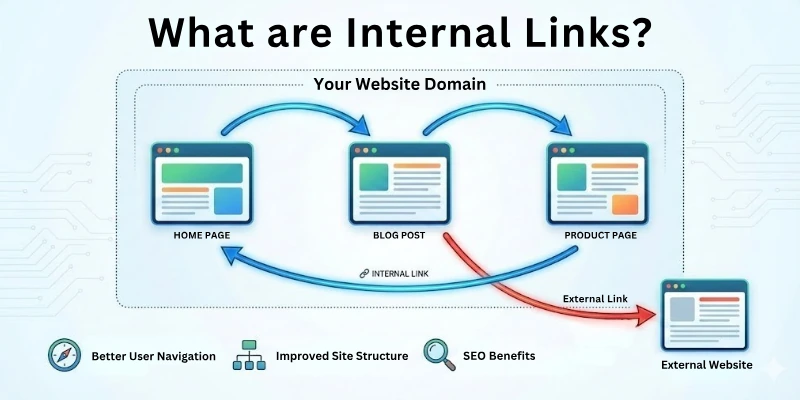
When a visitor clicks on an internal link, they are directed to the page that the link is pointing to. This can be done either by opening a new tab or by redirecting the visitor to the new page within the same tab.
Now, here comes a question: are internal links very important for your site’s ranking or visibility? Exactly yes! To get deeper detail, move forward.
Why are Internal Links Important?
Internal links are like your website’s roads. They make it easier for users and search engines to navigate your site, and they can also help increase your SEO rankings.
When you use an effective inner connection linking strategy, you are informing search engines that your site is well-organized and authoritative. You’re also making it easier for users to find the content they’re looking for, which can improve the user experience of your website and lower your bounce rate.
Here are some of the specific benefits of internal linking for your website:
- Improved SEO rankings
- Better user experience
- Increased page views
- Improved link equity
And, without internal links, it will be difficult for users and search engines to find the information they’re looking for on your site. This can lead to a higher bounce rate, lower SEO rankings, and fewer page views.
Guys, before I lead you towards the strategy of how to build the best internal links between your webpages, I think first you must pass through the types of internal links.
Types of Internal Links
There are two main types of internal links:
- Navigational Links
- Contextual Links
Here is a concise explanation for each type of link.
1. Navigational Links
These links show in your website’s header, footer, and sidebar and assist users in navigating your site structure. Links to your homepage, product categories, and blog posts are all examples of navigational links.
The navigational links are further divided into subcategories, which are:
- Header links: These links appear at the top of your website page, and they typically include links to your homepage, product categories, and blog posts.
- Footer links: These links appear at the bottom of your website page, and they often include links to important pages such as your contact page, privacy policy, and terms of service.
- Sidebar links: These links appear on the side of your website page, and they can be used to highlight important pages, product categories, or blog posts.
2. Contextual Links
These links appear within the body of your website content, and they point to other relevant pages on your site. Examples of contextual links include links to related products, blog posts, or resources.
The contextual links are also further divided into subcategories, which are:
- In-text links: These links appear within the body of your website content, and they point to other relevant pages on your site.
- Image links: These links are created when you make an image clickable. When clicked, they take the user to another page on your site.
- Button links: These links are created using buttons. They are frequently used to convince users to do something, such as sign up for your newsletter or make a purchase.
So, guys, it’s time to disclose the golden treasure box with the mystery of how you can set up an effective internal linking strategy.
How to Create an Effective Internal Linking Strategy
Here are the steps to create an effective internal linking strategy:
- Conduct a Content Audit
- Identify your Pillar Pages
- Cluster Using Internal Links
- Choose Right Anchor Text
- Identify Your Site’s Authority Pages
- Support New Pages
- Ensure Proper Link Placement
- Use Hierarchical Navigation
- Link to Relevant and Related Content
- Balance the Number of Internal Links
- Regularly Update and Optimize Links
- Monitor and Analyze Performance
- Implement Structured Data Markup for Enhanced Navigation
Let me guide you each step in a detailed manner.
1. Conduct a Content Audit
Before building a solid internal linking framework, you need to understand what content already exists on your site. A content audit helps you find strengths, weaknesses, duplicates, outdated pieces, and internal linking opportunities.
This step creates clarity and prevents you from linking blindly. It also allows you to see which pages deserve more visibility and which pages lack support. A well-done audit becomes the base for your entire internal linking strategy.
Key points during content audits:
- Identify content gaps and underlinked pages.
- Mark evergreen pages that can pass link equity.
- Flag outdated, thin, or duplicate pages.
- Categorize content by topic/theme for easy clustering.
- Note existing backlinks pointing to valuable pages.
2. Identify Your Pillar Pages
Pillar pages are the core foundation of your content ecosystem. They represent your main topics, products, or services, and hold the highest strategic value. Instead of scattering internal links randomly, pillar pages allow you to centralize authority.
They also improve navigation and help users understand your site’s main topics. Once defined, pillar pages become your internal linking targets for supporting content.
Finding and defining pillar pages involves:
- Selecting high-volume and evergreen main topics.
- Matching pages to your business goals and services.
- Focusing on pages with strong conversion potential.
- Ensuring each pillar page covers a topic broadly.
- Verifying that each pillar can support multiple clusters.
3. Cluster Using Internal Links
A cluster model groups related pages around a central pillar topic to distribute authority. This approach helps search engines understand relationships between content pieces. It also keeps users engaged longer because the navigation feels purposeful and helpful.
Clustering strengthens both topical authority and organic search rankings. When done properly, it builds a strong semantic network across your content.
How to cluster pages effectively:
- Connect related blog posts to their main pillar page.
- Add contextual links between pages within the same cluster.
- Avoid linking unrelated clusters together.
- Build two-way linking where relevant (pillar ↔ subpage).
- Keep cluster topics tightly focused and clearly segmented.
4. Choose Right Anchor Text
Anchor text plays a major role in how search engines interpret the linked page’s topic. Using vague or generic anchors wastes valuable internal linking potential. Contextual anchor text enhances user clarity and SEO relevance.
Well-optimized anchor texts also help Google understand relationships between entities on your site. Choosing the right words can significantly improve rankings for target keywords.
Best practices for strong internal anchor text:
- Use descriptive phrases instead of generic terms.
- Match anchor intent with the target page topic.
- Avoid keyword stuffing or over-optimization.
- Rotate variations of keywords naturally.
- Keep anchor text aligned with user reading flow.
5. Identify Your Site’s Authority Pages
Some pages naturally gain higher authority through backlinks, traffic, or ranking history. These authority pages act as power sources for internal linking. When linked strategically, they can boost weaker or newer content.
This distributes link equity throughout the site instead of keeping it siloed. The goal is to channel strength into pages that need visibility and support.
Spotting authority pages typically includes:
- Checking backlink profiles using SEO tools.
- Identifying high-traffic or high-ranking content.
- Reviewing engagement metrics and user behavior.
- Evaluating pages with strong external visibility.
- Prioritizing evergreen content that stays relevant.
6. Support New Pages
New content usually struggles to gain clicks and authority on its own. Internal links act as initial boosters that help new pages get discovered faster. This speeds up indexing and ranking while improving user flow.
Connecting new pages to relevant existing content also enhances topic coverage. Over time, this creates a balanced content ecosystem without orphaned pages.
Ways to support new URLs using internal links:
- Link from long-standing pages within the same topic.
- Use contextual in-body links instead of footer-only links.
- Add links during content updates and publishing workflows.
- Highlight new pages in clusters, hubs, or featured sections.
- Avoid publishing new content without internal pathways.
7. Ensure Proper Link Placement
Where you place internal links affects usability and SEO impact. Links placed naturally within meaningful content carry the most value.
Random or forced placements can hurt user experience. Strategic link placement increases user engagement, reduces bounce rate, and guides navigation. Google also reads contextual placement signals to evaluate relevance.
Optimal link placement guidelines:
- Prioritize in-content links over sidebar or footer-only links.
- Position links near relevant sentences or keyword-rich areas.
- Avoid stuffing multiple links in one paragraph.
- Link naturally where the topic transitions or expands.
- Use clear visual spacing for better readability.
8. Use Hierarchical Navigation
A hierarchical structure creates logical order and depth across your site. This makes navigation intuitive for users and clearer for search crawlers. It prevents pages from becoming lost or buried under layers of navigation.
A strong hierarchy also supports topic grouping and authority distribution. This structure is essential for large websites with many categories.
Effective hierarchical navigation involves:
- Building parent → category → subcategory → article levels.
- Ensuring breadcrumb navigation is available and usable.
- Creating clean menus with simple topic segmentation.
- Keeping URLs structured according to site hierarchy.
- Avoiding overly deep structures that hide important content.
9. Link to Relevant and Related Content
Relevance ensures that internal links feel helpful and contextual to the reader. Linking unrelated topics can confuse users and weaken SEO signals.
Relevant linking strengthens topical depth and encourages more page views. It also helps search engines map semantic relationships across your content. This improves both user experience and ranking consistency.
Strategies for linking relevant content:
- Connect content that answers follow-up questions.
- Link to supporting guides, definitions, or examples.
- Avoid cross-topic linking unless contextually justified.
- Link where user intent naturally extends the topic.
- Use related content widgets sparingly, not as the main method.
10. Balance the Number of Internal Links
Internal links are valuable, but too many can dilute their impact. Overloading a page with links creates clutter and distracts users.
Balancing link volume ensures each link carries proper value. It also keeps the reading experience smooth and intentional. The goal is quality over quantity, relevance matters more than volume.
How to maintain link balance:
- Avoid linking every possible keyword on a page.
- Focus on strategic anchors, not excessive linking.
- Check for link stuffing during content reviews.
- Spread links evenly throughout longer content.
- Limit boilerplate footer links to essential pages.
11. Regularly Update and Optimize Links
Websites evolve, and so should their internal linking structure. Old links may become irrelevant, broken, or less effective over time.
Updating links keeps the navigation experience fresh and accurate. It also helps new content gain support from older, authoritative pages. Optimization ensures your linking system remains healthy long-term.
What to update during link maintenance:
- Remove or replace broken internal links.
- Add links to new relevant content pieces.
- Update anchor text based on keyword shifts.
- Clean up outdated clusters or outdated topics.
- Refresh links during content republishing cycles.
12. Monitor and Analyze Performance
Tracking internal link performance helps you understand what is actually working. Analytics reveal user pathways, engagement points, and link interactions.
This enables smarter optimization instead of guesswork. Performance tracking also uncovers underperforming content that needs better linking. Over time, this leads to a more efficient internal linking ecosystem.
How to measure internal link impact:
- Check click-through rates within analytics tools.
- Review time-on-page and session depth metrics.
- Identify pages receiving boosted traffic from internal links.
- Monitor organic ranking improvements after linking updates.
- Use behavior flow reports to track navigation patterns.
13. Implement Structured Data Markup for Enhanced Navigation
Structured data helps search engines interpret your site’s content relationship more clearly. This enhances how your site appears in SERPs and improves navigation through rich features like breadcrumbs. Schema markup also assists with indexing, especially for large sites.
While it doesn’t replace internal links, it complements them by adding clarity. Combined, they make your website more search-friendly and organized.
Structured data navigation enhancements include:
- Adding breadcrumb schema to improve SERP navigation paths.
- Using Article, FAQ, or HowTo schema for content clarity.
- Using SiteNavigationElement schema for menu organization.
- Helping Google understand relationships between pages.
- Improving click-through rates with enhanced SERP snippets.
Best Practices for Internal Linking
Here are some best practices for internal linking that you need to follow:
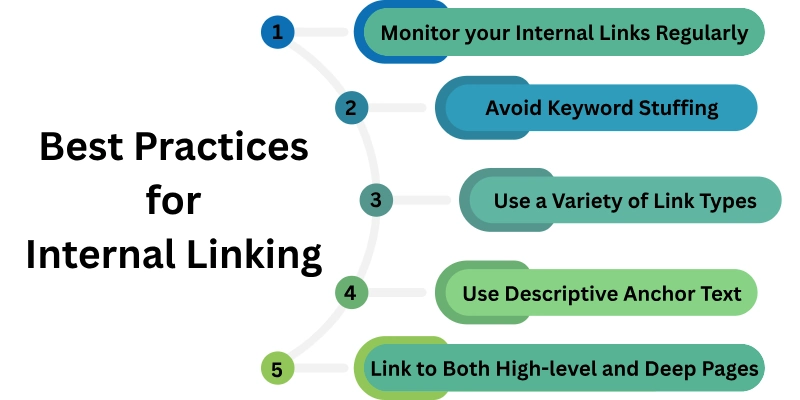
- Use Descriptive Anchor Text
- Link to Both High-level and Deep Pages
- Avoid Keyword Stuffing
- Use a Variety of Link Types
- Monitor your Internal Links Regularly
Let’s learn each.
1. Use Descriptive Anchor Text
Descriptive anchor text makes internal links more meaningful and user-friendly. It gives visitors a clear idea of what content they’ll land on before clicking. This increases trust, improves navigation, and enhances the flow of information across your site.
Search engines also rely on anchor context to understand topic relationships. With the right anchor phrasing, you guide both users and crawlers more efficiently.
Key recommendations for descriptive anchors:
- Use text that reflects the target page’s topic clearly.
- Avoid generic anchors like “click here” or “read more.”
- Keep the anchor short, relevant, and informative.
- Ensure anchors fit naturally into the sentence context.
- Match anchor intent with the linked page content.
2. Link to Both High-level and Deep Pages
Balancing links between top-level and deeper-level pages ensures equal distribution of authority. High-level pages strengthen overall site structure, while deep pages hold valuable detailed information. Linking both helps users discover important pages that might otherwise remain buried.
Search engines also crawl deep content better when pathways are clear. This balance results in richer user journeys and improved indexing power.
How to balance linking levels:
- Link important category pages from homepage or menus.
- Connect blog posts to both pillar and supporting subpages.
- Add contextual links to deep guides or resources.
- Use breadcrumb navigation for hierarchical depth.
- Prevent orphan pages by linking them from key hubs.
3. Avoid Keyword Stuffing
Keyword stuffing in anchors is outdated and harmful for SEO. It creates an unnatural linking pattern and signals manipulation to search engines.
Users also find over-optimized anchors distracting and spammy. The goal is to use natural language that improves clarity instead of forcing keywords. A clean, authentic linking style leads to stronger contextual value and better user experience.
Anchor usage without keyword stuffing:
- Use variations instead of repeating the exact same keyword.
- Prioritize clarity over keyword density.
- Write anchors that blend naturally into content.
- Avoid turning every keyword into a link.
- Choose matching anchor intent rather than forced targeting.
4. Use a Variety of Link Types
Different internal link types serve unique roles in structure and navigation. Contextual links increase topical depth because they connect information where it matters most. Navigational links help users jump to major sections without friction.
Footer links reinforce structure and help crawlers access key pages. Using a mix of link types builds a flexible ecosystem that satisfies both usability and SEO.
Types of internal links to include:
- Contextual links: placed within paragraphs for relevance.
- Menu/navigation links: for structural accessibility.
- Sidebar links: promoting related or recent content.
- Footer links: for essential or frequently needed pages.
- Breadcrumb links: for hierarchical navigation trails.
5. Monitor Your Internal Links Regularly
Over time, websites grow, change, and shift, which affects internal links. Broken links, redirects, or outdated pathways weaken user experience and SEO performance. Regular monitoring ensures your linking system stays healthy and up to date.
It also helps new content integrate smoothly into existing structures. Maintaining link integrity keeps your site crawlable, navigable, and authoritative.
What to check during link monitoring:
- Identify and fix broken links immediately.
- Remove links pointing to redirected or outdated URLs.
- Add links to new relevant content during updates.
- Audit anchor texts for clarity and relevance.
- Track link performance with analytics or SEO tools.
Is Auditing of Internal Links is Important?
Yes, it is.
Imagine you have a website about cars. You have a page about different types of cars, a page about car reviews, and a page about car buying tips.
You want to make sure that it’s easy for visitors to find all of the information they need on your website. So, you add internal links between the different pages.
For example, you might add a link from the “Types of Cars” page to the “Car Reviews” page. You might also add a link from the “Car Buying Tips” page to the “Types of Cars” page.
This way, visitors can easily navigate between the different pages on your website and find the information they’re looking for.
But what if one of your internal links is broken?
If a visitor clicks on a broken link, they’ll end up on a 404 error page. This is a bad experience for the visitor, and it can also hurt your website’s SEO.
That’s why it’s important to audit your internal links regularly.
An internal link audit will help you identify any broken links or other problems with your internal linking structure. Once you’ve identified the problems, you can fix them and improve the user experience on your website.
Here’s another reason why auditing internal links is important:
- Internal links can help you distribute link juice throughout your website.
Link juice is a term used to describe the authority that a page passes on to other pages through links.
The more internal links a page has the more link juice it receives. And the more link juice a page has, the higher it’s likely to rank in search engine results pages (SERPs).
So, by auditing your internal links, you can make sure that the most important pages on your website are receiving the most link juice.
Overall, auditing your internal links is an important part of maintaining a healthy and well-optimized website.
Here’s a tip: You can use a variety of tools to audit your internal links, such as Google Search Console and Ahrefs.
Conclusion
So, guys, it’s time to say goodbye! I hope your concepts about internal linking are now crystal clear. In this complete guide, we’ve explored the ins and outs of what internal links are and how they work. You’ve learned how to build a successful internal link strategy and much more.
But if you still have any lasting questions or if something isn’t quite clicking, don’t hesitate to drop a comment below. We’re here to help, and we want to make sure you’re feeling confident in your internal linking strategies.
FAQs
Here are some of the most commonly asked questions related to what is internal linking in SEO:
Yes, internal links are necessary for every website, regardless of their size or the subject matter they cover. They help users navigate your website, locate content that is relevant to their needs, and stay on your site for longer.
If your website does not contain any internal links, it may be much more difficult for search engines to recognize and index all of the pages on your website. Consequently, this may lead to lower rankings in search engines.
Internal links can be classified in two ways:
- Contextual links
- Navigational links
There are three main types of navigational links:
- Primary navigation: Your site’s main navigation menu shows on every page. Links to your homepage, about page, products or services page, and contact page are essential.
- Secondary navigation: This is a secondary navigation menu that may appear on some pages of your site, but not all. It can be used to link to related pages or categories.
- Breadcrumb navigation: This is a type of navigation that shows the user’s current location on your site, relative to the homepage. It is typically displayed at the top of a page.
Yes, internal links can be categorized by their purpose:
- Deep links: These links take the user to a specific page on your website, rather than the homepage. Deep links are useful for helping users find specific information on your site.
- Anchor text links: These links use relevant keywords to describe the page they are linking to. Anchor text links are helpful for both users and search engines.
- No-follow links: These links tell search engines not to follow the link. This is useful for links to external websites or pages that you don’t want search engines to index.


- Be Respectful
- Stay Relevant
- Stay Positive
- True Feedback
- Encourage Discussion
- Avoid Spamming
- No Fake News
- Don't Copy-Paste
- No Personal Attacks
- Be Respectful
- Stay Relevant
- Stay Positive
- True Feedback
- Encourage Discussion
- Avoid Spamming
- No Fake News
- Don't Copy-Paste
- No Personal Attacks
