What is Pillar-Cluster Content Architecture? Step-by-Step Guide
Published: 6 Jan 2026
Ever wondered how to organize your blog content in a way that’s both informative and SEO-friendly?
If so, you’re in the right place! This blog post will introduce you to pillar-cluster content architecture, a powerful strategy for creating a well-structured and comprehensive website.
In this post, you’ll learn:
- What pillar-cluster content architecture is and why it’s important
- How to choose the right pillar and cluster topics for your site
- How to create high-quality content for each pillar and cluster page
By the end of this post, you’ll have all the knowledge you need to start implementing pillar-cluster content architecture on your own website.
What is Pillar-Cluster Content Architecture?
The pillar-cluster content architecture, also known as topic cluster architecture, is a method for organizing the content of your website into groups of related topics. Each group has a primary topic, or pillar page, that provides an overview of the topic. The pillar page is then linked to other pages on your site, known as cluster pages that address subtopics in greater depth.
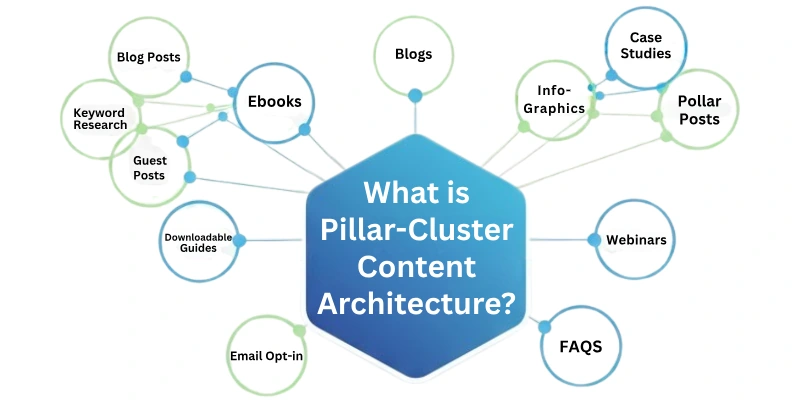
For example, if you have a website about SEO, your pillar page might be “SEO Guide.” Your cluster pages could then be “On-page SEO,” “Off-page SEO,” “Technical-SEO,” “Local SEO”, etc.
Why is Pillar-Cluster Content Architecture Important?
Pillar-cluster content architecture is important because it offers a number of benefits, including:
- Improved SEO: Makes it easy for search engines to crawl and understand your content, which helps to boost your website’s SEO.
- Enhanced user experience: Organizing content into logical sections improves website usability by making it easier for visitors to find what they need.
- Increased brand awareness and topical authority: You establish yourself as an authority on your subject when you publish outstanding content that covers your topic thoroughly. This can boost brand awareness and topical authority.
- More targeted traffic: When you establish pillar and cluster pages for specific topics, you are more likely to attract people who are interested in what you have to offer. This can result in better tailored traffic.
- Better internal linking: Creates internal links between your pages in a natural way. This helps to improve the navigation and SEO of your website.
- More efficient content creation: It’s easier to come up with new content ideas once you’ve established your pillar and cluster topics. Simply create content for your existing clusters, or establish new clusters to cover fresh subjects.
- Easier content updates: When your content is organized into pillar-cluster architecture, it’s easier to update your content to keep it fresh and relevant.
How to Structure your Website’s Content using Pillar-Cluster Architecture
As you guys know, structuring your website’s content using the Pillar-Cluster architecture is an effective way to improve your site’s topical authority, user experience, and SEO.
As this approach helps search engines understand the hierarchy and relationships between your content. But, guys, do you know how to structure that content, like what steps you guys need to follow up on?
Do not worry; in this section I will be guiding you through the step-by-step structure for creating pillar-cluster content.
First let me enlist all the 13 steps here:
- Identify your Niche
- Understand the Pillar-Cluster Model
- Identify Your Pillar Topics
- Create Pillar Content
- Plan Your Cluster Content
- Create Cluster Content
- Internal Linking
- Optimize for SEO
- User-Friendly Navigation
- Keep Content Updated
- Promote Your Content
- Monitor and Analyze
- Expand and Iterate
Let’s start learning each.
1. Identify your Niche
Guys, when you think about starting your own blogging, what comes to your mind next? Isn’t it the same that in the end, on what niche should you build your website so that it can rank quickly? That’s exactly how it is. In order to find a good niche, you have to follow many parameters.
Such as, in which niche you have expertise, experience, and competition of that keyword is also less. When you find a good niche, then the next step is how to organize the content on your website. For that, we follow the pillar-cluster model, what is it, let’s read in the next step.
2. Understand the Pillar-Cluster Model
Once we have identified our niche, the next step is content structuring. To understand how to do this properly, you need to know about the pillar-cluster model. This model can be divided into two parts:
- Pillar Content: The cornerstone of your website is pillar content. It should cover a wide, overarching issue relevant to your field of expertise. In-depth, comprehensive articles or pages are typical pillar content.
- Cluster Content: Cluster content consists of smaller, more specific pieces of info centered on subtopics related to the pillar content. These should be closely related to and linked to the pillar pages.
3. Identify Your Pillar Topics
Now, here comes a question that how we can identify our pillar topics?
So, guys start by identifying the main topics that are central to your website’s purpose. These topics should align with your websites objectives and cater to your target audience’s interests. For example, if you have a computer website, your pillar topics might be “computer parts,” “best computers,” and “Computer Tips & Tricks.”
4. Create Pillar Content
Each pillar topic should have a dedicated, comprehensive piece of content known as the “pillar content.” Pillar content is often in the form of an in-depth article or page that covers the broad topic. It should be informative and well-researched, and it should act as a starting point for that issue. For example, you create a pillar page for the keyword “Parts of Computer”, so in this piece of article, you will cover all the parts in an overview form.
5. Plan Your Cluster Content
Once you’ve established your pillar topics, it’s time to break down each one into more specific subtopics or clusters. These subtopics should be strongly related to the pillar content and provide more in-depth information on particular aspects of the primary topic. For the “Parts of Computer” pillar, cluster content might include articles on “CPU,” “Motherboard,” and “Keyboard.”
6. Create Cluster Content
For each subtopic identified in the previous step, create individual articles or pages. These should be valuable resources in their own right, covering their specific subtopic comprehensively. And these articles must link back to the pillar page that goes with them. For example, creating content on one keyword “What is CPU”, now this keyword is indirectly linking to the pillar page which is “Parts of Computer.”
7. Internal Linking
Internal linking is important in the pillar-cluster model. Make sure there are clear and meaningful linkages between the cluster and pillar content.
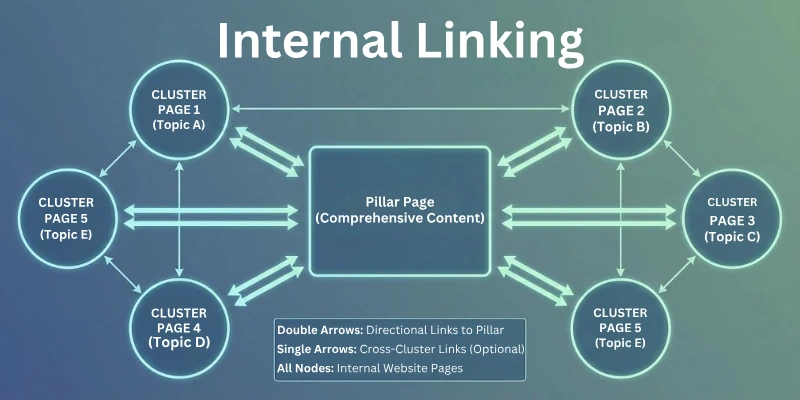
These links assist search engines in determining the relationship between your articles and guide users to explore related topics.
8. Optimize for SEO
Use on-page SEO methods for both your pillar and cluster content. Conduct keyword research to find relevant keywords and employ them strategically throughout your article. Additionally, optimize meta tags, headings, and image alt text to make your content more search engine-friendly.
9. User-Friendly Navigation
Organize your content in a user-friendly way. Use clear navigation menus, categories, and a logical structure. This makes it easier for visitors to find the information they’re seeking for and encourages them to explore more related stuff.
10. Keep Content Updated
Regularly update both pillar and cluster content to ensure it remains accurate and relevant. As search engines prefer fresh information, and upgrading your website can help you maintain or enhance your search engine rankings.
11. Promote Your Content
Promote your pillar and cluster content using social media, email newsletters, and guest blogging. The more people share and link to your content, the more authoritative your site appears to search engines.
12. Monitor and Analyze
Track the performance of your pillar and cluster content using web analytics tools. Key metrics to track include user interaction, organic traffic, and conversion rates. Analyze this information to make informed decisions and updates.
13. Expand and Iterate
Consider adding new pillar topics and cluster stuff to address rising trends and evolving demands as your website changes and your audience’s interests shift. This will also enhance the exposure of your site.
So guys, by following these steps, you can easily follow up on the pillar-cluster model to increase your site authority.
Conclusion
In this article, you’ve gained a solid understanding of the pillar-cluster content architecture. Now you know that it’s all about creating pillar content that serves as the foundation of your niche and supporting it with related cluster content to boost your website’s SEO.
So, whether you’re an experienced content marketer or just getting started, it’s time to put this knowledge to use and boost your online presence. Start creating those pillars and clusters now!
FAQs
Here are some of the most commonly asked questions related to the pillar-cluster content architecture:
Yes, topical authority is influenced by pillar and cluster content. Pillar pages and cluster pages work together to build a comprehensive and useful resource on a specific niche.
Yes, topical authority, pillar pages, and cluster content are all interlinked. Topical authority is a measure of how knowledgeable your website is on a specific niche. Pillar pages are the primary pages on your website that address your primary issues. Cluster pages are those that go into greater detail about specific subtopics inside your primary topics.
No, it is not necessary for your site to follow the pillar-cluster model. But, if you want to improve your SEO and establish your website as a thought leader in your niche, then a pillar-cluster content architecture is a great way to do it.
A pillar page provides a general overview of a topic, whereas a cluster page provides a more in-depth look at a specific subtopic. Pillar pages are often longer and lengthier than cluster pages. They also provide links to cluster pages for more thorough information.



- Be Respectful
- Stay Relevant
- Stay Positive
- True Feedback
- Encourage Discussion
- Avoid Spamming
- No Fake News
- Don't Copy-Paste
- No Personal Attacks
- Be Respectful
- Stay Relevant
- Stay Positive
- True Feedback
- Encourage Discussion
- Avoid Spamming
- No Fake News
- Don't Copy-Paste
- No Personal Attacks
