What is Keyword Cannibalization? Fix Your SEO Mistakes Now!
Published: 30 Jan 2026
Ever heard of a website eating itself?
That’s essentially what keyword cannibalization is in the world of SEO. It happens when a website has multiple pages competing for the same keywords, essentially “eating” into each other’s traffic and rankings.
Sound like something you want to avoid?
Exactly, yes!!!
In this blog post, we’ll dive into the world of keyword cannibalization, exploring what it is, how to identify it, and most importantly, how to prevent it from happening to your website.
So, whether you’re an SEO newbie or a seasoned professional, read on to learn everything you need to know about this SEO term.
What is Keyword Cannibalization?
Keyword cannibalization is an SEO issue that occurs when multiple pages on a website target the same or similar keywords, essentially competing against each other to rank higher in search engine results pages (SERPs).
This can happen intentionally or unintentionally, but the outcome is the same: it confuses search engines and dilutes the site’s ranking power for those keywords.
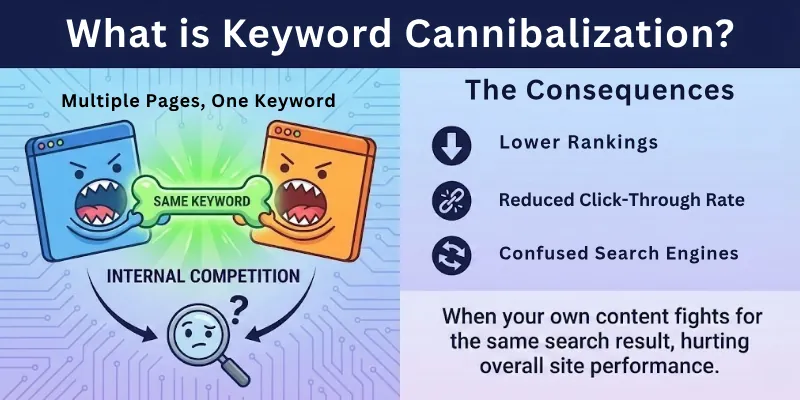
Imagine you’re at a buffet, and you’re so hungry that you grab a plate of everything in sight. You pile on the mashed potatoes, the chicken, the vegetables, and the dessert. But as you start eating, you realize that you’ve taken on too much. The flavors are clashing, and you’re struggling to finish even half of what you’ve piled on your plate.
Similarly, when multiple pages on a website target the same keyword, it’s like trying to eat too much at once. The search engines can’t decide which page is the most relevant to the search query, so they may not rank any of them very highly. This can lead to a decrease in organic traffic and lost revenue.
In the context of SEO, keyword cannibalization can occur in a few different ways:
- Two or more pages have the same exact title tag and meta description.
- Two or more pages have very similar content and target the same keywords throughout the text.
- Two or more pages have similar URLs that contain the same keywords.
- A website has a category page and subcategory pages that all target the same keyword.
Impact of Keyword Cannibalization on SEO Performance
Keyword cannibalization can significantly hinder a website’s SEO performance by:
- Diluted Ranking Power: When multiple pages target the same keywords, it divides the website’s ranking power among them, making it harder for any individual page to rank high in search results.
- Confusing Search Engines: Search engines like Google struggle to determine which page is the most relevant to a particular keyword when multiple pages compete for it. This can lead to lower rankings for all affected pages.
- Decreased Organic Traffic: As pages struggle to rank, they attract less organic traffic from search engines. This directly impacts the website’s overall visibility and potential for conversions.
- Wasted Backlink Authority: Backlinks from other websites serve as votes of confidence for a page’s relevance. When backlinks are divided among multiple pages targeting the same keyword, their value diminishes.
- Poor User Experience: Users may land on pages that don’t fully match their search intent, leading to frustration and a higher bounce rate. This can negatively impact the website’s overall user experience.
- Difficulty Tracking Performance: It becomes challenging to track the performance of individual keywords when multiple pages compete for them. This makes it harder to identify and address potential issues.
Causes of Keyword Cannibalization
Here is a list of all the causes:
- Poor Site Structure
- Duplicate Content
- Weak Keyword Strategy
- Inconsistent Internal Links
- Duplicate Meta Tags
- Unintentional Keyword Competition
- Dynamic URL Issues
- Missing Canonical Tags
- Unoptimized Content Updates
- Generic Page Titles
- Ignoring User Intent
- CMS Misconfigurations
- Lack of Monitoring
Lets cover all with detail!
1. Poor Site Structure
Poor site structure means your website isn’t organized in a way that clearly shows which pages matter most. When your categories, URLs, or navigation are messy, search engines struggle to understand your content hierarchy. This often causes multiple pages on your site to compete for the same keyword without you realizing it. Instead of one strong page ranking well, several weaker pages end up fighting each other. Over time, this reduces your site’s overall authority.
- Your main pages don’t stand out clearly
- Search engines get mixed signals
- Similar pages start competing internally
2. Duplicate Content
Duplicate content happens when you publish the same or very similar information on multiple pages. From your perspective, this may seem harmless, but search engines see it as confusion. They can’t decide which page deserves to rank, so they split ranking signals between them. This weakens all versions instead of helping one perform better. As a result, your rankings may drop or fluctuate.
- Your content loses uniqueness
- Authority gets divided across pages
- Search engines hesitate to rank any version
3. Weak Keyword Strategy
A weak keyword strategy means you don’t clearly assign keywords to specific pages. When this happens, multiple pages on your website may target the same keyword or slight variations of it. This creates internal competition where your own pages fight for rankings. Instead of strengthening one page, you accidentally weaken all of them. Over time, this limits your SEO growth.
- No clear keyword ownership per page
- Overlapping keyword targeting
- Poor long-term SEO planning
4. Inconsistent Internal Links
Inconsistent internal linking sends unclear signals to search engines about which pages you want to rank. If you link randomly or use the same anchor text for different pages, authority gets distributed unevenly. Search engines rely on your internal links to understand importance and relevance. When links are inconsistent, multiple pages may appear equally important. This leads directly to keyword cannibalization.
- Confuses search engine hierarchy
- Weakens your main pages
- Reduces SEO clarity
5. Duplicate Meta Tags
Duplicate meta titles and descriptions occur when you reuse the same metadata across multiple pages. This makes it harder for search engines to distinguish between your pages in search results. As a result, they may rank the wrong page or rotate rankings. Duplicate meta tags also reduce your click-through rate. Clear and unique meta tags help avoid keyword conflicts.
- Makes pages look identical in SERPs
- Reduces relevance signals
- Common on large websites
6. Unintentional Keyword Competition
Unintentional keyword competition happens when you don’t realize two or more pages are targeting the same keyword. This often occurs as your site grows and more content is added. Without a content plan, pages overlap naturally. Instead of helping each other, they compete for rankings. This lowers the effectiveness of your SEO efforts.
- Happens without obvious warning
- More common on content-heavy sites
- Weakens page authority
7. Dynamic URL Issues
Dynamic URLs can create multiple versions of the same page without you noticing. Even though the content looks identical, search engines may treat each URL as a separate page. This leads to duplicate pages competing for the same keyword. Authority gets split across URLs instead of being concentrated. Over time, rankings suffer due to confusion.
- Creates unnecessary page versions
- Confuses search engine indexing
- Often caused by filters or tracking parameters
8. Missing Canonical Tags
Canonical tags help you tell search engines which page is the main version. When these tags are missing, search engines may index multiple versions of the same content. This causes your keyword authority to be spread across pages. As a result, none of them rank as well as they should. Canonical tags are essential for preventing cannibalization.
- Consolidates ranking signals
- Prevents duplicate indexing
- Especially important for large sites
9. Unoptimized Content Updates
Unoptimized content updates happen when you refresh or expand content without checking keyword overlap. You may accidentally target keywords already assigned to other pages. This creates internal conflicts between old and updated content. Search engines struggle to decide which page is more relevant. Instead of improving rankings, updates can cause declines.
- Common during content refreshes
- Creates overlap between pages
- Needs proper keyword review
10. Generic Page Titles
Generic page titles don’t clearly explain what each page is about. When multiple pages use similar or vague titles, search engines struggle to differentiate them. This increases the chances of keyword overlap. Generic titles also make your pages less appealing to users. Clear, specific titles reduce cannibalization and improve clicks.
- Weak relevance signals
- Confuses search engines
- Lowers CTR from search results
11. Ignoring User Intent
Ignoring user intent means you focus on keywords but forget what users actually want. Multiple pages may target the same keyword while serving different purposes. This confuses search engines and leads to ranking instability. When intent isn’t clear, cannibalization becomes more likely. Aligning content with intent helps one page win clearly.
- Creates mismatched content
- Reduces user satisfaction
- Leads to unstable rankings
12. CMS Misconfigurations
CMS misconfigurations can accidentally create duplicate pages without your knowledge. Tag pages, category archives, and pagination often cause this issue. Search engines may index these pages and treat them as separate content. This results in multiple pages competing for the same keyword. Regular technical checks help prevent this problem.
- Generates hidden duplicates
- Wastes crawl budget
- Common in WordPress and eCommerce sites
13. Lack of Monitoring
Lack of monitoring means you don’t regularly track keyword rankings and page performance. Keyword cannibalization often develops slowly and silently. Without monitoring, issues can persist for months. By the time you notice, rankings may already be affected. Regular audits help you catch problems early.
- Issues remain unnoticed
- Causes long-term SEO damage
- Requires consistent tracking
Tools and Techniques to Detect Keyword Cannibalization
Here are 6 best techniques to detect keyword cannibalization:
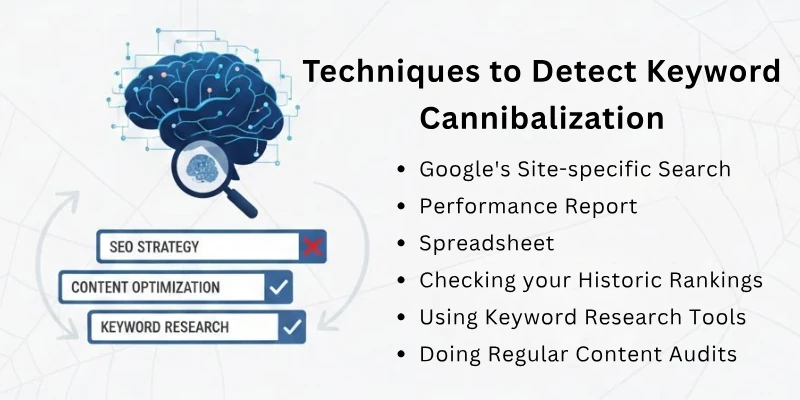
- Google’s Site-specific Search
- Performance Report
- Spreadsheet
- Checking your Historic Rankings
- Using Keyword Research Tools
- Doing Regular Content Audits
Let’s start covering each point in detail.
1. Google’s Site-specific Search
Google‘s site-specific search operator, denoted as “site:[domain]”, allows you to search for specific keywords within your website’s content. This technique is particularly useful for identifying pages targeting the same keyword.
To use this technique, follow these steps:
- Open Google and enter the “site:[domain]” operator followed by your website’s domain name. For example, if your website is “example.com,” you would enter “site:example.com”.
- After the space, add the keyword you want to investigate. For instance, if you’re checking for keyword cannibalization related to “SEO tips,” you would type “site:example.com SEO tips”.
- Press Enter and review the search results. If multiple pages from your website appear in the results, it’s a clear indication of potential keyword cannibalization.
2. Performance Report in Google Search Console
The Performance Report in Google Search Console provides valuable insights into your website’s search performance, including keyword rankings and impressions. This report can also be used to detect keyword cannibalization.
To access the Performance Report, follow these steps:
- Sign in to your Google Search Console account and select your website.
- In the sidebar, click on “Search Analytics” and then select “Performance.”
- In the “Query” field, enter the keyword you want to investigate.
- Review the results. If multiple pages from your website appear for the same keyword, it suggests potential keyword cannibalization.
3. Spreadsheet
A spreadsheet can be a simple yet effective tool for organizing and analyzing your website’s keywords. By creating a spreadsheet with columns for keywords, URLs, and other relevant information, you can easily identify pages targeting the same keywords.
To use this technique, follow these steps:
- Create a spreadsheet and add columns for keywords, URLs, page titles, and any other relevant information.
- Crawl your website using a tool like Screaming Frog or Sitebulb to extract URLs and title tags.
- Manually review the extracted URLs and title tags to identify pages targeting the same keywords.
- Enter the identified pages and their relevant information into the spreadsheet.
- Analyze the spreadsheet to identify patterns and potential keyword cannibalization issues.
4. Checking Your Historic Rankings
Monitoring your website’s historic rankings for specific keywords can reveal potential cannibalization issues. If multiple pages rank for the same keyword and their rankings fluctuate together, it suggests that they may be competing for the same search intent.
To use this technique, follow these steps:
- Use a rank tracking tool like SEMrush or Ahrefs to track your website’s rankings for specific keywords over time.
- Identify keywords for which multiple pages from your website are ranking.
- Analyze the ranking trends for these keywords. If multiple pages’ rankings fluctuate together, it indicates potential cannibalization.
5. Using Keyword Research Tools
Keyword research tools like SEMrush, Ahrefs, and Moz can provide valuable insights into your website’s keyword usage and identify potential cannibalization issues. These tools can show you which pages are ranking for specific keywords and how frequently those keywords are being searched for.
To use this technique, follow these steps:
- Sign in to your chosen keyword research tool and select your website.
- Enter the keyword you want to investigate.
- Analyze the results provided by the tool. Look for pages that are ranking for the same keyword and have similar content.
- Identify potential cannibalization issues based on the tool’s insights and your own judgment.
6. Doing Regular Content Audits
Regular content audits are essential for maintaining a healthy and well-optimized website. By regularly reviewing your website’s content, you can identify and address potential keyword cannibalization issues before they negatively impact your SEO performance.
To conduct a content audit, follow these steps:
- Schedule regular content audits, perhaps every quarter or six months.
- During the audit, review your website’s content for duplicate or similar content targeting the same keywords.
- Identify pages that could be consolidated, redirected, or rewritten to eliminate keyword cannibalization.
- Make the necessary changes to your website’s content to address the identified cannibalization issues.
How to Fix Keyword Cannibalization Issue: Effective Solutions
Once you have addressed the fact that your site has a keyword cannibalism issue, the next step is to see how you can fix this.
So don’t you worry, I have come up with different effective solutions. By implementing them, you can easily get rid of this spammy problem.
- Implement Clear Site Structure
- Conduct Keyword Research
- Create Unique and Focused Content
- Optimize Meta Tags
- Optimize Dynamic URL Parameters
- Create Landing Pages
- Use 301 Redirects
- Update Content
- Use Canonical Tags
- Use Internal Linking
Let’s learn: when to use it and how to use it?
1. Implement Clear Site Structure
A clear site structure helps you define which pages are most important and how your content is organized. When your website follows a logical hierarchy, search engines can easily understand relationships between pages. This reduces confusion and prevents multiple pages from targeting the same keyword. A strong structure also improves user experience and crawl efficiency. Overall, it creates a solid foundation for resolving keyword cannibalization.
When to use it?
- When your navigation feels confusing or cluttered
- When multiple pages compete for similar keywords
- When search engines struggle to identify priority pages
How to use it?
- Organize content into clear categories and subcategories
- Use clean, descriptive, and SEO-friendly URLs
- Assign one main keyword focus to each core page
2. Conduct Keyword Research
Keyword research helps you clearly define which keyword belongs to which page. Without proper research, you may unintentionally optimize multiple pages for the same term. This creates internal competition and weakens rankings. Proper keyword research ensures every page has a unique purpose. It also helps you align content with real user searches.
When to use it?
- Before creating new content
- When optimizing or refreshing existing pages
- When rankings fluctuate unexpectedly
How to use it?
- Use tools like Google Keyword Planner or Ahrefs
- Analyze competitors’ top-ranking pages
- Assign one primary keyword per page
3. Create Unique and Focused Content
Unique and focused content ensures that every page on your site serves a specific purpose. When pages overlap in topic or intent, search engines struggle to decide which one to rank. This causes keyword cannibalization and weakens authority. Creating focused content helps one page clearly win for a keyword. It also improves user satisfaction.
When to use it?
- When multiple pages target the same keyword
- When content feels repetitive or thin
- When rankings are split across pages
How to use it?
- Define a clear topic for each page
- Remove or rewrite duplicated sections
- Expand content with unique insights and value
4. Optimize Meta Tags
Meta tags tell search engines and users what your page is about. If your title tags and meta descriptions are generic or duplicated, search engines receive mixed signals. This can cause the wrong page to rank for a keyword. Optimized meta tags improve clarity and click-through rates. They also reduce keyword overlap between pages.
When to use it?
- When multiple pages have similar meta titles
- When CTR is low despite good rankings
- When pages target similar keywords
How to use it?
- Write unique title tags for every page
- Match meta descriptions with page intent
- Include the primary keyword naturally
5. Optimize Dynamic URL Parameters
Dynamic URLs often create multiple versions of the same page. Even if the content looks identical, search engines may treat them as separate pages. This leads to duplicate content and keyword cannibalization. Optimizing dynamic URLs helps consolidate authority. It also improves crawl efficiency.
When to use it?
- When your site generates parameter-based URLs
- When duplicate pages appear in search results
- When analytics show multiple URLs for the same content
How to use it?
- Use URL rewriting to create static URLs
- Remove unnecessary parameters
- Block unimportant parameters via Search Console
6. Create Landing Pages
Landing pages help you consolidate authority around important keywords. Instead of spreading content across multiple pages, you create one strong, focused page. This makes it easier for search engines to understand relevance. Landing pages are especially effective for competitive keywords. They also improve conversions.
When to use it?
- When several pages compete for one keyword
- When targeting high-value or commercial keywords
- When content feels scattered
How to use it?
- Identify your most valuable keywords
- Merge relevant content into one page
- Optimize for engagement and conversions
7. Use 301 Redirects
301 redirects permanently send users and search engines from one URL to another. This is useful when you merge or remove pages causing cannibalization. Redirects help transfer link equity and authority to the correct page. They also prevent users from landing on outdated URLs. This keeps your SEO clean and focused.
When to use it?
- When deleting or merging pages
- When old URLs still receive traffic
- When duplicate pages exist
How to use it?
- Redirect old URLs to the main page
- Test redirects for accuracy
- Update internal links accordingly
8. Update Content
Updating content helps resolve conflicts between older and newer pages. Over time, multiple articles may start targeting the same keyword. Content updates allow you to consolidate, refresh, or refine pages. This improves relevance and ranking stability. It also keeps your site fresh and accurate.
When to use it?
- When old and new content compete
- When rankings decline after publishing new posts
- When information becomes outdated
How to use it?
- Add updated data and insights
- Merge overlapping content
- Remove outdated or low-performing pages
9. Use Canonical Tags
Canonical tags tell search engines which version of a page is the main one. When similar pages exist, canonicals prevent authority from being split. They are essential for managing duplicate content issues. Proper use of canonical tags strengthens rankings. They are especially helpful for large websites.
When to use it?
- When duplicate or similar pages exist
- When dynamic URLs generate variations
- When content must exist in multiple formats
How to use it?
- Add canonical tags in the HTML head
- Point all duplicates to the preferred URL
- Double-check canonical consistency
10. Use Internal Linking
Internal linking helps search engines understand your site hierarchy. Strategic links guide authority toward your most important pages. Without proper internal linking, multiple pages may appear equally important. This causes keyword cannibalization. Strong internal linking reinforces keyword ownership.
When to use it?
- When related pages exist on similar topics
- When main pages lack authority
- When search engines misinterpret priorities
How to use it?
- Link supporting content to main pages
- Use descriptive anchor text
- Avoid linking the same keyword to multiple URLs
Conclusion
In this guide, we have covered what keyword cannibalization is in great detail and explained why it can harm your website’s performance. If you own a website, always keep an eye on your content and make sure each page has a clear purpose and keyword focus. Try not to create pages that compete with each other, because this can confuse search engines and lower your rankings. Regular content checks, smart updates, and clear site structure can help you avoid this problem.
For more common questions and quick answers, see the FAQs below.
FAQs
Here are some of the most frequently asked questions related to the keyword cannibalization:
Keyword cannibalization happens when multiple pages on the same website target the same keyword. This confuses search engines about which page should rank. As a result, rankings may drop or fluctuate. Instead of helping SEO, your pages end up competing with each other.
Yes, keyword cannibalization can negatively affect SEO if not handled properly. It splits ranking signals like backlinks and authority between multiple pages. This weakens all competing pages instead of strengthening one. Fixing it helps improve rankings and visibility.
You can check keyword cannibalization by searching your main keywords in Google and seeing if different pages rank at different times. SEO tools like Google Search Console also show multiple URLs ranking for the same query. If rankings keep switching, cannibalization is likely. Regular audits help catch this early.
Keyword cannibalization is usually caused by poor site structure, duplicate content, or weak keyword planning. It often happens when new content is added without checking existing pages. Similar page titles, meta tags, and topics also increase the risk. Over time, these small issues add up.
You can fix keyword cannibalization by assigning one main keyword to one page. Merge similar pages, use 301 redirects, or apply canonical tags where needed. Improving internal linking also helps show search engines which page is most important. Regular content reviews are key.
In some cases, it may look harmless, especially when pages target very different user intent. However, for most websites, it causes confusion rather than benefits. Search engines prefer one strong page over many weak ones. So it’s best to control it carefully.
Yes, keyword cannibalization directly affects Google rankings. When Google sees multiple pages targeting the same keyword, it may lower their positions. Rankings can become unstable or drop completely. Fixing cannibalization helps Google rank the right page.
Duplicate content means the same content appears on multiple pages. Keyword cannibalization means different pages target the same keyword, even if the content is different. Duplicate content often causes cannibalization, but not always. Both issues should be fixed for better SEO.
You should check for keyword cannibalization at least every few months. It’s especially important after publishing new content or updating old pages. Regular SEO audits help prevent long-term damage. Early detection makes fixes easier.
Yes, internal linking plays a big role in preventing keyword cannibalization. Linking supporting pages to a main page tells search engines which page should rank. Using clear anchor text also improves understanding. Strong internal links help build clear page hierarchy.




- Be Respectful
- Stay Relevant
- Stay Positive
- True Feedback
- Encourage Discussion
- Avoid Spamming
- No Fake News
- Don't Copy-Paste
- No Personal Attacks
- Be Respectful
- Stay Relevant
- Stay Positive
- True Feedback
- Encourage Discussion
- Avoid Spamming
- No Fake News
- Don't Copy-Paste
- No Personal Attacks
