What are Header Tags? Definition, Types & Best Practices
Published: 19 Jan 2026
Have you ever wondered what those big, bold headings are at the top of web pages? Or why do some pages have so many different sections, while others are just one long block of text?
The answer is header tags!
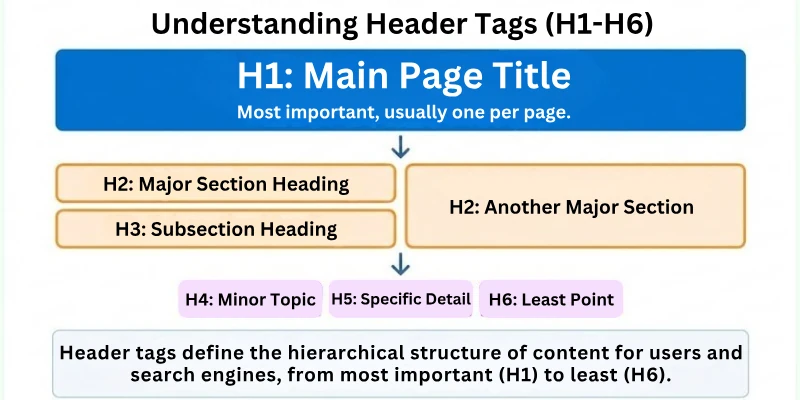
Header tags are a type of HTML code that is used to structure the content of a web page. They help search engines and users understand the main topics and subtopics of a page, and they can also make a page easier to read and scan.
 Subscribe to my YouTube channel
In this article, we’re going to talk about everything you need to know about header tags, including – What they are, how to use them, their types, best practices, their importance in SEO, and much more!
So, without wasting time, let’s move forward!
What are Header Tags?
Let us say you are writing a book. The most important section is the title, which is where you should start. After that, you would divide the book into parts and give each one its own title. There may be subheadings in each part to help organize the information even more.
The way header tags work is the same. The H1 tag is the page’s most important heading, and the title of the page is often put in it. For subheadings, use the H2 tag. For sub-subheadings, use the H3 tag. There are also H4, H5, and H6 tags, but people don’t use them as often.
Both readers and search engines rely on header tags. Readers scan a webpage for header tags to get a brief summary of the content. Header tags help search engines understand the structure and content of a webpage. This enables search engines to appropriately rank web pages in their search results.
Why are Header Tags Important?
Header tags are essential because they help structure content, making it more visually appealing and easier to read. When we read a blog post or any piece of text, it’s more engaging and coherent when it’s divided into distinct sections with a clear sequence.
This enables readers to quickly identify the main topic and then all of its various subparts. In essence, header tags enhance the reader’s experience by adding beauty and clarity to the content, making it more enjoyable to consume.
In summary, if you want to make your content more attractive and user-friendly, using headings is a must.
NOTE: Here, you guys need to keep in mind that when your content is going with the flow, search engines like Google consider your site more on-page optimized with the best user experience, and when the UX is the best of any site, Google ranks that site more likely.
Types of Header Tags
In HTML and CSS, there are 6 different kinds of header tags that are used to style and organize the text on a web page.
- H1
- H2
- H3
- H4
- H5
- H6
Here is the complete detail on which part of text you should use which header tag.
1. H1 (Heading 1)
The H1 tag is the highest-level heading and is typically used for the main title or headline of a webpage. It represents the most important and prominent text on the page.
- Example: <h1>This is the Main Title</h1>
- Use: H1 should be used once per page to define the main topic or title of the content.
2. H2 (Heading 2)
The H2 tag is a level below H1 and is used for section headings. It helps to break down the content into smaller, related sections.
- Example: <h2>Section 1: Introduction</h2>
- Use: H2 is used for subheadings under the main title and provides structure within the content.
3. H3 (Heading 3)
H3 is used for subsections within H2 sections. It further divides the content into smaller, related subtopics.
- Example: <h3>Subsection 1.1: Background</h3>
- Use: H3 tags help create a hierarchical structure within the content, breaking it down into smaller parts.
4. H4 (Heading 4)
H4 is used to create subheadings within H3 sections. It continues to organize content into smaller, more specific segments.
- Example: <h4>Sub-subsection 1.1.1: Historical Context</h4>
- Use: H4 tags provide even more granularity within subsections for complex content.
5. H5 (Heading 5)
H5 tags are used for further subheadings within H4 sections. They help create a more detailed hierarchy within the content.
- Example: <h5>Sub-sub-subsection 1.1.1.1: Events of the Past</h5>
- Use: H5 tags are rarely used but can be beneficial for extremely detailed organization.
6. H6 (Heading 6)
H6 is the lowest-level header and is used for minor subheadings within H5 sections. It provides the most detailed level of content organization.
- Example: <h6>Sub-sub-sub-subsection 1.1.1.1.1: A Specific Event</h6>
- Use: H6 tags are almost never used in practice, as content is rarely structured to this level of detail.
NOTE: H1, H2, H3, and H4 are the most common header tags used on web pages. H5 and H6 are less common because they are used for very specific purposes.
Best Practices for Using Header Tags
Here is a list of 12 best practices for using header tags:
- Hierarchy
- Uniqueness
- Use of H1
- Sequential Order
- Descriptive
- Conciseness
- Keywords
- Accessibility
- Avoid Overuse
- Proofreading
- Linking Headers
- Avoid All Caps
Let’s start covering each.
1. Hierarchy
Headers follow a structured order, similar to chapters in a book. The H1 represents the main title, while H2s break down major sections and H3s cover subtopics. Using a proper hierarchy makes content easier to scan and digest, both for readers and search engines. It also gives your page a clear flow, preventing confusion and improving readability. Think of this as building a logical map of your content so users don’t get lost.
Why hierarchy matters:
- Helps search engines understand content structure
- Improves user experience & scanning
- Keeps topics organized and clean
- Reduces bounce by guiding users smoothly
2. Uniqueness
Every page should have its own unique headers that reflect its individual content. Repeating the same header across multiple pages creates confusion and may hurt SEO signals. Unique headers tell search engines what makes that page special. As a creator, it also pushes you to think more specifically about your content. Consider headers as labels; each one should clearly describe its section.
Keep uniqueness in check by:
- Avoiding copy-paste headers across pages
- Choosing topic-specific phrasing
- Matching headers to the actual content below
- Making headers valuable, not generic
3. Use of H1
Your H1 acts like the book cover of your page; it sets context fast. There should only be one H1 per page, usually the main title or headline. Using multiple H1s can confuse search engines about the primary topic. A clean, descriptive H1 improves user understanding within seconds. Treat it as your first impression; make it count.
Good H1 characteristics:
- One per page
- Short & focused
- Clearly represents the topic
- Natural (not stuffed with keywords)
4. Sequential Order
Headers should follow a logical sequence (H1 → H2 → H3 → H4). Skipping levels (like jumping from H2 to H4) breaks the flow and creates structural gaps. This structure helps both humans and bots navigate without “context jumps”. Sequential order gives your content a natural storytelling rhythm. Think of it like stepping stones, you shouldn’t skip too many or you’ll stumble.
Sequential best practices:
- Never skip levels without reason
- Use lower headers only for deeper subtopics
- Keep structure similar to a table of contents
- Review headings before publishing
5. Descriptive
Headers should always describe what the reader is about to see. A vague header leaves readers confused and leads to poor engagement. Descriptive headers set expectations and improve scanning behavior. Think of them as sign labels that guide readers to the right info fast. The more clarity they provide, the better the user experience becomes.
Descriptive headers help with:
- Faster navigation
- Better content comprehension
- Higher dwell time & engagement
- Reduced frustration for readers
6. Conciseness
Headers should be short, clean, and focused. Long-winded headers look messy and overwhelm users. Keeping headers concise makes scanning effortless, especially on mobile.
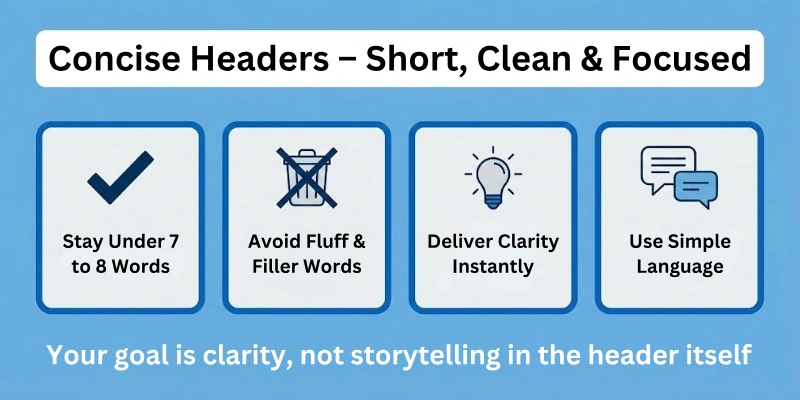
Users often skim pages first, concise headers help them find answers quickly. Your goal is clarity, not storytelling in the header itself.
Concise headers typically:
- Stay under 7–10 words
- Avoid fluff and filler words
- Deliver clarity instantly
- Use simple language over complex terms
7. Keywords
Including relevant keywords in headers helps describe what your content is about. This is good for both readers and search engines since they align expectations with the topic. But keywords must feel natural, never forced or stuffed. Keyword-based headers can help the page rank better for related queries. Think of keywords as highlighters; they enhance meaning, not replace it.
Keyword usage tips:
- Only use keywords naturally
- Prioritize user intent over volume
- Mix primary & secondary keywords smartly
- Avoid repeating the same keyword in every header
8. Accessibility
Headers should support all types of readers, including those using assistive tools. Screen readers rely on proper header structure to interpret content correctly. Accessible headers create a welcoming experience for all audiences. Using HTML tags properly (not just bold styling) is essential for accessibility. Accessibility is not just compliance; it’s user respect.
Accessibility improvements include:
- Using proper <h1>–<h6> HTML tags
- Avoiding header styling via CSS only
- Keeping logical reading order
- Writing clear, simple header text
9. Avoid Overuse
Header tags aren’t meant to style text just to make it big. Using them excessively breaks content structure and misleads search engines. Headers are for dividing ideas, not decorating text layouts. Too many headers can make content chaotic and difficult to follow. Restrain yourself; use headers with purpose, not convenience.
Avoid overuse by:
- Using headers only for new sections/subsections
- Not turning every idea into a header
- Letting paragraphs breathe without labels
- Combining related points under a single header
10. Proofreading
Headers are the first thing people read, so mistakes stand out quickly. Typos or grammar errors in headers damage credibility instantly. Proofreading your headers is a small step with a big impact on professionalism. It helps maintain your brand voice and builds trust. Even if the content is great, bad headers can scare users away.
Smart proofreading habits:
- Re-read headers before publishing
- Check for spelling & grammar errors
- Ask if the header clearly matches the content
- Read them out loud to test clarity
11. Linking Headers
In long content, linking headers through anchor links improves navigation. It allows users to jump directly to sections without endless scrolling. Anchor links are commonly used in table-of-contents-style layouts. They make the experience faster, especially for research-style content. Users love shortcuts; help them get straight to what they need.
Anchor links are useful when:
- Content is long-form (guides, tutorials)
- Multiple sections answer different needs
- Readers may not need every section
- Improving UX and time-on-page matters
12. Avoid All Caps
Headers written in all caps feel like shouting and reduce readability. All caps slow down reading speed and strain the eyes. Using title case or sentence case looks cleaner and more professional. The goal is to attract attention in a friendly way, not scare readers off. Readable headers keep engagement high and bounce rates low.
Better alternatives to ALL CAPS:
- Title Case (Recommended for SEO content)
- Sentence case (Good for blogs/articles)
- Avoiding Caps Lock for emphasis
- Using formatting styles instead of yelling
Conclusion
In this blog post, we learned about the six different styles of header tags, from H1 to H6, each with its own role in content layout. We identified some wise practices, such as keeping headers clear and short, and the important part that header tags play in enhancing SEO and overall user experience.
So, what comes next? It’s time to start using header tags correctly in your content to improve its visual appeal and readability.
Remember that tags are the coating on the cake that makes your content not only tasty but also enticing to Google. So go ahead and optimize your content while your header tags do their thing! Your readers (and Google) will appreciate it.
FAQs
Here are some of the most frequently asked questions related to the heading tags:
For logical content arrangement, use as many header tags as needed. It’s best to keep a clear hierarchy, with H1 for the main title, H2, H3, and so on for sections and subsections. While there’s no limit, too many headers can clutter your text.
Header tags provide structure and hierarchy to your content. They outline the organization of your page, while regular text formatting, like making text bold or larger, is used for emphasis or style.
Yes, you can use CSS (Cascading Style Sheets) to style header tags to match the look of your website. CSS allows you to customise the font, size, colour, and other visual features of your headers without maintaining the underlying HTML structure.
Choosing the correct keywords for your header tags involves looking into what terms your target audience is likely to search for. Choose keywords that are relevant to the content and have a high search volume. To do so, you need to know about niche parameters and keyword types.
While minor errors in header tags are unlikely to have a major impact on your website’s ranking, it is critical to use header tags correctly in order to stick to SEO best practices. Major errors, like using only H1 tags or keyword stuffing, can negatively affect your SEO efforts.



- Be Respectful
- Stay Relevant
- Stay Positive
- True Feedback
- Encourage Discussion
- Avoid Spamming
- No Fake News
- Don't Copy-Paste
- No Personal Attacks
- Be Respectful
- Stay Relevant
- Stay Positive
- True Feedback
- Encourage Discussion
- Avoid Spamming
- No Fake News
- Don't Copy-Paste
- No Personal Attacks
