Landing Page vs. Exit Page: What Do They Mean?
Published: 24 Nov 2025
When you start learning about websites, you may come across the terms “landing page” and “exit page”. Understanding these two types of pages is important for anyone working with websites.
In this blog post, I will explain what landing pages and exit pages are, how they are different from each other, and why they matter when building a website.
So, guys, let us discover the difference between landing page and exit page in detail.
Landing Page vs. Exit Page: Quick Comparison Table
Here is just a quick overview:
| Feature | Landing Page | Exit Page |
|---|---|---|
| Purpose | First page a visitor sees after clicking a link | Last page a visitor sees before leaving |
| Role in User Journey | Entry point | Exit or stopping point |
| Main Goal | Provide information / introduce content | Shows where user lost interest |
| Helps You Track | What users are searching for | Where users stop interacting |
| Examples | Blog post, product page, article | Product page, blog post, cart page |
| SEO Usefulness | Helps measure traffic sources & top-performing content | Helps identify pages with high exit rate |
What is Landing Page?
A landing page is simply the first page that a visitor sees when they click on a link. Imagine you are searching for something on Google. When you click on one of the results, the page that opens is your landing page. It can be any type of page, like a blog post, a product page, or even an article.
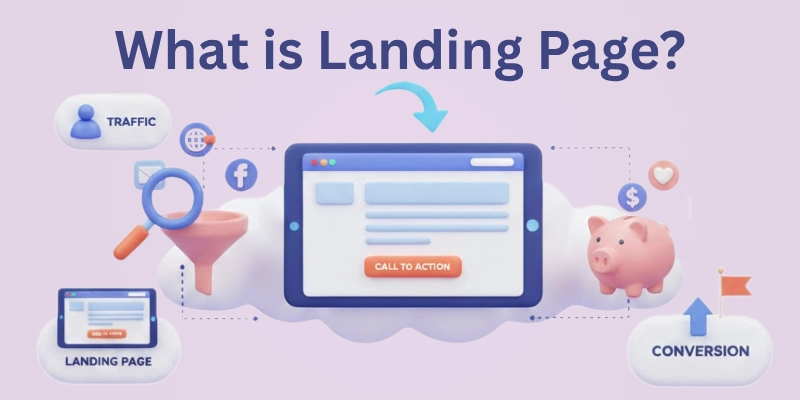
- Key Point: The landing page is the starting point where the visitor gets information. It is not designed to make them buy something or sign up for anything, though it may still have those options.
Examples of Landing Pages
- You searched for “Advantages and Disadvantages of SEO” on Google and clicked on the first link in the SERPs. That page is the landing page.
- You clicked a link on social media to read about the latest fashion trends, and the article that opens is your landing page.
Landing pages are important because they give visitors their first impression of your website. If the page loads slowly or looks messy, visitors might leave without reading anything.
This is why making a good landing page is key to keeping people on your website.
What is Exit Page?
An exit page is the last page a visitor sees before leaving your website. For example, if you visit three different pages on a website and then close the browser or click the back button, the last page you visit is the exit page.
- Key Point: The exit page is the end of the visitor’s journey on your site. It shows where the visitor stopped interacting with the website.
Examples of Exit Pages
- You are shopping online, but you leave the website after viewing a product page. That product page is the exit page.
- You read a blog post and then decide to leave the website. The blog post becomes the exit page.
Tracking which pages people are leaving helps website owners understand what might be wrong. If many visitors are leaving from the same page, it may mean that the page is confusing or not engaging enough.
Main Difference Between Landing Page and Exit Page
To make things clearer, let’s compare the two – landing page vs exit page:
- Landing Page: This is the first page a visitor sees after clicking a link. It gives information or shows content the user is looking for.
- Exit Page: This is the last page a visitor sees before leaving the site. It tells website owners where visitors lost interest and decided to leave.
In short, the landing page is where the visitor starts, and the exit page is where the visitor ends their time on your website. They play different roles in understanding how people interact with your site.
Why Tracking Landing Pages is Important?
Knowing which landing pages bring visitors to your website is very important. This tells you what kind of content or information people are interested in.
For example, if most people come to your site through a blog post about “What is Content Optimization?” You know that this topic is popular.
Tracking landing pages can also show how your website is performing. If a landing page has a high number of visitors but they leave right away, it could mean that the page isn’t helpful or easy to use.
In this case, you may need to make the page faster, simpler, or more interesting to keep visitors on your site.
Why Tracking Exit Pages is Important?
Exit pages help website owners understand why visitors leave. If people are leaving your website from a specific page, it could mean that the page has problems, such as:
- The page is not interesting.
- The page takes too long to load.
- The page does not have enough helpful information.
By checking exit pages, you can see which pages need improvement. Maybe the page needs better content or an easier design. Fixing these pages can help keep visitors on your website for longer.
Common Mistakes on Landing and Exit Pages
Here are some common mistakes that can happen on landing and exit pages:
Mistakes on Landing Pages:
- Slow Loading: If the page takes too long to load, visitors may leave before they even see it.
- Too Much Information: A landing page with too many details or ads can be overwhelming.
- No Clear Focus: If the page doesn’t provide the information the visitor was expecting, they might leave quickly.
Mistakes on Exit Pages:
- Confusing Layout: If the exit page is messy or hard to navigate, visitors may leave out of frustration.
- Lack of Engagement: If the page does not encourage the visitor to stay longer, they may lose interest and leave.
How to Improve Your Landing and Exit Pages?
Here are some simple tips for improving both landing and exit pages to make your website better:
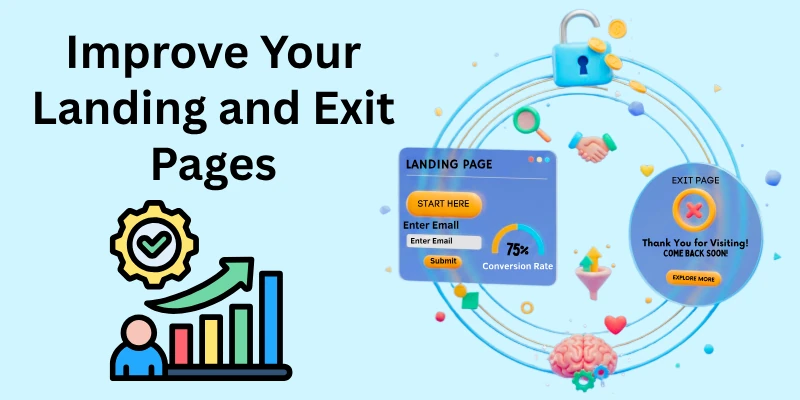
Tips for Better Landing Pages:
- Keep it Simple: Make sure the page is easy to read and loads quickly.
- Provide Clear Information: Make sure the visitor can easily find what they are looking for.
- Use Clean Design: Make the layout simple and the text easy to read.
Tips for Reducing Exit Rates:
- Improve Content: Make sure the content is engaging and helpful.
- Fix Technical Issues: Make sure the page loads quickly and works properly.
- Guide Visitors to More Pages: Offer links to other parts of your website so visitors don’t leave too soon.
Conclusion
In this guide you have covered the detailed difference between landing page and exit page. Both landing pages and exit pages are important for understanding how people interact with your website. The landing page shows where visitors are entering, while the exit page shows where they are leaving. Tracking and improving both types of pages can help you create a better website that keeps visitors interested.
So, guys, better manage your website and make it a place where people want to stay longer and explore more.
FAQs
Here are some of the most frequently asked questions related to the landing and exit page:
No, a landing page is not only for websites with products. It can be any page where visitors arrive after clicking a link, like blog posts or information pages. It’s not focused on selling something.
Yes, a landing page can also become an exit page if a visitor leaves the website without going to another page. The landing page is the first page the user visits, but if they leave from the same page, it’s also the exit page. This means it plays both roles.
No, landing pages do not always need a call to action. Sometimes, they are just for information or a blog post without asking the user to do anything. The purpose depends on the content.
Visitors may leave your landing page if it takes too long to load, is confusing, or doesn’t give the information they expected. Sometimes, the content may not match what they were looking for. Improving page speed and content can help reduce this.
Yes, every page on your website can be an exit page, depending on where visitors decide to leave. Visitors may leave from different pages, such as the homepage, blog posts, or product pages.
A bounce rate is when a visitor leaves the site after only viewing one page, making that page both the landing and exit page. An exit page, on the other hand, is any page the user leaves from, whether they viewed other pages or not. Bounce rates are related to quick exits, while exit pages track all types of exits.
Not every exit page needs fixing. Some exit pages, like “Thank You” or “Contact Us” pages, naturally lead visitors to leave. Focus on fixing exit pages where visitors leave without completing actions or finding what they need.
You can track a landing page’s performance by checking how many visitors stay on the page and how long they stay. If visitors leave quickly or don’t visit other pages, it may mean the landing page isn’t working well. Improving the design, speed, or content can help.
Yes, exit pages can affect your SEO if many visitors leave the same page quickly. Search engines may see this as a sign that the page is not helpful. Fixing issues on exit pages can improve user experience and SEO.
No, landing pages are not always the homepage. They can be any page on your website, like a blog post or product page, depending on what the visitor clicked on to arrive. A landing page is simply where the user first lands after clicking a link.



- Be Respectful
- Stay Relevant
- Stay Positive
- True Feedback
- Encourage Discussion
- Avoid Spamming
- No Fake News
- Don't Copy-Paste
- No Personal Attacks
- Be Respectful
- Stay Relevant
- Stay Positive
- True Feedback
- Encourage Discussion
- Avoid Spamming
- No Fake News
- Don't Copy-Paste
- No Personal Attacks
