What is Canonical Tag & Why Is It Important for SEO?
Published: 27 Jan 2026
Did you know that in the vast world of SEO, there’s a small but powerful HTML tag known as the “canonical tag”? And, if you’re wondering, “What is a canonical tag in SEO?” you’re in the right place.
We will explain this important SEO element in this post. What it is, why it’s important, and how to use it to optimize your page for search engines are all explained.
So, let’s not waste any time and get to the facts!
What is Canonical Tag in SEO?
A canonical tag is a piece of HTML code that tells search engines which version of a webpage is the original or primary version.
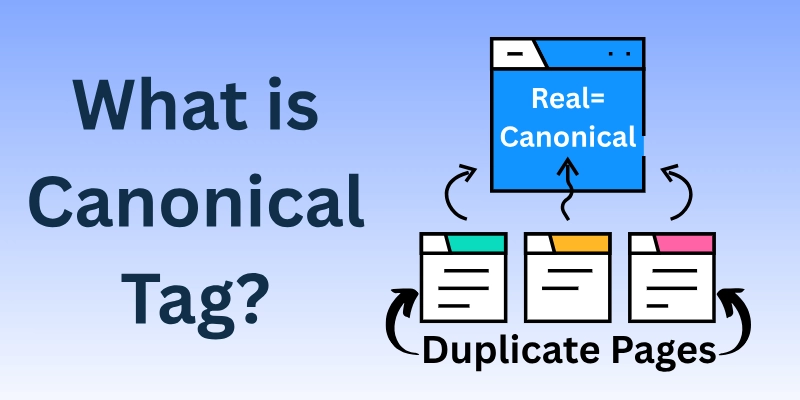
This is especially useful when there are multiple versions of the same page with slight differences (such as different URLs). By using the canonical tag, you help search engines avoid confusion and prevent duplicate content issues.
Let’s use your election analogy to better understand canonicalization:
- Imagine Group A, Group B, Group C, and Group D are all different groups within the same political party.
- Group D is the official ticket holder, which means Group D is the main group that represents the party in the election.
Here, Group D is like the canonical version of the page. Even though Group A, B, and C are part of the same party (similar content), the canonical tag points to Group D as the master copy or official group to support.
What Does a Canonical Tag Look Like?
A canonical tag in HTML looks like this:
<link rel=”canonical” href=”https://www.example.com/canonical-page“>
- This is also known as the syntax of canonical tags.
- And in this example, the “rel” attribute specifies the relationship type as “canonical.”
- And the “href” attribute contains the URL of the preferred or canonical version of the web page.
- Search engines use this tag to identify and prioritize the specified URL as the authoritative version when dealing with duplicate or similar content.
Why Are Canonical Tags Important in SEO?
In the world of SEO, these tags play a very important part. They help search engines to figure out which form of a web page is the best when there are duplicates or pages that look the same.
So, guys, let’s look more closely at why SEO canonical tags are so important:
- Preventing Duplicate Content: Duplicate content can confuse search engines and lower your site’s reputation. Luckily, canonical tags can help you avoid this problem.
- Consolidating Ranking Signals: By choosing the canonical version, you can combine ranking signals like backlinks and social shares onto one page, which is more likely to show up higher in search results.
- Improved User Experience: When these tags are used right, users can easily access the information they want, which improves their time on your site.
- Crawl Budget Optimization: These tags tell search engine bots to pay attention to the canonical page. This saves the crawl budget and makes sure indexing works well.
- Avoiding Penalties: Prevents search engines from penalizing you for having duplicate content, which can cause your results to drop.
- Enhancing Site Structure: These tags help keep your site’s layout clean and organized, making it easier for search engines to navigate and understand what your site is about.
- International SEO is important for dealing with language and regional differences in content. It ensures that people see the best version based on where they are or what language they prefer.
Canonical Tag Best Practices
Here are some of the best ways to use the canonical tag to get better results:
- Use the Same URL
- Choose One Main Version
- Put Canonicals in the Head
- Use Full URLs
- Canonical Your Homepage
- Check Dynamic Canonicals
- Don’t Canonicalize Similar Pages
- Avoid Mixed Signals
- Implement Cross-Domain Canonicals Properly
- Consider Mobile and AMP Versions
Let’s start covering each in detail.
1. Use the Same URL
Think of a URL as a webpage’s address. Just like a house should have only one address, a webpage should have a consistent URL.
If you sometimes call your house “House 1” and other times “Home 1,” people might get confused. The same goes for web pages, stick to one version of the URL.
Example:
- If you choose https://www.example.com, always use this format.
- Don’t switch between http://example.com or https://example.com because they might look different to search engines.
2. Choose One Main Version
Imagine you have three copies of the same book. You want your friends to read only one copy, so you tell them which one is the “official” copy.
Canonical tags do the same thing for similar web pages. You choose one version as the “master” page, and all the other similar pages point to it.
Example: If you have Page A, Page B, and Page C with similar content, tell search engines that Page D is the main one, and the others are just extra copies.
3. Put Canonicals in the Head
If you want your friends to quickly find your important message, you won’t hide it in the middle of a long letter.
Instead, you’d place it at the beginning. Similarly, when you use canonical tags, you should place them in a special spot at the top of the webpage’s code, where search engines can easily find them.
4. Use Full URLs
Always provide the full address when telling search engines which page is the main one. It’s like writing down the full address of your house instead of just the house number.
If you only write “House 1,” people might not know which street it’s on. So, give the full address, such as “123 Main Street, Townville”.
5. Canonical Your Homepage
Even your homepage (the first page people see when they visit your website) should have a canonical tag.
Some websites have different versions of the homepage, like https://example.com and https://www.example.com. Pick one version and make sure it’s the one everyone, including search engines, sees as the main one.
Example: If you decide that https://www.example.com is your main homepage, tell search engines that’s the one to show.
6. Check Dynamic Canonicals
If your website has pages that change often (like new product pages), it’s important to check that the canonical tags are still working correctly. It’s like checking to make sure you’re still using the right address for your house after you move or make changes.
7. Don’t Canonicalize Similar Pages
If you have two pages that are similar but not exactly the same, consider using a canonical tag.
It’s like having two versions of a book, one is in English, and one is in Spanish. Do you want both versions to be treated the same?
If the differences are small, like different prices for the same product, it might be okay to use a canonical tag. But if the differences are big (like different descriptions), it’s better to treat them as separate pages.
8. Avoid Mixed Signals (No Loops or Confusion)
Imagine you have two books, Book A and Book B, and you keep telling your friends that Book A is the main copy, but then Book A points back to Book B, and it creates a loop.
Your friends would get confused about which book is the real one. Canonical tags should never create this kind of loop. The master page should stand alone and not point back to the copies.
Example:
- Correct: Pages A, B, and C point to Page D as the master page.
- Incorrect: Page D points back to Page A, creating confusion.
9. Implement Cross-Domain Canonicals Properly (Different Websites)
Sometimes, you might have the same content on two different websites. For example, you could have example.com and example.org with the same article. Using a canonical tag, you can tell search engines which website should be treated as the main one.
Example: If the article on example.com is the original, use a canonical tag on example.org to point back to example.com.
10. Consider Mobile and AMP Versions (Mobile-Friendly Pages)
If your website has a mobile version or AMP (Accelerated Mobile Pages) for faster loading, you need to use canonical tags to show which version is the main one.
Usually, the desktop version is treated as the main page, and the mobile or AMP versions point back to it. This helps search engines know that even though there are multiple versions, they all represent the same page.
What to Avoid with Canonical Tags?
Here are some things to avoid when using canonical tags:
- No Multiple Canonicals
- No Canonicals on Non-Duplicates
- Not for Paginated Pages
- Don’t Block in Robots.txt
- Don’t Use Canonical in the <body>
- Don’t Mix With Redirects
- Don’t Block Crawling
- Don’t Point to “No Index” Pages
Let’s start covering each point in detail.
1. No Multiple Canonicals
When you use multiple canonical tags on the same page, it can be hard for search engines to figure out which page is the original one. This can cause the wrong page to be searched and ranked, which can hurt your SEO.
2. No Canonicals on Non-Duplicates
The only pages that should employ canonical tags are the ones that have duplicate content. There is no requirement to use a canonical tag on a page if that page does not contain any duplicate material.
3. Not for Paginated Pages
Be careful when using canonical tags on pages with page numbers. The canonical link should go to the right version of the paginated series and not combine all the paginated pages into one.
4. Don’t Block in Robots.txt
The robots.txt file tells search engines which pages to crawl and index. If your robots.txt file blocks canonical tags, search engines won’t be able to see them. This can cause the wrong page to be searched and ranked, which can hurt your SEO.
5. Don’t Use Canonical in the <body>
Within the head> section of the HTML document is where you should put the canonical tags. It’s possible that search engines will misinterpret your content if you put it in the “body” section.
6. Don’t Mix With Redirects
Both canonical tags and links can tell search engines which version of a page is the most important one. But you shouldn’t use both canonical tags and links at the same time. If you do this, it can confuse search engines and make it hard for them to figure out how the pages relate to each other.
7. Don’t Block Crawling
You can tell search engines not to crawl certain pages on your site with the robots.txt file. But you shouldn’t stop crawlers from reading original tags. If you do this, search engines won’t be able to read the canonical page, which is bad for your SEO.
8. Don’t Point to “No Index” Pages
With the “noindex” meta tag, a page is told not to be indexed. If you point a canonical tag to a page that is set to “noindex,” search engines won’t index the canonical page either. This is not good for SEO.
How to Add or Implement a Canonical Tag?
So, guys, here are 12 ways to add a canonical tag to your desired webpages.
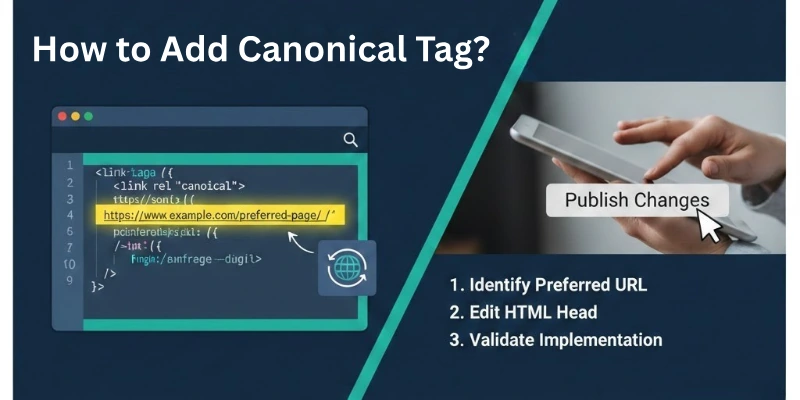
- HTML rel=”canonical” tag: Most of the time, this is how you add a canonical tag. It is a meta tag that is placed in the <head> section of the HTML code for the page.
- HTTP Header: You can also trigger a canonical URL in the HTTP header of the page. The header is called Link, and the syntax is – Link: <https://www.example.com/canonical-page.html>; rel=”canonical”
- WordPress Plugins: You can add canonical tags to your pages with the help of many WordPress tools. Yoast SEO, Rank Math, and All in One SEO Pack are all famous plugins.
- CMS Platforms: Some content management systems (CMS) like Drupal and Joomla have built-in ways to add canonical tags.
- Web Development Frameworks: Some website-building systems, like Django and Rails, have built-in ways to add canonical tags.
- Google Search Console: You can also add canonical tags to your pages with Google Search Console. To do this, click on the “Canonicals” area under the “Search Appearance” tab.
- Manually Edit the HTML: If you know how to change HTML code, you can add a canonical tag to your pages by hand.
- Server-side Implementation: This is a more advanced method that includes adding the canonical tag to the page’s server-side code. Large sites that get a lot of traffic often use this method.
- XML Sitemaps: In your XML sitemaps, you can also list canonical URLs. This is a good way to let search engines know which of your pages are the “canonical” ones.
- SEO Tools: You can add canonical tags to your pages with a number of SEO tools. You can also use these tools to make sure that your canonical tags are being used properly.
- Content Delivery Network (CDN): A CDN is a group of servers that send web content to users. Some CDNs have a function that lets you add canonical tags to your pages.
- JavaScript Implementation: This is a more advanced method of adding the canonical tag to the page’s JavaScript code. Most websites use this method to add or remove canonical tags on the fly based on certain situations.
How to Audit Your Canonical Tags for SEO
Once you have implemented the canonical tag on your site, you must monitor it regularly or monthly. So, how can you check whether the tags are working well?
To check them, you need to audit your canonical tags for SEO. Here are steps through which you can make it possible:
1. Run a Crawl
This means that you need to use an SEO tool to crawl your website and collect information about all of the pages, including their canonical tags. Several tools, such as Screaming Frog, Moz, Ahrefs, and SEMrush, can do this.
2. View the Canonical Audit Report
The canonical audit report will show you all of the pages on your website that have canonical tags, as well as any mistakes or problems. Typically, this report will include the following:
- The URL of the page
- The canonical tag
- The status of the canonical tag (valid, invalid, or missing)
- Any errors or inconsistencies
3. Fix Any Errors or Inconsistencies
Once you have recognized any errors or inconsistencies in your canonical tags, you can fix them by editing the HTML code of the pages. Or by using a canonicalization plugin for your CMS.
Canonical Tags vs. 301 Redirects
Canonical tags and 301 redirects serve different purposes in managing duplicate or similar content on a website.
A 301 redirect permanently redirects one URL to another. It is typically used when you want to consolidate multiple pages into a single, preferred URL. This affects both front-end and back-end aspects, changing the user’s visible URL and informing search engines about the new URL.
On the other hand, canonical tags are used to indicate the preferred version of a page when there are multiple similar pages with slight differences. While canonical tags don’t alter the front-end URL, they only impact the back-end by suggesting which version should be considered authoritative for indexing, helping prevent duplicate content issues.
Conclusion
So guys, in this article we covered everything about the canonical tag in SEO in great detail. You now know how it works, why it matters, and how to use it correctly to avoid duplicate content issues.
My personal recommendation is to always keep your URLs clean, pick one main version for each page, and regularly check your canonicals during audits. Small fixes here can make a big difference in your rankings over time.
FAQs
Here are some of the most commonly asked questions related to the canonical tag:
You should use a canonical tag when more than one URL has the same or like information. E-commerce product variations, pagination, and content syndication are all common examples of how this is used.
Yes, you can use canonical tags for information that is in more than one domain. This is useful when you have the same content on different websites and want to tell search engines which one is the main source.
When you use a canonical tag, search engines usually combine the ranking signs for the canonical page, making it more likely to show up in search results. But it doesn’t guarantee that the canonical page will always rank highest.
There shouldn’t be more than one canonical tag on the same page. For every page, there should only be one canonical URL. This will keep search engines from getting lost.
Yes, multiple pages that contain canonical tags have the ability to send link juice to the canonical page. This facilitates the pages in question to acquire more recognition and to advance higher in the rankings.
If you remove a canonical tag, search engines will look at the page again and may treat it as a new piece of information. This could cause problems if there are already pages with the same information.
Even though canonical tags work well in many cases of duplication of data, they may not work in all cases. To get rid of duplicate content successfully, you may need to use other methods, like 301 redirects or parameter handling.




- Be Respectful
- Stay Relevant
- Stay Positive
- True Feedback
- Encourage Discussion
- Avoid Spamming
- No Fake News
- Don't Copy-Paste
- No Personal Attacks
- Be Respectful
- Stay Relevant
- Stay Positive
- True Feedback
- Encourage Discussion
- Avoid Spamming
- No Fake News
- Don't Copy-Paste
- No Personal Attacks
