What Are Orphan Pages in SEO and How to Fix Them
Published: 18 Dec 2025
Have you ever felt confused after publishing a page and then seeing no traffic at all? You wait for Google to show your page, but nothing happens. Many website owners face this problem and often think something is wrong with SEO or content quality.
This guide is written for that exact confusion. Here I will explain what are orphan pages in SEO in very simple and clear words. I will show you why some pages stay invisible, how they affect your rankings, and how to fix them step by step.
I work with SEO daily, and I have seen many good pages fail only because they were not linked properly. By the end of this guide, you will fully understand what are orphan pages in SEO and know how to fix them with confidence.
What Are Orphan Pages in SEO?
Orphan pages are pages on your website that have no internal links pointing to them. This means users cannot reach these pages by clicking menus, categories, or other pages on your site. If a page is not connected to the rest of your website, it becomes invisible in normal browsing.
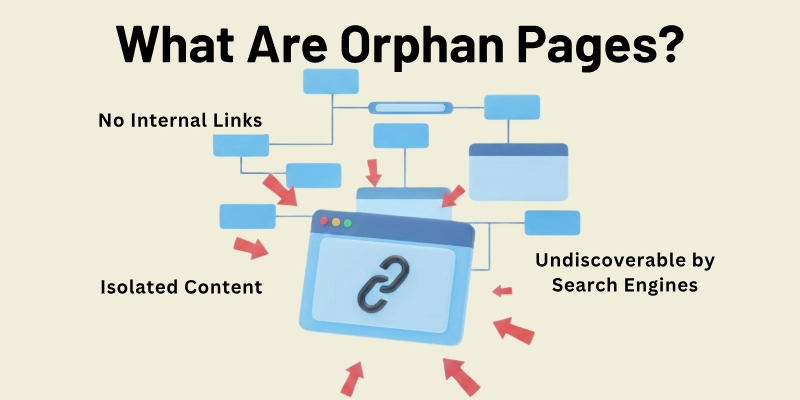
So when people ask what are orphan pages in SEO, the simple answer is this. These pages exist on your site, but they are hidden from users and search engines. Google mostly finds pages by following links. If no page links to another page, Google may not discover it easily or understand its importance.
Even if Google finds the page through a sitemap or an external link, the page usually performs poorly. It does not get link value or context from other pages. That is why knowing what orphan pages are is important for improving rankings, traffic, and user experience.
How Orphan Pages Are Created
Orphan pages are usually created by mistake. Most website owners do not plan to make them. They appear when internal linking is ignored or when site changes are not handled carefully.
Here are the most common reasons:
- Poor Internal Linking
- Site Migrations Or Website Redesigns
- Deleted Pages Or Broken Internal Links
- Changes In Menus Categories Or Navigation
- Auto-Generated Pages By Plugins Or Tools
- Temporary Campaign Or Test Pages
- Incorrect Internal Linking Updates
Let me guide you about each in detail.
1. Poor Internal Linking
This is the most common reason orphan pages appear. When a new page is published, many people forget to link it from older related pages. Search engines discover pages by following links, so without internal links the page stays hidden. Even if the content is helpful, it will not perform well because no page supports it.
2. Site Migrations Or Website Redesigns
During site migrations URLs often change. If redirects are not added correctly, internal links break. Pages may still exist, but they lose their place in the site structure. Over time these pages become orphan pages and stop receiving traffic.
3. Deleted Pages Or Broken Internal Links
When website owners delete old posts or pages, they often remove important internal links. If a deleted page was the only source linking to another page, the remaining page becomes an orphan. This usually happens during content cleanup without link checks.
4. Changes In Menus Categories Or Navigation
Removing a page from menus or category pages can disconnect it from the rest of the website. If that page does not have links from other content, users and search engines cannot find it easily. This slow disconnection turns the page into an orphan.
5. Auto-Generated Pages By Plugins Or Tools
Some plugins create pages automatically, such as filters, tags, or system pages. These pages are rarely linked manually. If they remain live, they can quietly become orphan pages and affect crawl efficiency.
6. Temporary Campaign Or Test Pages
Pages created for short-term campaign testing or promotions are often forgotten later. Once the campaign ends these pages are left without internal links. Over time they become orphan pages that serve no purpose.
7. Incorrect Internal Linking Updates
Sometimes internal links are removed during content edits. A writer may update an article and remove links without realizing their importance. This breaks the internal connection and creates orphan pages.
What Counts as an Orphan Page
An orphan page is a page that has zero internal links pointing to it from anywhere on your website. This includes links from the homepage, menus, blog posts, categories, or any other page. If no page connects to it, it becomes invisible to both users and search engines.
Even pages that have links only from other orphan pages are still considered orphans. This is because they remain disconnected from the main website structure. Users and Google cannot reach them by normal navigation, so they are effectively hidden.
Example 1:
You create two blog posts, Post B and Post C, which link to each other. If the only page linking to them, Post A, is itself an orphan, then B and C are also orphan pages in the context of your site.
Example 2:
You publish a new product page but forget to link it from your product category or homepage. Even if someone shares the link externally, it remains an orphan because it has no internal connections.
Strictly speaking, a true orphan page has no incoming internal links from anywhere on the site, but any page that is disconnected from the main site network should be treated as an orphan for SEO purposes.
Why Orphan Pages Are Bad for SEO
Orphan pages can silently hurt your website’s SEO in several ways. Since they have no internal links pointing to them, both users and search engines struggle to find them.
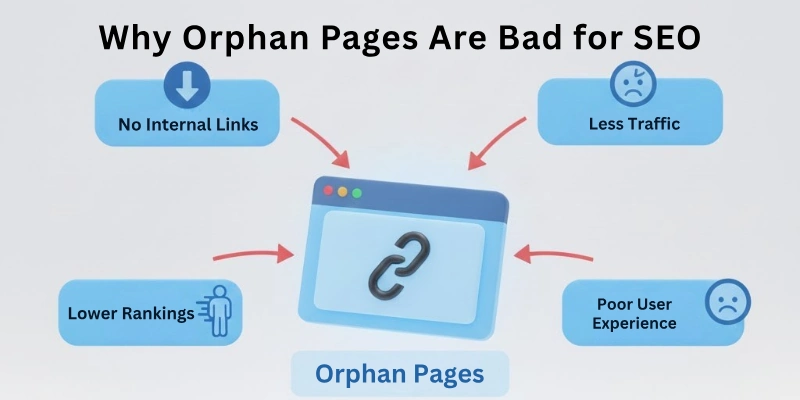
This reduces traffic, rankings, and overall site performance.
1. Poor Rankings
Google relies heavily on links to discover and rank pages. Orphan pages may not get indexed properly, and even if they do, they often rank poorly because they lack link authority and context from other pages.
2. Lower Organic Traffic
Pages that rank poorly get very little organic traffic. If a page never receives internal links, it might never appear in search results, meaning it could get zero visitors from Google.
3. Inaccessible Content for Users
Orphan pages cannot be reached through menus, categories, or related posts. This makes it hard for visitors to find useful content. For example, a FAQ page or pricing page that is orphaned won’t help your audience or conversions.
4. Wasted Crawl Budget
Google allocates a limited number of pages to crawl on your site. Orphan pages take up part of this crawl budget without contributing to rankings or traffic. On large websites, hundreds or thousands of orphan pages can waste resources and slow down indexing of important pages.
5. Missed Internal Linking Opportunities
Internal linking helps spread authority, relevance, and traffic across your site. Orphan pages miss this benefit entirely, making it harder for them to compete in search results.
In short, orphan pages are like hidden rooms in your website; no one can enter them easily, and search engines often ignore them. Fixing them improves both user experience and SEO performance.
How to Find Orphan Pages on Your Website
Finding orphan pages can be tricky because, by definition, they have no internal links. But there are a few practical ways to discover them so you can fix the issue and improve your SEO.
1. Use an SEO Audit Tool
Many SEO tools, like Semrush or Ahrefs, can crawl your website and compare your sitemap with actual pages. Pages that exist in your sitemap but have no incoming links are flagged as orphan pages. These tools can also show pages that receive traffic but are not linked internally, making it easier to identify problems.
2. Use a Website Crawler
Crawling tools like Screaming Frog help measure crawl depth, which is how many clicks it takes to reach a page from the homepage. Pages with blank crawl depth or very deep placement are often orphan pages. This helps you spot pages that users and search engines struggle to find.
3. Check WordPress Plugins
If you use WordPress, plugins like RankMath can show pages and posts with zero incoming internal links. This is a quick way to identify orphan pages for small to medium sites. Keep in mind that some tools only count in-content links and may not detect links in menus or categories, so manual checks can still be useful.
4. Compare Sitemap vs Site Pages
Manually comparing your XML sitemap with all crawled URLs can also reveal orphan pages. Any page in your sitemap that is not linked anywhere internally is an orphan. This method works best for smaller sites where you can handle pages one by one.
By regularly checking for orphan pages, you can ensure that every important page on your website is accessible, indexed, and able to rank.
How to Fix Orphan Pages
Fixing orphan pages is not just about SEO; it’s about making your website more user-friendly and helping Google understand your content. Depending on the page’s value and purpose, there are several ways to handle them effectively.
1. Add Internal Links
This is the simplest and most common solution. If the orphan page has valuable content, link to it from relevant posts, category pages, or menus.
Example: Suppose you have an orphaned blog post on “Eco-Friendly Home Tips”. You can link to it from a popular article like “Sustainable Living Practices” or your homepage. This not only helps users discover it but also passes link authority, improving its chances to rank.
Pro Tip: Focus on adding links from pages that already get traffic. This ensures the orphan page receives attention from both users and search engines.
2. Merge and Redirect
If the orphan page has outdated or partial content but some useful information, consider merging it with another related page. After merging, use a 301 redirect from the old URL to the new one.
Example: An old list of “Top Gaming Laptops 2022” can be merged with your current “Best Gaming Laptops 2026” post. Then redirect the old page to the updated one. This keeps backlinks and traffic intact while cleaning up your site.
3. Use a Noindex Tag
Sometimes pages are meant for specific purposes, like ad landing pages or campaign pages. In such cases, you want users to access them, but not search engines. Adding a noindex tag prevents Google from indexing these pages.
Example: A landing page for a special promotion that users only access via an email link does not need to rank in Google. This keeps it accessible to the audience you intend without affecting your site’s SEO.
4. Delete the Page
If the orphan page has no value, traffic, or backlinks, the best option may be to delete it. Make sure the page returns a 404 (Not Found) or 410 (Gone) status.
Example: An old product page that is permanently out of stock with no unique content can be removed safely. This prevents clutter, improves crawl efficiency, and ensures your site focuses on valuable pages.
Personalized Advice
When I work on websites, I always start by reviewing the purpose of each orphan page. I ask myself:
- Does this page help users?
- Does it have content that can rank or earn backlinks?
- Can it be merged with another page?
Then I decide whether to link, merge, noindex, or delete. Doing this regularly keeps the website healthy and improves both SEO and user experience.
Best Practices to Prevent Orphan Pages
Preventing orphan pages is much easier than fixing them later. By building a strong internal linking system and monitoring your site regularly, you can make sure every important page is connected and visible to both users and search engines.
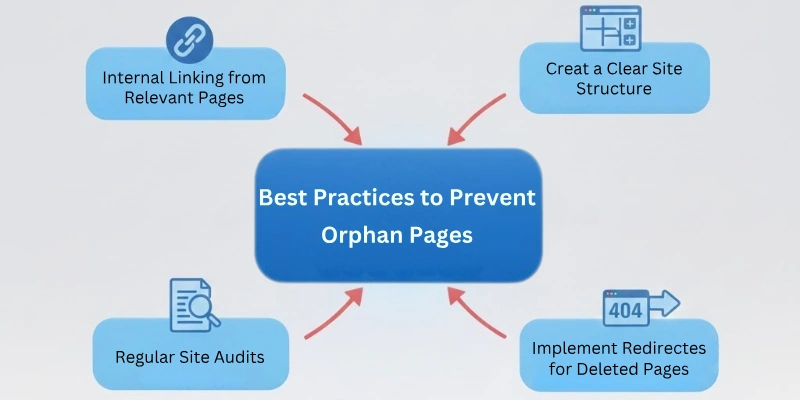
Here are some practical steps you can follow.
1. Make Internal Linking a Habit
Whenever you publish a new page or blog post, make it a rule to add links to and from related pages. This ensures the page is not left alone and helps search engines discover it easily.
Example: If you write a new article on “Home Office Organization,” link it from existing posts about productivity, home setup, or work-from-home tips. This creates a natural flow between content and passes link authority.
Pro Tip: Encourage your team or writers to use site search to find relevant pages to link. For example, type site:yourwebsite.com “keyword” in Google to quickly find pages to connect.
2. Track Internal Linking Efforts
Keeping track of internal links helps you spot pages with few or zero links before they become orphan pages.
How to Do It:
- Create a simple spreadsheet with two columns: URL and Number of Internal Links
- Export link data from tools like Screaming Frog, Semrush, or RankMath
- Sort the pages by link count to see which pages have zero or very few internal links
This makes it easy to prioritize linking for orphan pages and maintain a healthy site structure.
3. Keep Crawl Depth Shallow
Pages that are too many clicks away from the homepage are harder for users and Google to reach. Aim to keep every important page within 3–5 clicks from the homepage.
Example: If a blog post is buried 20 pages deep in your category structure, link to it from a higher-level page or a popular article. This helps Google crawl it faster and improves visibility.
4. Plan Content Strategically
Before publishing new pages, plan where they will fit in your website structure. Decide which categories, menus, or posts will link to them. This prevents pages from being published without connections.
Example: For an e-commerce site, every new product should have links from its category page, related products, and possibly blog posts or guides.
5. Perform Regular Audits
Even with a strong system, orphan pages can appear over time due to content deletion, migrations, or edits. Schedule regular site audits to check for orphan pages and fix them quickly.
Pro Tip: Use tools like Semrush, Screaming Frog, or RankMath for audits. Combine automated checks with manual reviews to make sure nothing is missed.
Personalized Advice
When I manage websites, I always combine planning, linking, and tracking. Every new page is added to a spreadsheet, linked from multiple relevant places, and checked in audits. This way, orphan pages rarely appear, and the site stays strong for SEO and user experience.
When Orphan Pages Can Be Acceptable
Not all orphan pages are bad. In some cases, keeping a page isolated is intentional and even beneficial. The key is to understand when it is okay to leave a page as an orphan.
1. Ad Landing Pages
Many websites create landing pages specifically for paid campaigns. These pages are meant for users who click on an ad and do not need to appear in regular site navigation. Linking them internally could confuse users or dilute campaign performance.
Example: A landing page for a software discount or webinar signup is often left orphan intentionally. Users access it through an ad, email, or direct link only.
2. Private or Restricted Content
Some content is meant only for a select audience, such as subscribers, members, or internal teams. Orphaning these pages ensures they are not visible to general visitors or search engines.
Example: A newsletter confirmation page or a members-only resource may have no internal links, which is perfectly fine.
3. Temporary or Campaign Pages
Pages created for short-term promotions, seasonal offers, or limited-time events are often orphaned by design. After the campaign ends, these pages may be deleted or archived.
Example: A landing page for a Black Friday sale may not be linked anywhere except the promotion itself.
4. Experimental or Test Pages
Sometimes developers create pages for testing layouts, features, or new designs. These pages are intentionally isolated and never intended for normal navigation or indexing.
Personal Advice:
When reviewing orphan pages, I always ask:
- Is this page meant to be seen by everyone?
- Is it useful for SEO or user experience?
If the answer is no, leaving it as an orphan is fine. The key is intentionality. Orphan pages that serve a purpose do not harm SEO, but accidental orphan pages always do.
Final Thoughts on Orphan Pages and SEO
So guys, it’s time to say goodbye, but before you go, let’s wrap up what we learned about orphan pages. If your website has pages that no one can find, you are leaving traffic, rankings, and user engagement on the table.
In this guide, we covered what are orphan pages in SEO, how they are created, why they harm your site, and most importantly, how to fix them. We also talked about when orphan pages are acceptable and how to prevent them in the future.
From my experience working with websites every day, the key takeaway is simple: always keep your pages connected. Add internal links, plan content strategically, monitor crawl depth, and run regular audits. This ensures Google can find your pages and your visitors can enjoy all your content.
Take a few minutes to check your site today. Identify orphan pages, decide whether to link, merge, noindex, or delete them, and watch your SEO and traffic improve. Remember, small efforts in fixing orphan pages can make a big difference over time.
FAQs
Here are some of the most commonly asked questions related to the orphan pages in SEO:
Orphan pages are pages on your website that have no internal links pointing to them. This means users cannot reach them through your menus, categories, or other pages. Search engines also find it harder to discover these pages. They often get little to no traffic unless linked externally.
Orphan pages can hurt your SEO because search engines struggle to find and index them. Even if they are indexed, they usually rank poorly due to lack of internal link authority. This can lead to lower organic traffic and wasted crawl budget. Fixing orphan pages improves both rankings and user experience.
You can find orphan pages using SEO audit tools like Semrush or Ahrefs, which compare your sitemap to your site pages. Crawling tools like Screaming Frog can also detect pages with zero internal links or blank crawl depth. WordPress plugins like RankMath can show posts with no incoming links. Manual checks can help for smaller websites.
Yes, Google can index orphan pages if it finds them through your sitemap or external links. However, pages without internal links often rank poorly because they don’t receive link authority from other pages. Relying only on sitemaps or external links is not ideal for SEO. Internal linking is always the best solution.
Orphan pages are often caused by poor internal linking, site migrations, deleted pages, or changes in menus and categories. Temporary or auto-generated pages can also become orphaned. Even small mistakes like removing links during content edits can create orphan pages. Understanding the causes helps prevent them in the future.
You can fix orphan pages by adding internal links from relevant pages, merging content and using redirects, adding a noindex tag for special cases, or deleting pages that have no value. The method depends on the purpose and value of the orphan page. Regular audits help keep your site healthy.
No, some orphan pages are acceptable and intentional. Ad landing pages, private content, campaign pages, or test pages can remain orphan without hurting SEO. The key is that they serve a specific purpose and do not need normal internal links. Accidental orphan pages are the ones that harm SEO.
Prevent orphan pages by linking new content from existing pages, planning content structure before publishing, and monitoring internal links regularly. Keep important pages within 3–5 clicks from the homepage. Conduct regular site audits to catch any orphan pages early. This keeps your website user-friendly and search-engine friendly.
Yes, orphan pages make it difficult for users to find content through normal navigation. Important pages like FAQs, product details, or guides may remain hidden. This can reduce engagement, conversions, and overall satisfaction. Linking all pages properly ensures visitors can find and use your content easily.
It is best to check for orphan pages regularly, at least once every few months. Big websites with many pages should run audits more frequently. Regular checks help you fix issues before they affect SEO and user experience. Staying proactive keeps your site healthy and fully optimized.