What is Exit Rate? Learn Strategies to Reduce It
Published: 7 Dec 2025
Have you ever wondered, “What is Exit Rate in SEO?” Don’t worry; it’s not as complicated as it sounds! In this blog post, we’re going to break it down for you in simple terms.
Think of it as your guide to understanding the exit rate without the confusing tech talk. We’ll chat about what Exit Rate is, why it’s important, and how knowing about it can help your online game.
So, if you’re ready for a chill exploration into the world of Exit Rate and what it means for your website, let’s roll!
What is Exit Rate in SEO?
Exit rate shows how often users leave your website from a specific page. It tells you the percentage of people who exit after visiting that page, whether they started there or clicked from other pages.
Imagine a user visiting your website. They might click around from one page to another. For example, they start on Page 1, then go to Page 2, and finally end on Page 3. The moment a user leaves or exits your site from any of these pages is called the exit rate.
The exit rate shows how often users leave your site from a specific page, not the entire website.
Exit Rate vs. Bounce Rate: Clear Difference
Let’s say you have a website that ranks for the keyword “Advantages and Disadvantages of the Internet.” A user comes to your website and opens the article on that topic. They read the article and then closed the website. This would be considered a bounce.
Now, let’s say another user comes to your website. They read the article and then see that you also offer a blogging course. They click on the link to the course page and read more information. Then, they see that you also offer jobs. They click on the link to the jobs page. They browse the jobs and then close the website. In this case, the user visited multiple pages on your website before leaving. The last page they visited before leaving was the jobs page, so that would be considered an exit.
So, the technical definitions will be:
- The bounce rate is the percentage of single-page sessions on your website. A single-page session is when a user lands on your website and then leaves without interacting with any other pages.
- Exit rate is the percentage of pageviews that were the last in the session. A session is a group of interactions that a user has with your website in a single visit.
Why Does Exit Rate Matter for SEO?
Exit rate is a crucial metric for SEO because it provides insights into user behavior and indicates whether your website is effectively fulfilling its intended purpose.
Here are some reasons why exit rate matters for SEO:
- Understanding User Engagement
- Assessing Page Relevance
- Optimizing Navigation Flow
- Identifying Conversion Barriers
- Gauging User Satisfaction
Let’s learn about each in full detail.
1. Understanding User Engagement
Even if a user visits multiple pages, a high exit rate can still indicate that they are not finding what they need or that your content is not keeping them engaged. Analyzing exit rates across your website can help you identify patterns and understand why users are leaving after viewing multiple pages.
2. Assessing Page Relevance
High exit rates on specific pages within a user’s journey can indicate that those pages are not relevant to their search intent or are not providing the expected information. This feedback can help you improve the relevance and value of your content for each stage of the user’s journey.
3. Optimizing Navigation Flow
If users consistently exit from certain pages, this could suggest that your website’s navigation is not intuitive or that there are dead ends in the user flow. Analyzing exit rates can help you identify points of friction and improve the overall navigation experience.
4. Identifying Conversion Barriers
High exit rates on pages intended for conversions, such as the last page in a product purchase or lead generation process, can indicate that there are barriers to conversion. This feedback can help you optimize the conversion funnel and improve conversion rates.
5. Gauging User Satisfaction
While a user may have visited multiple pages, a high exit rate can still suggest that they were not satisfied with their overall experience on your website. This feedback can help you identify areas where your website is falling short of user expectations.
How to Measure Exit Rate?
Imagine a visitor lands on the homepage of a travel blog. They browse through a few articles about exciting destinations and travel tips, and then they leave the website. In this scenario, the exit page would be the last article they viewed before leaving.
To calculate the exit rate for this article, you would divide the number of times the article was the last page viewed in a session by the total number of pageviews for that article.
Exit Rate= Total Exits from the page / Total Visits
For instance, if the article was the last page viewed in 10 out of 50 sessions and had a total of 100 page views, the exit rate would be 10% (10 exits / 100 pageviews = 0.10).
Strategies to Reduce Exit Rate
Here are some effective strategies to reduce exit rate and keep visitors engaged on your website:
- Optimize Page Loading Speed
- Enhance Content Quality and Relevance
- Simplify Website Navigation
- Optimize for Mobile Devices
- Strategically Place Call-to-Actions (CTAs)
- Leverage Internal Linking Effectively
- Minimize Ad Intrusiveness
- Address Technical Issues Promptly
- Understand User Behavior and Preferences
- Provide Clear Exit Intent Pop-ups
Let’s learn about each tip in detail.
1. Optimize Page Loading Speed
Slow loading times are a major factor contributing to high exit rates. According to Google, if a page takes more than 3 seconds to load, visitors are 53% less likely to stay on the page. To optimize page loading speed, consider the following strategies:
- Image Optimization
- Code Optimization
- Content Delivery Networks (CDNs)
2. Enhance Content Quality and Relevance
High-quality, relevant, and engaging content is essential to keep visitors on your website and reduce exit rates. To create effective content, consider the following strategies:
- Understand Target Audience
- Keyword Research
- Content Quality Guidelines
3. Simplify Website Navigation
Clear and intuitive website navigation is crucial for guiding visitors to the information they need and reducing exit rates. To improve website navigation, consider the following strategies:
- Consistent Layout
- Intuitive Menus
- Breadcrumb Trails
4. Optimize for Mobile Devices
With the increasing use of mobile devices, it is crucial to ensure that your website is optimized for mobile viewing to reduce exit rates among mobile users. To optimize your website for mobile devices, consider the following strategies:
- Responsive Design
- Optimized Fonts
- Optimized Images
5. Strategically Place Call-to-Actions (CTAs)
Clear and compelling CTAs encourage visitors to take desired actions, such as signing up for a newsletter, making a purchase, or exploring further content. Strategically place CTAs throughout the website to guide users and reduce exit rates. To apply CTA strategically, consider the following strategies:
- Prominent Placement
- Clear and Compelling Text
- Variety of CTAs
6. Leverage Internal Linking Effectively
Internal linking is a powerful way to help users navigate your website and discover related content, which can help to reduce exit rates by keeping users engaged and interested in your website. To leverage internal linking effectively, consider the following strategies:
- Relevant Anchor Text
- Strategic Placement
- Avoid Excessive Linking
7. Minimize Ad Intrusiveness
Excessive or intrusive advertising can be a major turn-off for visitors and can lead to increased exit rates. To minimize ad intrusiveness, consider the following strategies:
- Limited Ad Placement
- Non-intrusive Formats
- User Experience-Focused Approach
8. Address Technical Issues Promptly
Technical issues, such as broken links, error pages, and bugs, can significantly disrupt the user experience and can lead to increased exit rates. To address technical issues promptly, consider the following strategies:
- Regular Testing
- Proactive Monitoring
- Thorough Bug Fixes
9. Understand User Behavior and Preferences
Gaining insights into user behavior and preferences is crucial for optimizing your website and reducing exit rates. By understanding how users interact with your website, you can identify areas for improvement and make data-driven decisions that enhance the overall user experience. Strategies for understanding user behavior:
- Heatmaps
- Session Recordings
- User Surveys
10. Provide Clear Exit Intent Pop-ups
Exit intent pop-ups can be an effective way to recapture visitors who are about to leave your website and potentially reduce exit rates. By presenting a compelling offer or relevant information, you can entice visitors to stay on the site and explore further. Strategies for effective exit intent pop-ups:
- Targeted Timing
- Compelling Content
- Non-intrusive Design
How to Check Exit Rate of Your Website?
Checking your website’s exit rate is essential for understanding user behavior and identifying areas for improvement.
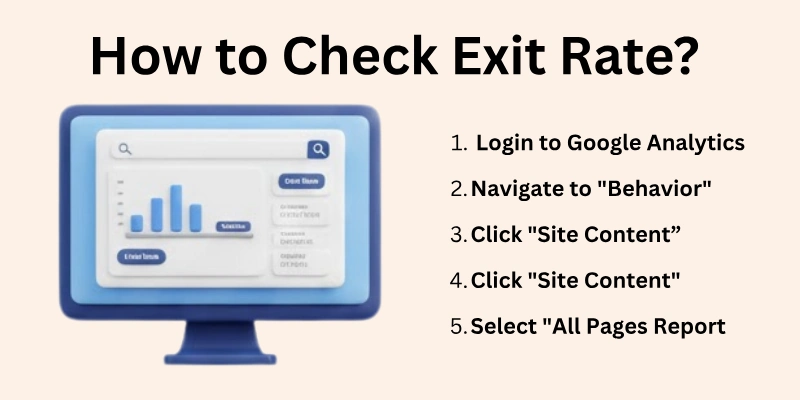
Several tools and methods can be used to measure exit rate, each offering varying levels of detail and complexity.
Using Google Analytics
Google Analytics is a popular and widely used web analytics platform that provides comprehensive data on website traffic, user behavior, and conversion rates. To check exit rate using Google Analytics:
- Access Google Analytics: Sign in to your Google Analytics account and select the website you want to analyze.
- Navigate to Behavior > Site Content > All Pages: This section displays a list of all pages on your website along with various metrics, including exit rate.
- Analyze Exit Rate Data: Review the exit rate data for each page. Higher exit rates may indicate areas where users are not finding the information they need or are encountering usability issues.
- Drill Down for Details: Click on individual pages to view more granular exit rate data, such as exit rate by device, traffic source, and user demographics.
Using Other Web Analytics Tools
Apart from Google Analytics, several other web analytics tools offer exit rate tracking capabilities. These tools may provide additional features or insights not available in Google Analytics. Some popular alternatives include:
- Adobe Analytics: A comprehensive web analytics platform that offers in-depth data analysis and segmentation capabilities.
- Piwik PRO: An open-source web analytics platform that provides self-hosted data control and privacy compliance.
- Matomo: Another open-source web analytics platform with a focus on data privacy and customization.
Using Server-Side Log Analysis
For more advanced users, analyzing server-side logs can provide even more granular insights into exit rate data. Server-side logs capture detailed information about every request made to your website, including user actions, page transitions, and exit points.
- Access Server-Side Logs: Access your website’s server-side logs, which are typically stored in text files.
- Parse and Analyze Log Data: Use log parsing tools or programming skills to extract relevant data and analyze exit rate patterns.
- Correlate with Other Data: Combine log analysis data with other metrics, such as user behavior data from Google Analytics, to gain a comprehensive understanding of exit rates.
Tips for Effective Exit Rate Analysis
Here are some of the major tips to be noted:
- Consider Different Time Frames: Analyze exit rates over various time periods, such as daily, weekly, or monthly, to identify trends and patterns.
- Segment Data by Traffic Source: Analyze exit rates by traffic sources, such as organic search, social media, or referral traffic, to identify specific channels with high exit rates.
- Compare Exit Rates by Page Type: Compare exit rates for different types of pages, such as product pages, blog posts, and landing pages, to identify content areas that need improvement.
- Combine with Other Metrics: Correlate exit rate data with other metrics, such as page views, bounce rate, and conversion rates, to gain a holistic understanding of user behavior.
Conclusion
In this guide, we have covered what is exit rate in SEO, how it works, how it is different from bounce rate, and why it matters for your website’s performance. We also discussed how to measure exit rate and practical strategies you can use to reduce it.
From a personal point of view, exit rate is not always a bad thing. Every website visitor has to leave at some point. The real goal is to understand where users are leaving and why. If visitors exit after completing an action or getting the information they need, that’s a win. Problems only arise when users leave important pages without taking the desired action.
Instead of chasing a “perfect” exit rate, focus on improving content quality, user experience, and clear navigation. When your pages match user intent and guide visitors naturally, exit rates improve on their own.
To clear up more common doubts and questions, let’s look at some frequently asked questions about exit rate in SEO below.
FAQs
Here are some of the most frequently asked questions related to the exit rate in seo:
While Google has not explicitly stated whether exit rate is a direct ranking factor, there is evidence to suggest that it may play a role in SEO. Studies have shown a correlation between exit rate and rankings, indicating that websites with lower exit rates tend to rank higher in search engine results pages (SERPs).
Yes, even if the page is helpful, users might leave after getting the information they need. For example, if they read an article or finish a tutorial, they may exit. High exit rates are not always negative, depending on the purpose of the page.
Check if users are leaving important pages like checkout or sign-up pages. If they exit without completing key actions, it’s a problem. Look at user behavior in analytics to see if changes are needed.
Exit rate by itself doesn’t directly affect search rankings. However, if users are leaving because they’re unhappy with the content or experience, it could indirectly impact rankings through lower engagement.
Yes, the homepage often has a high exit rate because users might find what they need and then leave. It’s common for homepages to act as landing pages, and not all users will explore further.
A high exit rate on a thank-you page is usually not a problem. It means users have completed their actions, like making a purchase or signing up, and are leaving. For pages like this, a high exit rate is normal and expected.
Not necessarily, as users might leave after reading the content. If they’ve finished the article and exit, it’s not a big concern. However, you can encourage them to stay longer by suggesting related content or adding a call-to-action.
You can improve exit rates by ensuring the page loads fast, is easy to navigate, and has clear calls to action. Ensure the content matches user expectations and reduces any distractions that could lead users to leave.
A landing page exit rate might be high if users are not finding what they expected or don’t engage further. A product page exit rate can be problematic if users leave before buying. Each type of page has different expectations, so it’s important to understand why users leave each one.
No, users will always leave at some point. The goal is not to eliminate exits but to ensure that users exit after completing important actions. Instead, focus on improving user satisfaction.
There is no definitive answer for the ideal exit rate, as it can vary depending on the type of website, its content, and the user’s intent. However, as a general guideline, an exit rate of 20-40% is considered acceptable, while an exit rate above 50% is considered high and may indicate a need for improvement.