What is Sitemap and Why It Is Important for Your Website
Published: 20 Feb 2026
You work hard on your website, post articles, and update pages, but traffic still does not grow. I have helped many people fix this issue, and in most cases the problem was a missing or broken sitemap. That is why learning what is sitemap should be your first step in SEO.
A proper sitemap tells search engines which pages to visit and which ones matter most. This simple setup can improve your chances of ranking.
Let’s dig in and see how it works.
What is Sitemap?
A sitemap is like a map for your website that helps search engines like Google find and understand all the pages on your site.
It’s a simple file, usually in XML format, that lists all the important pages so search engines can crawl them more easily and show them in search results.
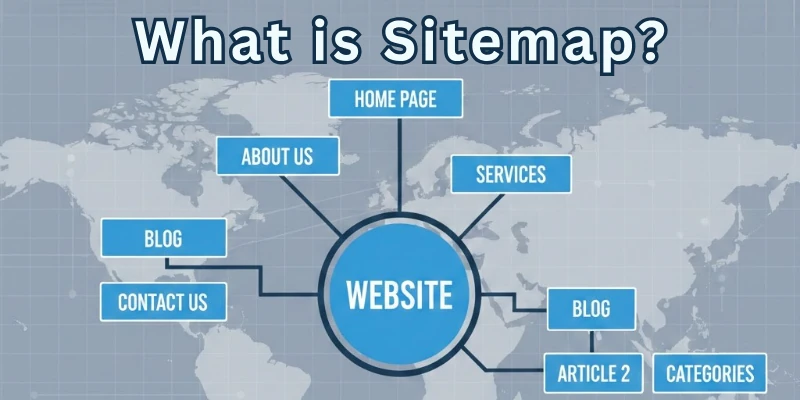
Think of it as giving directions to search engines so they don’t miss any page on your website. For example, if you have a blog with 20 posts, a sitemap will tell Google about each post so they can be indexed and shown in search results.
Example: If you have a website about cooking recipes, your sitemap will list all the recipe pages so search engines can find each one easily.
Why is Sitemap Important?
A sitemap is critical for increasing the efficiency of search engine crawlers navigating and indexing a website. By providing a full list of all the pages of a website, a sitemap guarantees that search engines can quickly identify and access all content.
This allows search engine crawlers to rapidly and efficiently analyse the website’s structure and content, ensuring that no valuable pages are neglected or missed during the indexing process.
What Does an XML Sitemap Look Like?
An XML sitemap is a file written in the XML format, which employs tags to organize information. An XML sitemap might look something like this:
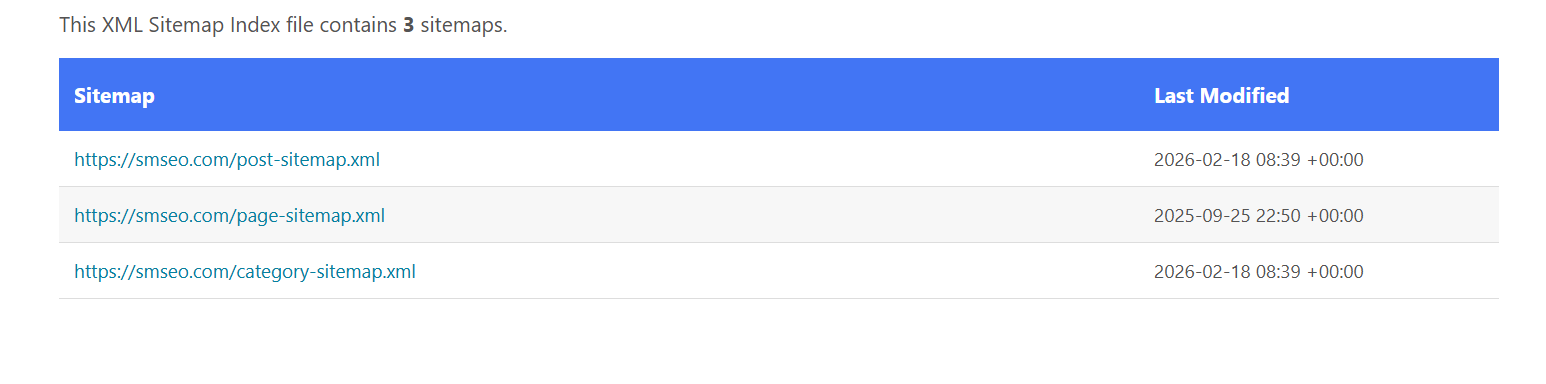
The screenshot above shows a sitemap index file, which is a master sitemap that links to multiple smaller sitemap files. Instead of listing all URLs in one place, the website divides them into sections:
- Post Sitemap: Contains blog post URLs
- Page Sitemap: Contains static page URLs
- Category Sitemap: Contains category archive URLs
- Last Modified Column: Shows when each sitemap was last updated
Search engines first read this index file, then visit each listed sitemap to discover all pages on the website.
Simple explanation: A sitemap can look like either:
- a list of URLs (single sitemap), or
- a list of sitemap files (sitemap index like this screenshot).
How to Build a Sitemap?
Here’s an explanation of the three ways you can build a sitemap:
- Generating Sitemaps via Plugins
- Generating Sitemaps Online
- Generating Sitemaps Manually by Coding
Let’s start learning each in detail.
1. Generating Sitemaps via Plugins
Many content management systems (CMS) and website platforms have plugins or extensions that may generate sitemaps for your website automatically.
- These plugins normally scan the content of your website and create a sitemap file in the appropriate XML format.
- You can install and configure the plugin according to the instructions for your platform, and it will automatically update the sitemap as you add or alter pages.
- This method is useful since it automates the process, which saves you time and effort.
2. Generating Sitemaps Online
There are various online tools and services available that can generate sitemaps for your website.
- These tools usually work by crawling your website, analyzing its structure, and generating the sitemap file.
- You may need to provide the URL of your website, and some tools offer additional customization options.
- Once the sitemap is generated, you can download it and upload it to your website. Generating sitemaps online can be a quick and easy solution, especially for smaller websites or those without a CMS.
3. Generating Sitemaps Manually by Coding
If you have coding skills or prefer a more hands-on approach, you can create a sitemap manually by writing the XML code yourself.
- You would need to create an XML file with the appropriate structure and include the necessary elements, such as URLs, last modification dates, change frequencies, and priorities.
- You can use a text editor or an integrated development environment (IDE) to write the XML code.
- Manually coding a sitemap gives you full control over its structure and allows for customization.
- But it can be more time-consuming and requires familiarity with XML syntax.
What Websites Need an XML Sitemap?
XML sitemaps are beneficial for various types of websites. They are particularly useful for:
- Large websites with numerous pages that may not all be easily discoverable through regular website navigation.
- Websites with pages that are not well-linked or have complex hierarchical structures.
- Newly launched websites with few external backlinks, as sitemaps help search engines find and index the pages more efficiently.
- Websites with regularly updated content, as sitemaps inform search engines about the latest changes on the site.
Which Pages Should Be In Your XML Sitemap?
Ideally, your XML sitemap should include all the important pages of your website. This typically includes:
- Main content pages: Pages that provide valuable information to users, such as articles, product pages, or blog posts.
- Category or section pages: Pages that group related content together, such as product categories or blog categories.
- Important static pages: Pages like the homepage, about us, contact, and frequently asked questions (FAQ) that users frequently visit.
- Canonical versions of duplicate content: If you have multiple versions of the same content (e.g., different URLs for mobile and desktop), include the preferred canonical version in the sitemap.
How to Make Google Find Your Sitemap?
To help Google find your sitemap, follow these steps:

- Sign in to your Google Search Console (previously known as Google Webmaster Tools) account.
- Select your website property.
- Navigate to the “Sitemaps” section.
- Enter the URL of your sitemap in the provided field and submit it.
How to Add XML Sitemaps to Your Site?
To add an XML sitemap to your website, follow these general steps:
- Generate or create the XML sitemap using one of the methods mentioned earlier.
- Name the file “sitemap.xml” or a different name of your choice.
- Upload the sitemap file to the root directory of your website using FTP or file manager tools provided by your hosting provider.
- Optionally, you can add a reference to the sitemap in your website’s robots.txt file to help search engines find it.
What Are the Limitations of Sitemap?
XML sitemaps have certain limitations to keep in mind:
- The maximum file size for a sitemap is 50 MB.
- Each sitemap file can contain a maximum of 50,000 URLs.
- If you have more than 50,000 URLs, you can use a sitemap index file to list multiple sitemap files.
- URLs in a sitemap should be from the same domain and should be properly formatted.
- Sitemaps should follow the XML sitemap protocol and adhere to the required structure and elements.
Following these guidelines and best practices will ensure that your XML sitemap effectively communicates your website’s structure and content to search engines, improving your site’s visibility and indexing.
Conclusion
So guys, in this article, I explained what an XML sitemap is and why it matters for your website. A well-structured XML sitemap helps search engines find, crawl, and understand your pages more easily, which improves your chances of better visibility online.
From my experience, I strongly recommend every website owner create and submit a sitemap, even if your site is small. It is one of the simplest SEO steps, but it can make a real difference in how quickly your content gets indexed.
Don’t miss this easy opportunity; set up your XML sitemap today and give your website a stronger start in search results.
FAQs
Here are some of the most commonly asked questions related to what is sitemap:
A sitemap is a list of all the pages on your website. It helps search engines like Google crawl your website more efficiently and index all of your pages. This can help your website rank higher in search results pages (SERPs).
You should update your sitemap whenever you add, remove, or update a page on your website. This will help search engines keep your sitemap up-to-date and ensure that all of your pages are indexed.
If your sitemap contains errors, search engines may not be able to crawl or index your website properly. This can hurt your SEO performance. To fix errors in your sitemap, you can use a sitemap validation tool.
Yes, there are a number of tools and plugins that can help automate the sitemap creation process. Some popular options include:
- Google XML Sitemaps
- Yoast SEO
- Rank Math
There are a few alternatives to XML sitemaps, such as:
- HTML sitemaps: HTML sitemaps are human-readable lists of your website’s pages. They are not as efficient as XML sitemaps for search engines.
- Image sitemaps: Image sitemaps list all of the images on your website. This can be helpful for search engines to index your images.
- Video sitemaps: Video sitemaps list all of the videos on your website. This can be helpful for search engines to index your videos.
Whether you should use an alternative to XML sitemaps depends on your specific needs. If you are concerned about SEO, then you should use an XML sitemap. However, if you are primarily concerned about making your website easy for visitors to navigate, then you may want to use an HTML sitemap or an image sitemap.






- Be Respectful
- Stay Relevant
- Stay Positive
- True Feedback
- Encourage Discussion
- Avoid Spamming
- No Fake News
- Don't Copy-Paste
- No Personal Attacks
- Be Respectful
- Stay Relevant
- Stay Positive
- True Feedback
- Encourage Discussion
- Avoid Spamming
- No Fake News
- Don't Copy-Paste
- No Personal Attacks
